

heyguy
Active Member
- Messages
- 166
- Reaction score
- 166
- Points
- 43
Yeah that's what I'm thinking.Sell the power running boards and use the money to install the stationary mounted running boards!
Yeah that's what I'm thinking.Sell the power running boards and use the money to install the stationary mounted running boards!

Anyone know if there's a setting in alfaobd to keep the power running boards down while driving? My dually flares just got hammered with gravel and it would solve the issue. Would also be nice for washing the steps.

Mud flaps?Anyone know if there's a setting in alfaobd to keep the power running boards down while driving? My dually flares just got hammered with gravel and it would solve the issue. Would also be nice for washing the steps.
Has anyone successfully been able to program the front facing trail camera?
What @Brutal_HO said above is correct.Has anyone successfully been able to program the front facing trail camera?
What @Brutal_HO said above is correct.
The settings I changed are detailed in this post, along with some discussion of issues other people ran into: https://hdrams.com/forum/index.php?threads/alfaobd-powerwagon-dump.2292/post-30950

 hdrams.com

The close yellow/blue plug looks correct, but I can't see the far can block well enough to be sure, so have to ask. Did you plug the green/white plug into the far block with the white base?On my 2021 ram 2500 mega cab limited 6.7, I plugged everything in. Can’t get the obdlink max+ to power on.
Anyone have any ideas? Plugged everything in. Only saw the lights on once.
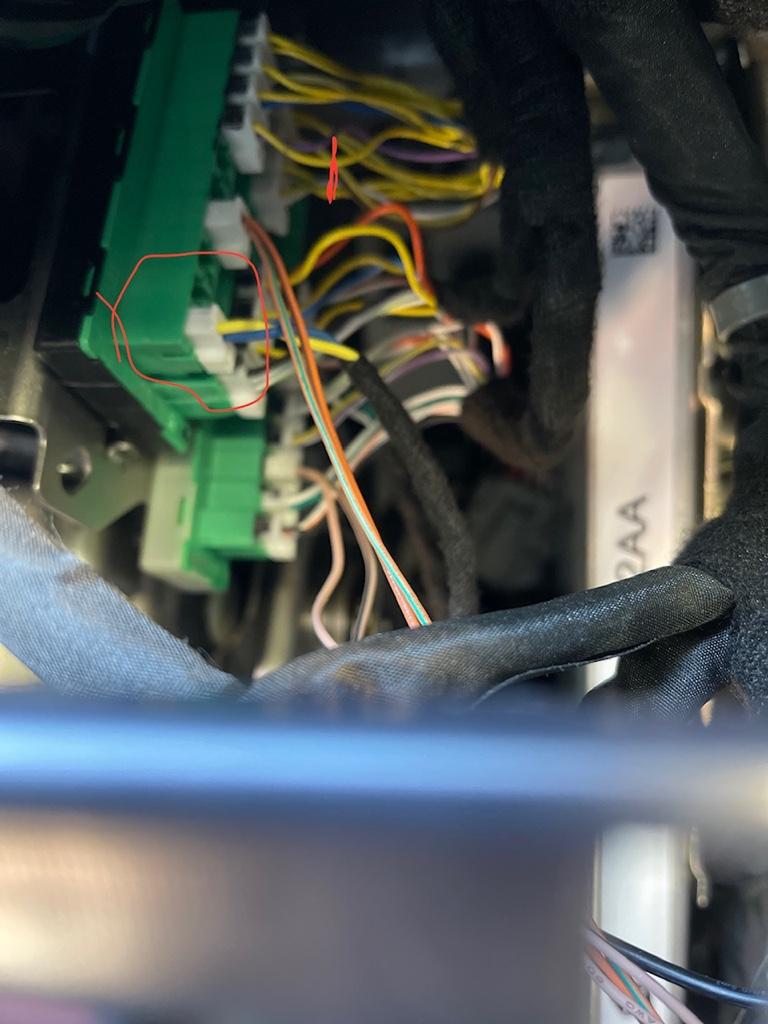
Sent from my iPhone using Tapatalk
Going by memory, at it's been quite a few years since I originally set mine up, but...The Bluetooth button, yes. I plugged the other cable into the far green/gray block. It’s where the orange horizontal line is. Can’t see it but it’s behind there.
Based on it coming on once, I’m guessing git has to be plugged in right. I press the power button 2 times. Can the driver door be open? Does it take a few minutes to power on? Do you need to press and hold the Bluetooth button for a few seconds to power on?
Sent from my iPad using Tapatalk
While it should get power regardless, I would setup the OBDLink plugged into the factory OBD port without the KAOdTECH connected just to rule out any issue with the cable.The Bluetooth button, yes. I plugged the other cable into the far green/gray block. It’s where the orange horizontal line is. Can’t see it but it’s behind there.
Based on it coming on once, I’m guessing git has to be plugged in right. I press the power button 2 times. Can the driver door be open? Does it take a few minutes to power on? Do you need to press and hold the Bluetooth button for a few seconds to power on?
Sent from my iPad using Tapatalk

It was discussed a few pages back. This is a link that was given. I haven't done it yet.Anyone know how to make it so the Current Gear is Always On in the 2019 2500? I have a 2020 1500 and that's actually an option in the display configured in the EVIC, wondering if anyone may know of a place to do this via Alfa for the 2019 2500?
Thanks in advance
hdrams.com

Anyone know how to make it so the Current Gear is Always On in the 2019 2500? I have a 2020 1500 and that's actually an option in the display configured in the EVIC, wondering if anyone may know of a place to do this via Alfa for the 2019 2500?
Thanks in advance
I did this for my '21 and it worked fine. I kind of like having it there. I also kept my fog lights on with high beams and recalibrated my tire size and tire pressure.It was discussed a few pages back. This is a link that was given. I haven't done it yet.
Gear indicator option in gauge cluster?
Strange everyone doesn't have this option. I just cycle the - to show the gear it's in then cycle the + right up to 8th gear and it stays on until the truck is shut off or out of D i can't remember which. You would thing a simple option like that would be on all models. We are talking about a...

Did you change this setting to NO-Questions from alfaodb rookie, trying to turn off signature lights and doesnt seem to take. Waited over night, cycled ign bunch and in alfa says NO but lights are still on. Any tricks to try to actually get lights to respond to program?
I see what you got. Those are not the settings. These are the settings to change:No, on mine the only signature option i could find is :
cbc config i/o: right dedicated DRL lamp/right signature led present/right front turn signal#2/headlamp leveling output present.
Changed both the right and left to NO but nothing happened. Using android on a tablet for a 2020. Confirmed its No in system but lights are on. Could it be labeled something different?
Changed mine back, didnt have a7 or a5 listed above so changed TRUCK BED LIGHTING FEATURE to NOT PRESENT. No immediate impact, hopefully they disable...these things are goofy, again thanks for all your help with solving thisI see what you got. Those are not the settings. These are the settings to change:
CBC Config I/O Usage front park/signature lamp left pin A7- NO
**2014 CBC Config I/O & Feat. Front park/signature lamp right pin A5- NO**
**Note** If you do not see the above 2014 CBC setting, then use this one:
2014 CBC Config I/O & Feat. Truck bed lighting feature- NOT PRESENT **

