What's new
Ram Heavy Duty Forum

Register a free account today to become a member! Once signed in, you'll be able to participate on this site by adding your own topics and posts, as well as connect with other members through your own private inbox!

AlfaOBD

You could just set it to the same profile for both seat buttons.

You could also try changing this setting, but I'm not sure if it'll work. Under "Settings" on UConnect go to "Doors & Locks" and disable "Personal Settings Linked to Key Fob"
I'll give it a shot. It's not from the fob unfortunately- it's from the 1 and 2 buttons on the drivers door. We're different heights...so when we switch to the saved settings, Uconnect goes all wonky for a while.
 
Yeah, I know it's not the fobs, but it's the only setting related to memory in there. Throwing things at the wall and hoping they'll stick.
 
It’s been about 6-7 years since Ive played with alfaobd. Is there a way to save or copy all my settings prior too changing everything. My first time playing with my 2017 I changed something and didn’t back it up and made nearly every light on my dash on lol. Had to take it to the dealer to fix it. Don’t want to mess up this truck.
 
Yes, you can create a backup file that can be restored.

For the backup file, connect to body computer, then click the car with hood open, drop down the menu box and scroll all the way to the bottom just under car configuration change, and choose create backup file
 
I have a lighting question - I saw this in the 'common AlfaODB settings' thread:
Disable Signature LED lighting: To turn the accent lights off- CBC Extern Light Calibr: Signature Light Present- NO

What I'd like to do is disable the adaptive projector LED's from being DRL's. I'd still like them on during normal headlight usage, but I think the single line across looks much cleaner. Is that the setting above? Or something else?
 

Attachments

  • IMG_0700.jpeg
    IMG_0700.jpeg
    112.7 KB · Views: 14
Yes, you can create a backup file that can be restored.

For the backup file, connect to body computer, then click the car with hood open, drop down the menu box and scroll all the way to the bottom just under car configuration change, and choose create backup file
Thank you!
 
I have a lighting question - I saw this in the 'common AlfaODB settings' thread:


What I'd like to do is disable the adaptive projector LED's from being DRL's. I'd still like them on during normal headlight usage, but I think the single line across looks much cleaner. Is that the setting above? Or something else?
Those LEDs are part of the signature light. Disabling them will leave them always disabled.
 
I have a lighting question - I saw this in the 'common AlfaODB settings' thread:


What I'd like to do is disable the adaptive projector LED's from being DRL's. I'd still like them on during normal headlight usage, but I think the single line across looks much cleaner. Is that the setting above? Or something else?
I disabled them as well as I like to be able to sit in my truck and not advertise I’m there more than needed. I changed my drl’s to my turn signals. The led strips still work with headlights on as well as remote start. Hope this helps explain it some
 
Thanks for the reply - since you switched to the turns being DRL's, does that mean the LED strips are not DRL anymore either? Only on during normal headlights or remote start?
 
Thanks for the reply - since you switched to the turns being DRL's, does that mean the LED strips are not DRL anymore either? Only on during normal headlights or remote start?
Correct. The LED strips and the projectors are disabled besides with headlights. I turned off signature lighting
 
Gotcha - what I was missing was that both the LED strips and the adaptive are called 'Signature'.. got it now!
The “adaptive” part is the projector itself. It’s adaptive in that it turns. The 4 square signature lights are just signature lights, nothing more.
 
Has anyone had their cluster malfunction after programming a new tire size and setting new TPMS values? 2022 2500. I used alpha obd and the security bypass from Jimmy. Used the 2020 body computer setting and “program tire size” and “update pressure thresholds”
 

Attachments

  • IMG_4580.jpeg
    IMG_4580.jpeg
    772.3 KB · Views: 24
  • IMG_4579.jpeg
    IMG_4579.jpeg
    766.1 KB · Views: 23
Has anyone had their cluster malfunction after programming a new tire size and setting new TPMS values? 2022 2500. I used alpha obd and the security bypass from Jimmy. Used the 2020 body computer setting and “program tire size” and “update pressure thresholds”
When you do tire size adjustment, you have to run a reinitialize of the ABS to clear all that.
 

Attachments

  • Screenshot_20250302_184501_AlfaOBD.jpg
    Screenshot_20250302_184501_AlfaOBD.jpg
    174.2 KB · Views: 17
Sorry if this has been answered already, I didn't read all 74 pages...
What is the preferred system, tablet using android, or laptop using the windows software? I just watched a video where the guy says the android is more user friendly. Any truth to this statement?
 
Has anyone played with AlfaOBD on their 2019 HD's yet? I'm curious if anything is accessible to "change" and if it just works. There is lots of different info out there on other forums, but i haven't found anything in regards to the 2019's.

EDIT: AlfaOBD does work, here is the what is needed to use it on 2019 and newer HD Rams:
- The Android app from google play store, or windows download from AlfaOBD.com. (Windows version strongly recommended) (AlfaOBD is Windows/Android only)
- A Bluetooth interface such as OBDLink MX+ or OBDLink LX (cheaper than the MX+ if you don't need iOS support or use on Ford or GM (MX+ comes with a choice))
vgate vLinker MC or MC+ works as well as the OBDLink and is half the cost.
- And a bypass harness to bypass the security gateway module so changes can be made- https://www.kaodtech.com/product-page/security-module-bypass

[MOD: Adding a pic of the KAOdTECH bypass cable connections to reduce the daily question]

White/Green wire to WHITE base connector (CANBUS-IHS)
Yellow/Blue wire to BLACK base connector (CANBUS-C)
https://hdrams.com/forum/index.php?...module-location-for-programmer.440/post-26099

index.php
So, I got everything needed to program using the AlfaOBD on my 2024 and was excited to get things going yesterday morning. After figuring out how to connect the OBDLink MX to my laptop and installing the gateway bypass harness, I was ready to roll. Then I hit the wall: CAN Error Connect Fail. I tried to connect using different year vehicles but got the same results. Once I disconnected the Kaodtech bypass harness, I could connect. I followed the instructions provided by Kaodtech using the black connector to the black can bus, and the white connector to the white can bus. I even tried moving the connections to different open bus locations. Still no connection.
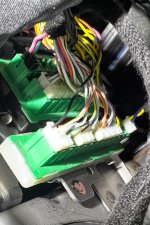
So now I'm looking everything over again and I see that in this picture, the blue/yellow is connected to the black can bus and the green/white is connected to the white can bus.
My harness came with the blue/yellow wire on a white connector indicating it goes to the white can bus. The black connector uses a pink/green wire combination. According to Kaodtech, this goes to the black can bus. Should I try to switch these? Will there be any chance of messing the bmc up if I do so?
IMG_E7793.JPG
 
Back
Top