
Ram Heavy Duty Forum
You are using an out of date browser. It may not display this or other websites correctly.
You should upgrade or use an alternative browser.
You should upgrade or use an alternative browser.
AlfaOBD
- Thread starter MEZZ2006
- Start date
DeepH20Driller
Well-Known Member
- Messages
- 794
- Reaction score
- 1,165
- Points
- 93
Waiting on OBDLink MX+ to come in. I have purchased the Kaodtech bypass.
Just curious, does anybody use the “demo” version w/ success? Or is it absolutely necessary to buy the “full” version.
I have both a Windows PC and a Samsung Tablet. Which version would you guys recommend?
Just curious, does anybody use the “demo” version w/ success? Or is it absolutely necessary to buy the “full” version.
I have both a Windows PC and a Samsung Tablet. Which version would you guys recommend?

Waiting on OBDLink MX+ to come in. I have purchased the Kaodtech bypass.
Just curious, does anybody use the “demo” version w/ success? Or is it absolutely necessary to buy the “full” version.
I have both a Windows PC and a Samsung Tablet. Which version would you guys recommend?
Demo AlfaOBD?
You can read and move around, just can't write any changes.
DeepH20Driller
Well-Known Member
- Messages
- 794
- Reaction score
- 1,165
- Points
- 93
Sorry, yeah, Demo AlfaOBDDemo AlfaOBD?
You can read and move around, just can't write any changes.
DeepH20Driller
Well-Known Member
- Messages
- 794
- Reaction score
- 1,165
- Points
- 93
Just curious, but why is the Windows version of software recommended over Android? Is there options on Windows that’s not available on Android?
Just curious, but why is the Windows version of software recommended over Android? Is there options on Windows that’s not available on Android?
Used to be that only the Windows version could be forced to use a different BCM model year, but there's an override in the Android version now.
Some just prefer using a laptop instead of an Android phone or tablet, or don't have Android.
DeepH20Driller
Well-Known Member
- Messages
- 794
- Reaction score
- 1,165
- Points
- 93
Thanks, man!! Gonna go with Android as it’s easier to carry the small tablet around. I’m living in 2010 over here, laptop almost needs a dolly to carry it around. It has a banging audio system, tho!! HahaUsed to be that only the Windows version could be forced to use a different BCM model year, but there's an override in the Android version now.
Some just prefer using a laptop instead of an Android phone or tablet, or don't have Android.
Thanks, man!! Gonna go with Android as it’s easier to carry the small tablet around. I’m living in 2010 over here, laptop almost needs a dolly to carry it around. It has a banging audio system, tho!! Haha
Sounds more like a 1984 ghetto blaster.

Toyotaguy
Active Member
Is there a way to add memory position mirrors to a big horn with the towing technology package so power fold, power convex and cameras?
Sent from my iPhone using Tapatalk
Sent from my iPhone using Tapatalk
Ok I’m sure you all have covered this but… this thread is 45 pages long.
If you use the Alphaobd will it leave a stamp on the ECU such that a dealer can tell if it was tampered with and void the warranty? Thx
No.
They find tunes by looking at how many times the ECU has been flashed.
AlfaOBD doesn't work like that.
It's not a tuner. It only allows changes to options in the BCM. I've only ever seen one person claim a warranty issue with their dealer.
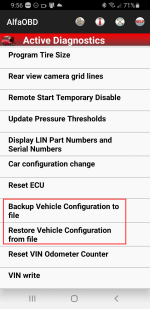
The latest version has the ability to save and restore all the settings so there's no way they would know.
Toyotaguy
Active Member
No.
They find tunes by looking at how many times the ECU has been flashed.
AlfaOBD doesn't work like that.
It's not a tuner. It only allows changes to options in the BCM. I've only ever seen one person claim a warranty issue with their dealer.
The latest version has the ability to save and restore all the settings so there's no way they would know.
The latest version of alpha OBD allows backup and restore? Does that include the android version?
Sent from my iPhone using Tapatalk
The latest version of alpha OBD allows backup and restore? Does that include the android version?
Sent from my iPhone using Tapatalk
Toyotaguy
Active Member
Awesome I’ll have to update my app.
Has anybody added memory mirror function?
Sent from my iPhone using Tapatalk
Has anybody added memory mirror function?
Sent from my iPhone using Tapatalk
dirt-merchant
Member
- Messages
- 51
- Reaction score
- 22
- Points
- 8
Anyone know which model kaodtech.com Security Bypass Harness works on the 2022 PW?
I'm guessing the "2019+ 5th Gen HD (2500+)", that right?
I'm guessing the "2019+ 5th Gen HD (2500+)", that right?
Anyone know which model kaodtech.com Security Bypass Harness works on the 2022 PW?
I'm guessing the "2019+ 5th Gen HD (2500+)", that right?
Yes

steve49
Well-Known Member
Can alfaOBD change the Uconnect 8.4 screen to off until you touch the screen? I know there is a button below the bottom right corner of the screen that turns it off till touched, or until you restart the truck. I use a Sirius/Xm portable device to move from the house, garage, travel trailer, side by side UTV, etc. When connected in the truck the screen says device connected, would just as soon have the screen off till I need to check settings/apps.

DesertLawman
New Member
- Messages
- 12
- Reaction score
- 2
- Points
- 3
Same here with my 2022 3500Over the weekend I tried to get global windows down to work but wasn't successful.
Same here with my 2022 3500
Where did you find the setting in Alfaobd to do that?
Global Down doesn't work on 19+ trucks. The door modules don't have the capability.

Links to solved DIY Sales code mods and common AlfaOBD settings
Here's a roll-up thread for posting links to any successful DIY Sales code mod and AlfaOBD settings required (or not) and common AlfaOBD settings only mods. This is NOT a How-To or Q&A for AlfaOBD or discussion thread. Links and settings only please. TL;DR If you're not here to contribute, you...
 hdrams.com
Q: Can I enable Global Window Down?
Q: Can I enable Auto-folding Mirrors?
A: No. Door modules in the 2019+ HD trucks do not support Global Up/Down or Auto Folding Mirrors. (Needs update info on M/Y NOT supported)
Third party "active" modules like the Tazer-RAM may have these features but AlfaOBD is passive and can only change BCM settings, and only affects supported module(s) functions.
DesertLawman
New Member
- Messages
- 12
- Reaction score
- 2
- Points
- 3
Yes. It's in the setting menu. 0, 3 or 5. No programming neededIs there a way to increase the number of flashes from the turn signal when you just bump the stock to change lanes?
Sent from my iPhone using Tapatalk