What's new
Ram Heavy Duty Forum

Register a free account today to become a member! Once signed in, you'll be able to participate on this site by adding your own topics and posts, as well as connect with other members through your own private inbox!

AlfaOBD

FYI, don't use a phone plugged into the truck radio/NAV as I think that dives a false GPS reading (still from the truck). Standalone GPS as it sounds like you have, or phone not connected.
If anyone's systems are actually doing that sync I think it must be a phone setting.

During my time of guessing/adjusting, I tested mine using two identical Samsung phones running the same version of Waze with one connected via USB and one not connected (and never activated truck wifi).
Both phones read exactly the same and both were different than the truck
 
Can anything be done with the reverse lights in the mirror so they just come on automatically when in reverse instead of having to use the bed light switch?
keep the bed light switch on. I think the lights turn off when the truck is put in drive. I'll have to check when I get home.
 
Yes, you can keep the bed light switch on and the reverse lights will come on. They do go off when put in drive, however, if you have the LED bed lights, they do stay on. Also they will stay on after the truck is shut off and you leave the truck.
 
Yes, you can keep the bed light switch on and the reverse lights will come on. They do go off when put in drive, however, if you have the LED bed lights, they do stay on. Also they will stay on after the truck is shut off and you leave the truck.

The guidance lights will also stay on if the truck is in neutral.
 
No, I haven't gotten it to work. Might try again later today.
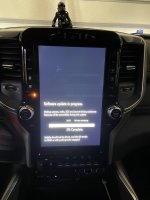
I finally got it to work. So all the USB drives I was using, I was formatting using GUID partition table type. I decided to try using the older “master boot record” partition schema and once I did the truck saw it immediately. Finally! Mystery solved.
 

Attachments

  • 3C384F73-76A8-45F0-9D1B-C6C7C199CA7A.jpeg
    3C384F73-76A8-45F0-9D1B-C6C7C199CA7A.jpeg
    412 KB · Views: 70
Tried to change my fogs to stay on with the high beams. Was not able to do it. The PID listing seems to be different on the 2022. Anyone with a 2022 able to do it yet?
What’s the name of the setting you tried to change?
You’re looking to change “CBC Features: Front Fog Lamp Dropout Enabled” to NO.
 
CBC Features is not listed as an option. In any lighting selection, fog light dropout is not there at all. All I am seeing is Front left and front right fog lamps.
Doesn’t sound like you are inside the car configuration change section.
After you connected to the body computer, click on the car with hood open (active diagnostics tab for windows), drop down the list, and scroll all the way towards the bottom and click car configuration change. Then you’ll find the setting I posted above.
 
I finally got it to work. So all the USB drives I was using, I was formatting using GUID partition table type. I decided to try using the older “master boot record” partition schema and once I did the truck saw it immediately. Finally! Mystery solved.
Boom. Recognized the update immediately for me after doing this. Updating now. Thanks!
 
Also, maybe this is just in my head, I swear my auto climate control functions much better after this Uconnect update. It used to only be HOT or COLD. Now it seems to moderate temps in between and adjust the fan more evenly.
 
Also, maybe this is just in my head, I swear my auto climate control functions much better after this Uconnect update. It used to only be HOT or COLD. Now it seems to moderate temps in between and adjust the fan more evenly.
What software version are you on now?
 
Back
Top