What's new
Ram Heavy Duty Forum

Register a free account today to become a member! Once signed in, you'll be able to participate on this site by adding your own topics and posts, as well as connect with other members through your own private inbox!

Alfaobd?

This is what I was thinking of getting so as not to go thru that again.
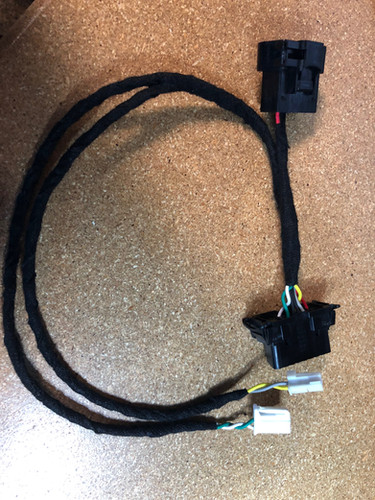

This is what I got for my truck. Very high quality and easy to install.
I turned on fog lights with high beams. I tried global window down, but that didn't work. At some point I would like to add the proximity entry, where you just grab the door handle to unlock the doors, but I'm waiting for someone else to do it first. I also plan to add led bulbs in the front turnsignals, at some point, so I will set those lights to LED in AlfaOBD when I add them.
 
This is what I got for my truck. Very high quality and easy to install.
I turned on fog lights with high beams. I tried global window down, but that didn't work. At some point I would like to add the proximity entry, where you just grab the door handle to unlock the doors, but I'm waiting for someone else to do it first. I also plan to add led bulbs in the front turnsignals, at some point, so I will set those lights to LED in AlfaOBD when I add them.

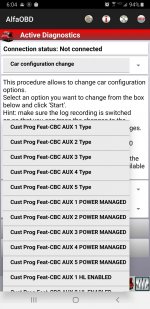
Could you post a pic of what it displays for turning on Aux switches in Alfaobd, will it allow you to turn on all 6 or does the software only still go up to 2017 as I have seen people have been using. Trying to decide if I'm just going to have the dealer add LHL sales code to my truck to turn all 6 of them on.
 
You have the option for momentary or normal on ,off switch.
 

Attachments

  • Screenshot_20200118-060445_AlfaOBD.jpg
    Screenshot_20200118-060445_AlfaOBD.jpg
    283 KB · Views: 141
You have the option for momentary or normal on ,off switch.

Thank you paulvi, is that from the 2018MY in alfaobd.

I see you still only have the option for 5 aux switches which will be enough in my case but would be nice to be able to access all 6 since they will be wired up.
 
Last edited:
Thank you paulvi, is that from the 2018 2018MY in alfaobd.

I see you still only have the option for 5 aux switches which will be enough in my case but would be nice to be able to access all 6 since they will be wired up.
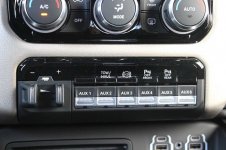
#6 its the PTO option you can enable too.
 
Interesting, if you don't have a PTO I guess you can just turn PTO on and have it work just like aux 1-5 as well I'm guessing like in this switch panel.

Well shoot, now I have to get Alfaobd software now.
 

Attachments

  • 6 Aux Switch.jpg
    6 Aux Switch.jpg
    161.8 KB · Views: 107
I have alpha, so can't wait to add the switch bank.
 
AlphaOBD has the MY2020 update now, all the options should be there.

I still wasn't able to get the Global Down to work. Tried changing the Window Express settings too, but no joy.

I was able to enable the trailer TPMS screen in the EVIC, but disabled it - because it throws a service required (I dont' have the sensor installed) - before checking the radio trailer settings for pressure.

I set the max speed to 200km but forgot if there was another setting to raise the cruise so I didn't get to that.
 
Can you make the mirrors fold in when you lock the doors like the Jeeps do?
 
It's pretty annoying that you can't just configure that right from the Uconnect, what are Ram engineers thinking?
 
I think this has been discussed before, but can Alfa OBD enable displaying current gear without having to use the gear limit - switch? Or have cruise and exhaust brake remember last state?
 
I think this has been discussed before, but can Alfa OBD enable displaying current gear without having to use the gear limit - switch? Or have cruise and exhaust brake remember last state?

That would be nice at least for the brake. I think I saw someone setup one of their Aux switches to trigger the exhaust brake and had it set to ignition so it always came on, but there wasn't any specifics in the post.
 
I am attempting to get a registered copy of AlfaOBD working with my Android phone. I installed a GDP68000U bypass cable that I bought from Thoroughbred Diesel; they confirmed the cable works with the 2019MY. Can someone confirm it is plugged into the correct port in the truck?

I have a 2019 Ram 3500 HO Diesel, if it matters.

Security Bypass Cable.jpg
 
each of the small pigtails, one per side of the split terminal block, should be labeled black and white. you plug the connectors into the corresponding base color of each block.

are the wires labeled black / white?
 
each of the small pigtails, one per side of the split terminal block, should be labeled black and white. you plug the connectors into the corresponding base color of each block.

are the wires labeled black / white?

The GDP68000U bypass cable only has one pigtail. I found a video on YouTube that I followed when I installed it, but I can't find the video at the moment.
 
I have reached out to Thoroughbred Diesel and GDP to determine if this bypass cable enables AlfaOBD. It is possible this cable only enables EFI Live updates, not AlfaOBD. Thanks!
 
if you have a '19, you need the one with two smaller connectors, one for each side of the terminal block.. ..as far as I know.
 
I just ordered a KAOdTECH, thanks.

Yes, for 2019/2020 use the Kaodtech cable. I just did and it works perfectly.

FYI, if you just grab the bezel around the headlight switch and give it a tug, it will pop right out and give you easy access to those CAN blocks. They are right behind the switch. If you're just doing a temp install and are not plugging the Kaodtech OBD header into your knee bolster, you don't even need to remove it. Can't believe how easy that made it.

P.S. When you get the new cable, it does not matter which port in the connector block you plug into, they're all electrically the same - but it does matter which bus (black or white base) you plug into. Use the one that's easiest for you.
 
Back
Top