
Ram Heavy Duty Forum
You are using an out of date browser. It may not display this or other websites correctly.
You should upgrade or use an alternative browser.
You should upgrade or use an alternative browser.
AlfaOBD Powerwagon dump
- Thread starter jsalbre
- Start date

I can’t find a power wagon log. What specifically are you curious about, I can probably answer it. There won’t be anything different except for VehConfig 7 axle locker and sway disconnect. Probably special package setting (EVIC startup pic), and hill descent control.Does anyone have a BCM settings dump from a Powerwagon they can share?
I’m looking into some settings changes and I want to see if my theory holds true.
Thanks!
Sorry, not a theory, it was late and I was half asleep when I posted that. It made sense to my brain at the time.
I’m trying to enable the trail camera with guidelines. I’ve found some settings that look like they probably will enable it, but I’m hesitant to play with too much before confirmation.
I have the off-road package, so hill descent control is already there.
I’m trying to enable the trail camera with guidelines. I’ve found some settings that look like they probably will enable it, but I’m hesitant to play with too much before confirmation.
I have the off-road package, so hill descent control is already there.
Ok, so to make this work I changed “VehConfig 8: Off-Road Camera Present” and “Customer.Set.Menu 3: Forward Facing Camera Gridlines CSM Present” to “Yes”.
It took a few ignition cycles, but I got a setting for the gridlines under Settings/Camera and a button for “Forward Camera“ under apps.
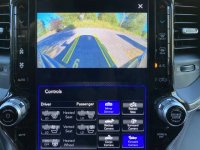
It took a few ignition cycles, but I got a setting for the gridlines under Settings/Camera and a button for “Forward Camera“ under apps.

Speedracer93CobraR
Well-Known Member
- Messages
- 209
- Reaction score
- 383
- Points
- 63
This is interesting. So, you were able to project your tire "track" on the front/forward facing camera? I would like to do this if you can share how you made it happen.
The settings described above are changed using AlfaOBD. You need surround view camera system to make this happen, obviously.This is interesting. So, you were able to project your tire "track" on the front/forward facing camera? I would like to do this if you can share how you made it happen.
This is interesting. So, you were able to project your tire "track" on the front/forward facing camera? I would like to do this if you can share how you made it happen.
Correct. This is a feature from the Powerwagon. Look through the manual and it’s detailed how it works.
As Jimmy said I enabled it via AlfaOBD.
Speedracer93CobraR
Well-Known Member
- Messages
- 209
- Reaction score
- 383
- Points
- 63
I have surround view, but I don't have AlfaOBD access.
MEZZ2006
Active Member
I figured I would give this a shot last night, I turned the above settings on with Alfa OBD. I got the buttons in my display, but they don't function. I can check the gridlines on, but it doesn't stay and gives a message of "settings did not save". Also, the top down surround view stopped displaying. The individual cameras display images, but the stitched together top view is black. Does it take a while for these items to "correct" themselves?
I figured I would give this a shot last night, I turned the above settings on with Alfa OBD. I got the buttons in my display, but they don't function. I can check the gridlines on, but it doesn't stay and gives a message of "settings did not save". Also, the top down surround view stopped displaying. The individual cameras display images, but the stitched together top view is black. Does it take a while for these items to "correct" themselves?
I changed the settings and then had a 2 hour drive to my next campground. When I checked later in the day it was functioning.
Can you post up your current settings? I’ll compare them to mine and see if anything camera related is mismatched.
MEZZ2006
Active Member
I changed the settings and then had a 2 hour drive to my next campground. When I checked later in the day it was functioning.
Can you post up your current settings? I’ll compare them to mine and see if anything camera related is mismatched.
I sent you a link to my settings file.

Ok, so to make this work I changed “VehConfig 8: Off-Road Camera Present” and “Customer.Set.Menu 3: Forward Facing Camera Gridlines CSM Present” to “Yes”.
It took a few ignition cycles, but I got a setting for the gridlines under Settings/Camera and a button for “Forward Camera“ under apps.
View attachment 5938
Interesting. I tried this a while back and it broke a bunch of stuff. I guess I didn't wait long enough.
Interesting. I tried this a while back and it broke a bunch of stuff. I guess I didn't wait long enough.
Seems to be breaking things for MEZZ2006 as well. Is your truck a 19 or 20?
Edit: Also, are you using AlfaOBD on Android or Windows?
Seems to be breaking things for MEZZ2006 as well. Is your truck a 19 or 20?
Edit: Also, are you using AlfaOBD on Android or Windows?
(See sig)
2020. Using AlphaOBD on Android.
As I recall I also lost the overhead surround view. I'd have to try again to check for sure.
(See sig)
2020. Using AlphaOBD on Android.
As I recall I also lost the overhead surround view. I'd have to try again to check for sure.
Sorry, was reading on mobile (its a transit day) and the sit didn’t show up. Mezz is also using Android, and I’m using Windows. I wonder if that may be the issue.
Sorry, was reading on mobile (its a transit day) and the sit didn’t show up. Mezz is also using Android, and I’m using Windows. I wonder if that may be the issue.
Could be. That's not the first time something in the android version has been wonky. That said, Mezz is also a 19.
I'm thinking I should just pop the extra $25 and get the Windows version as well. I just prefer working with a spare phone I always keep in my truck.
Last edited:
It wouldn’t be the first time the Android version hasn’t come through on these 2019+ BCMs. That’s why I always recommend guys just get the windows version for the 2019+ trucks. There’s quite a few settings missing from the list when the Android version auto connects to the BCM, whereas you can force them with the windows version.Sorry, was reading on mobile (its a transit day) and the sit didn’t show up. Mezz is also using Android, and I’m using Windows. I wonder if that may be the issue.
If you already have one version, he’ll give you the other for ~$25Could be. That's not the first time something in the android version has been wonky. That said, Mezz is also a 19.
I'm thinking I should just pop the extra 425 and get the Windows version as well. I just prefer working with a spare phone I always keep in my truck.