What's new
Ram Heavy Duty Forum

Register a free account today to become a member! Once signed in, you'll be able to participate on this site by adding your own topics and posts, as well as connect with other members through your own private inbox!

2023 Option Help/Opinions

yeah - all depends on what you're used to...I came from a 2016 tradesman and used the under seat storage as my tool box...struggling with the idea of adding a tool box in the bed as I haven't had one in over 20 years... (the 2003 had the under the seat storage as well)...so the only readily available space is under the single driver's side back seat and it's limited by the fold flat system unless you remove it (guess it can be taken out)

if I had to pick the premium headlights or the alpine system for the bighorn and only wanted to splurge on one, I'd lean towards the headlights as they change up the entire look of the truck and of course work well (they have the LED strips for the DRL vs the headlights) Ultimately the alpine system isn't terrible IMO and just depends on your objective/budget
I took my fold flat system out last weekend. It was super easy, and fast to do. Just need to fold the seats up and remove 4 nuts and 4 bolts. Sub sounds better this way also since it's not covered up anymore.
 
Do you know if you can mirror google maps from your iphone onto the screen? I never have gotten navigation in a vehicle because phones are just so much better for that these days.
I believe they do have apple carplay, I'm not sure how well it works or what exactly it does. Maybe a dealer will let you sit in a truck for a bit and figure out if it works.
 
Had a 12" screen in my 2019 and ordered my 2022 with a 8.4". Couldn't be happier. Zero regrets. Sure thr 12" had SOME physical buttons, but 8.4 is better when it comes to buttons. Being able to keep my eyes on the road since I can just reach over and feel for what I need. Not having to go through as many menu's alone was with the switch for me. Having a physical "off" button for the ac is also great.
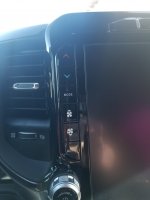
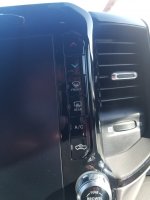
There is an AC off button on the 12" . it's on the right side under the defrost buttons. ;) Saw it this morning when I was pushing the defrost button. :)
 
There is an AC off button on the 12" . it's on the right side under the defrost buttons. ;) Saw it this morning when I was pushing the defrost button. :)
The no climate buttons on a 12" screen argument kills me. I think I make changes to my climate setting 95% of the time with the hard buttons next to the screen. Anyone passing up on the 12 for that reason either hasnt been in a truck with a 12" or isnt paying attention when they are looking at one.

I personally love the big screen. Car play is fantastic on the whole screen, cameras look great, easy to toggle between everything etc
 
The no climate buttons on a 12" screen argument kills me. I think I make changes to my climate setting 95% of the time with the hard buttons next to the screen. Anyone passing up on the 12 for that reason either hasnt been in a truck with a 12" or isnt paying attention when they are looking at one.

I personally love the big screen. Car play is fantastic on the whole screen, cameras look great, easy to toggle between everything etc

I almost bought into this as well but at the last minute before I ordered, I sat in one at the dealership and just played around with it for like a half hour so that might be a good idea for you. I also leave it on auto 99% of the time and just will use the up and down arrows to change the temp. The only thing that requires me to use the screen as far as climate control is to turn on/off the heated seats and steering wheel. That requires a few buttons to get into the screen, but I am not sure how it works on the 8.4 whether it has physical buttons or not.
 
I almost bought into this as well but at the last minute before I ordered, I sat in one at the dealership and just played around with it for like a half hour so that might be a good idea for you. I also leave it on auto 99% of the time and just will use the up and down arrows to change the temp. The only thing that requires me to use the screen as far as climate control is to turn on/off the heated seats and steering wheel. That requires a few buttons to get into the screen, but I am not sure how it works on the 8.4 whether it has physical buttons or not.
I thought the auto HVAC worked well, I really miss it in my 2500 tradesman.
The 8.4 has physical buttons for heated/cooled seats and wheel.
For DD with the 12" screen, I would keep the radio on top and then the heated/cooled hvac page on the bottom half. I also put it as a quick link on the bottom of the screen.
 
The heated/cooled seat control is easy.
Hit the controls button on the lower part of the screen and it pulls it up. Make changes. Then hit the button again and it closes.
 
Last edited:
I thought the auto HVAC worked well, I really miss it in my 2500 tradesman.
The 8.4 has physical buttons for heated/cooled seats and wheel.
For DD with the 12" screen, I would keep the radio on top and then the heated/cooled hvac page on the bottom half. I also put it as a quick link on the bottom of the screen.
Ya you can customize the home screen on the 12", I have carplay up top and split the bottom screen into climate and cameras so I can get what I need with one touch. Works well if you take 2 mins to set everything up.
 
There is an AC off button on the 12" . it's on the right side under the defrost buttons. ;) Saw it this morning when I was pushing the defrost button. :)
Sorry, I could have been a little more specific. I was referring to turning off the hvac not just turning off the compressor and leaving the fans going. I can only assume most others that say there is no a/c off button are referring to the same. But we all know what happens when you assume things.
The no climate buttons on a 12" screen argument kills me. I think I make changes to my climate setting 95% of the time with the hard buttons next to the screen. Anyone passing up on the 12 for that reason either hasnt been in a truck with a 12" or isnt paying attention when they are looking at one.

I personally love the big screen. Car play is fantastic on the whole screen, cameras look great, easy to toggle between everything etc
It's not an argument, just a difference of personal preference. Not sure why someone having a differant preference kills you. To each their own.
I had a 2019 limited and ddidn't ike the 12" screen. One of the reasons were the controls. And you are right, I don't pay attention when looking at the screen since I am busy keeping my eyes on the road lol. That's the point I was getting at.
 
I believe they do have apple carplay, I'm not sure how well it works or what exactly it does. Maybe a dealer will let you sit in a truck for a bit and figure out if it works.
Connect your device and select either CarPlay or Android app and it will bring up the apps on your phone. Then just select the Google map app and it will mirror your phone.
 
There’s a physical button for that on the 12” too. You just press the mode button until the hvac is off.

as in you have to cycle through modes...one of which is "off"?

if so, then that's the point, guessing there isn't a dedicated on/off selector on the 12"

If I'm going to look down and make a radio/hvac change, I want to be able to do it within one motion....just me I know, but I don't even like my bighorn with the dual zone controls, the fan selector doesn't have any real haptic feedback so you have to watch the screen to know how much you are adjusting the screen...if it had built in "clicks" it'd be more user friendly....

had a 2017 accord and in order to change the temp you had to push a button up/down, but each push of the button only changed the temp one degree....so you want to change it from 58 - 70...it's like you're playing a video game...from the pics above, looks the the 12" system may be similar...

that's why they make 'em with different options... you get to choose what you like/prefer

 
The heated/cooled seat control is easy.
Hit the controls button on the lower part of the screen and it pulls it up. Make changes. Then hit the button again and it closes.
Don't even have to go into controls. In the top corners you'll see the seat image, tap that and it's a shortcut right to your seat controls. It also opens a slide for cabin temp control. Super easy, and if you really need to you can feel for it because it's in the very corner almost against the trim.

For other responses in this thread; I don't understand this whole eyes on the road the entire time and can't look at a screen or even towards a button for a second to change something. Have to "feel around" for it. Why? How do you check your bond spots when changing lanes? Take a drink? Look at your passenger? I have a very difficult time believing that there are drivers that one they are in motion never take their eyes off the road ahead of them for any reason.
 
as in you have to cycle through modes...one of which is "off"?

if so, then that's the point, guessing there isn't a dedicated on/off selector on the 12"

If I'm going to look down and make a radio/hvac change, I want to be able to do it within one motion....just me I know, but I don't even like my bighorn with the dual zone controls, the fan selector doesn't have any real haptic feedback so you have to watch the screen to know how much you are adjusting the screen...if it had built in "clicks" it'd be more user friendly....

had a 2017 accord and in order to change the temp you had to push a button up/down, but each push of the button only changed the temp one degree....so you want to change it from 58 - 70...it's like you're playing a video game...from the pics above, looks the the 12" system may be similar...

that's why they make 'em with different options... you get to choose what you like/prefer
For me, it doesn’t matter because I never physically mess with the hvac controls. I just say “hey Ram, set temp to…”, or “hey ram, turn off climate control”.
But then again, if I where to physically interface with the screen or physical controls, I could probably wait till I got to a stop sign or light.
Or…since the comma.ai I have installed is usually driving the truck for me, I can mess around with physical controls with my eyes off the road for a little longer than a glance.
 
WOW! It works.
Push one button on the steering wheel without taking your eyes off the road. Change both temps, or just driver or passenger.
You can also change radio channels or inputs. And even have it find an address or business for you.
Probably a lot more it can do, all at a push of a button on the steeringwheel.

Some of this I knew, just never tried the AC stuff before. Usually just set and forget on auto.
 
WOW! It works.
Push one button on the steering wheel without taking your eyes off the road. Change both temps, or just driver or passenger.
You can also change radio channels or inputs. And even have it find an address or business for you.
Probably a lot more it can do, all at a push of a button on the steeringwheel.

Some of this I knew, just never tried the AC stuff before. Usually just set and forget on auto.
With 2022+ and Uconnect 5, you don’t even need to press a button, just say “hey ram…”
 
Don't even have to go into controls. In the top corners you'll see the seat image, tap that and it's a shortcut right to your seat controls. It also opens a slide for cabin temp control. Super easy, and if you really need to you can feel for it because it's in the very corner almost against the trim.

For other responses in this thread; I don't understand this whole eyes on the road the entire time and can't look at a screen or even towards a button for a second to change something. Have to "feel around" for it. Why? How do you check your bond spots when changing lanes? Take a drink? Look at your passenger? I have a very difficult time believing that there are drivers that one they are in motion never take their eyes off the road ahead of them for any reason.


one second to look down...no concern here. what about 2 seconds? no problem again. Three? depending on the road that's probably a stretch if your attention is 100% off the road...not talking about scanning mirrors/gauges/kid screaming in back seat

the issue is when it take 4-5 seconds of the driver's continuous attention fixated on the screen in order to complete a pretty monotonous task...ie temp change by 8-12 degrees...I don't have a 12" but would guess the options are a temp slider on the screen, pushing the appropriate temp button 8-12 times or holding the temp button for it to speed up...the first two aren't ideal
 
Back
Top