
Ram Heavy Duty Forum
You are using an out of date browser. It may not display this or other websites correctly.
You should upgrade or use an alternative browser.
You should upgrade or use an alternative browser.
2022 Ram Tow/Trailer Camera Options
- Thread starter iflyskyhigh
- Start date
-
- Tags
- jimmy07


<div class="bbWrapper">So if I read it correctly, it looks like if you order the Safety Group on a Laramie or the Limited level 1 package on a Limited, you will have the wiring for the tow mode camera. You will just need to order the camera separately XH7.</div>

<div class="bbWrapper"><blockquote data-attributes="member: 4316" data-quote="sludge" data-source="post: 130572"
class="bbCodeBlock bbCodeBlock--expandable bbCodeBlock--quote js-expandWatch">
<div class="bbCodeBlock-title">
<a href="/forum/goto/post?id=130572"
class="bbCodeBlock-sourceJump"
rel="nofollow"
data-xf-click="attribution"
data-content-selector="#post-130572">sludge said:</a>
</div>
<div class="bbCodeBlock-content">
<div class="bbCodeBlock-expandContent js-expandContent ">
Here's some information on the cameras that I received from a dealer.
</div>
<div class="bbCodeBlock-expandLink js-expandLink"><a role="button" tabindex="0">Click to expand...</a></div>
</div>
</blockquote><br />
This is HUGELY helpful and explains why some trucks are coming with the bumper plug despite the fact that the truck does not have the wired tow mode camera option on the build sheet or monroney. Thank you for sharing!!<br />
<br />
<br />
Sent from my iPhone using Tapatalk</div>
gpattikjr
Well-Known Member
<div class="bbWrapper"><blockquote data-attributes="member: 17191" data-quote="Markposen304" data-source="post: 130373"
class="bbCodeBlock bbCodeBlock--expandable bbCodeBlock--quote js-expandWatch">
<div class="bbCodeBlock-title">
<a href="/forum/goto/post?id=130373"
class="bbCodeBlock-sourceJump"
rel="nofollow"
data-xf-click="attribution"
data-content-selector="#post-130373">Markposen304 said:</a>
</div>
<div class="bbCodeBlock-content">
<div class="bbCodeBlock-expandContent js-expandContent ">
Anyone else think it’s ridiculous that there is no wireless option for trailer cameras? I was going to get the trailer surround view camera system until I learned the 4 cameras are all wired. So I would need to drill and mount on the outside of the trailer and would be a pain if I ever upgrade my trailer. You can get a Bluetooth one with screen for a couple hundred bucks and take it with you. It doesn’t do great as a “see thru” rear view mirror but does the trick for backing.<br />
<br />
<br />
Sent from my iPhone using Tapatalk
</div>
<div class="bbCodeBlock-expandLink js-expandLink"><a role="button" tabindex="0">Click to expand...</a></div>
</div>
</blockquote>Uh, weather.</div>
<div class="bbWrapper"><blockquote data-attributes="member: 4316" data-quote="sludge" data-source="post: 130574"
class="bbCodeBlock bbCodeBlock--expandable bbCodeBlock--quote js-expandWatch">
<div class="bbCodeBlock-title">
<a href="/forum/goto/post?id=130574"
class="bbCodeBlock-sourceJump"
rel="nofollow"
data-xf-click="attribution"
data-content-selector="#post-130574">sludge said:</a>
</div>
<div class="bbCodeBlock-content">
<div class="bbCodeBlock-expandContent js-expandContent ">
So if I read it correctly, it looks like if you order the Safety Group on a Laramie or the Limited level 1 package on a Limited, you will have the wiring for the tow mode camera. You will just need to order the camera separately XH7.
</div>
<div class="bbCodeBlock-expandLink js-expandLink"><a role="button" tabindex="0">Click to expand...</a></div>
</div>
</blockquote><br />
That’s the way I read that also. Which would coincide with my previous posts about seeing trucks without the XH7 option on the build sheet or window sticker, but having the plug in the bumper. The “wired tow mode camera” available in the online builder and at the dealership order system must refer to the trailer half of the system. Which is pretty good news because I thought I was going to have to buy wiring harnesses <br />
<br />
<br />
Sent from my iPhone using Tapatalk</div>

Damon
New Member
- Messages
- 7
- Reaction score
- 10
- Points
- 3
<div class="bbWrapper">Take a look at the below post from a GM group. It would appear that the invisible trailer group uses the same hardware as we use but they place the camera FAKRA cable connection where Ram puts the 12pin camera connection. This is exactly what I need for relocation up to the bed of the truck for 5th wheel setup. Lots of good pics I was able to match up with pics one of our members posted earlier in this thread, only question is, do we have the length needed to get to the bed????<br />
<br />
<div class="bbCodeBlock bbCodeBlock--unfurl js-unfurl fauxBlockLink"
data-unfurl="true" data-result-id="9420" data-url="https://www.gm-trucks.com/forums/topic/226784-anyone-know-part-number-for-trailer-camera-that-plugs-into-ports-on-rear-bumper/" data-host="www.gm-trucks.com" data-pending="false">
<div class="contentRow">
<div class="contentRow-figure contentRow-figure--fixedSmall js-unfurl-figure">
<img src="/forum/proxy.php?image=https%3A%2F%2Fwww.gm-trucks.com%2Fforums%2Fuploads%2Fmonthly_2021_06%2F764CE8A4-9DB7-4BCD-B7CA-6F620F1BF421.jpeg.4c294cfb0de8ce10bf130b0f601c1e90.jpeg&hash=6d76798591acc87a97d8bfa270e5fb3a&return_error=1" loading="lazy" alt="www.gm-trucks.com" class="bbCodeBlockUnfurl-image" data-onerror="hide-parent"/>
</div>
<div class="contentRow-main">
<h3 class="contentRow-header js-unfurl-title">
<a href="https://www.gm-trucks.com/forums/topic/226784-anyone-know-part-number-for-trailer-camera-that-plugs-into-ports-on-rear-bumper/"
class="link link--external fauxBlockLink-blockLink"
target="_blank"
rel="nofollow ugc noopener"
data-proxy-href="/forum/proxy.php?link=https%3A%2F%2Fwww.gm-trucks.com%2Fforums%2Ftopic%2F226784-anyone-know-part-number-for-trailer-camera-that-plugs-into-ports-on-rear-bumper%2F&hash=da417bcf539755fe19996b74331c7bb7">
Anyone know part number for trailer camera that plugs into ports on rear bumper?
</a>
</h3>
<div class="contentRow-snippet js-unfurl-desc">Trying to find part number of trailer camera and wiring. Thanks in advance</div>
<div class="contentRow-minor contentRow-minor--hideLinks">
<span class="js-unfurl-favicon">
<img src="/forum/proxy.php?image=https%3A%2F%2Fwww.gm-trucks.com%2Fforums%2Fuploads%2Fmonthly_2019_07%2Fandroid-chrome-36x36.png%3Fv%3D1733959195&hash=59c9daec346b3fd4aedd33f3c64f05b4&return_error=1" loading="lazy" alt="www.gm-trucks.com" class="bbCodeBlockUnfurl-icon"
data-onerror="hide-parent"/>
</span>
www.gm-trucks.com
</div>
</div>
</div>
</div></div>

Kubotafreak
Member
- Messages
- 48
- Reaction score
- 64
- Points
- 18
<div class="bbWrapper"><blockquote data-attributes="member: 15983" data-quote="mbarber84" data-source="post: 130617"
class="bbCodeBlock bbCodeBlock--expandable bbCodeBlock--quote js-expandWatch">
<div class="bbCodeBlock-title">
<a href="/forum/goto/post?id=130617"
class="bbCodeBlock-sourceJump"
rel="nofollow"
data-xf-click="attribution"
data-content-selector="#post-130617">mbarber84 said:</a>
</div>
<div class="bbCodeBlock-content">
<div class="bbCodeBlock-expandContent js-expandContent ">
That’s the way I read that also. Which would coincide with my previous posts about seeing trucks without the XH7 option on the build sheet or window sticker, but having the plug in the bumper. The “wired tow mode camera” available in the online builder and at the dealership order system must refer to the trailer half of the system. Which is pretty good news because I thought I was going to have to buy wiring harnesses<br />
<br />
<br />
Sent from my iPhone using Tapatalk
</div>
<div class="bbCodeBlock-expandLink js-expandLink"><a role="button" tabindex="0">Click to expand...</a></div>
</div>
</blockquote>Sounds like this is also the case for the 12 pin (trailer 360 with 1 aux) connectors being present if you ordered truck 360. The prior column stipulates the 2 aux camera 12 pin wire option cannot be added in conjunction with the surround view tech package. That second column says the truck 360 preps the vehicle for trailer 360. Kind of eludes to the ability to add trailer 360 later. Which is a great move for customer added cameras after the sale. I just still don't understand why they would not deem it necessary for a single tow mode camera port from the bed location.</div>
Last edited:

Mark Halwa
Member
- Messages
- 58
- Reaction score
- 57
- Points
- 18
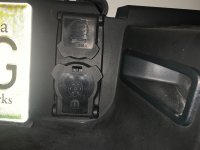
<div class="bbWrapper">1) - I have a 2021 3500 Longhorn with the XFQ option and read the RAM camera wasn't good. Has anyone found a camera with good resolution to connect to the plug on the right side of the license plate? <br />
2) - I might be dreaming but, can the camera's image be displayed on my digital rearview mirror?</div>
Attachments

dsneill
Member
<div class="bbWrapper">The camera that displays on the digital rear view mirror plugs into a connector on the left side of license plate I have not got the camera yet to try it out. <br />
<br />
2022 3500 drw HO Laramie</div>

matemike
Well-Known Member
- Messages
- 373
- Reaction score
- 552
- Points
- 93
<div class="bbWrapper">New to RAMs here. Not even new yet since I only have one on order, not owned. But I have a very basic camera question.<br />
<br />
Is there a way to see the reverse camera while driving? I want to see the trailer hitch connection with that camera.<br />
<br />
I got the Tow-mode digital rear view mirror camera (AVF) but I did not get the towing technology group (AAN) or the center stop lamp camera (LPD). But my Limited 2500 will have the standard reverse camera. Can I view that on the 12" screen when driving down the highway? Or does only operate in reverse?</div>
<div class="bbWrapper"><blockquote data-attributes="member: 17733" data-quote="matemike" data-source="post: 134088"
class="bbCodeBlock bbCodeBlock--expandable bbCodeBlock--quote js-expandWatch">
<div class="bbCodeBlock-title">
<a href="/forum/goto/post?id=134088"
class="bbCodeBlock-sourceJump"
rel="nofollow"
data-xf-click="attribution"
data-content-selector="#post-134088">matemike said:</a>
</div>
<div class="bbCodeBlock-content">
<div class="bbCodeBlock-expandContent js-expandContent ">
New to RAMs here. Not even new yet since I only have one on order, not owned. But I have a very basic camera question.<br />
<br />
Is there a way to see the reverse camera while driving? I want to see the trailer hitch connection with that camera.<br />
<br />
I got the Tow-mode digital rear view mirror camera (AVF) but I did not get the towing technology group (AAN) or the center stop lamp camera (LPD). But my Limited 2500 will have the standard reverse camera. Can I view that on the 12" screen when driving down the highway? Or does only operate in reverse?
</div>
<div class="bbCodeBlock-expandLink js-expandLink"><a role="button" tabindex="0">Click to expand...</a></div>
</div>
</blockquote><br />
If you got the tow mode digital rearview group then all you need to do is mount the wired camera on the back of your trailer, plug it in to the receptacle on the left side of your rear license plate bracket, and turn your digital rearview mirror to the tow mode setting. You should get a constant live feed from that camera displayed on your digital rear view. I too am waiting for my truck to arrive, but this is the way it should work based on all the reading I’ve done here, as well as reading up on the 2022 owners manual. <br />
<br />
As far as being able to see your hitch with the reverse camera, I’m assuming you mean the backup camera mounted on your tailgate. The answer there, I believe, is no. The camera will not operate constantly while moving forward. <br />
<br />
<br />
Sent from my iPhone using Tapatalk</div>
<div class="bbWrapper"><blockquote data-attributes="member: 17733" data-quote="matemike" data-source="post: 134088"
class="bbCodeBlock bbCodeBlock--expandable bbCodeBlock--quote js-expandWatch">
<div class="bbCodeBlock-title">
<a href="/forum/goto/post?id=134088"
class="bbCodeBlock-sourceJump"
rel="nofollow"
data-xf-click="attribution"
data-content-selector="#post-134088">matemike said:</a>
</div>
<div class="bbCodeBlock-content">
<div class="bbCodeBlock-expandContent js-expandContent ">
Is there a way to see the reverse camera while driving? I want to see the trailer hitch connection with that camera.
</div>
<div class="bbCodeBlock-expandLink js-expandLink"><a role="button" tabindex="0">Click to expand...</a></div>
</div>
</blockquote>Yes. There is a soft key for the backup camera on the radio screen. You can view that camera while driving for 10 seconds at a time.</div>
matemike
Well-Known Member
- Messages
- 373
- Reaction score
- 552
- Points
- 93
<div class="bbWrapper"><blockquote data-attributes="member: 15983" data-quote="mbarber84" data-source="post: 134112"
class="bbCodeBlock bbCodeBlock--expandable bbCodeBlock--quote js-expandWatch">
<div class="bbCodeBlock-title">
<a href="/forum/goto/post?id=134112"
class="bbCodeBlock-sourceJump"
rel="nofollow"
data-xf-click="attribution"
data-content-selector="#post-134112">mbarber84 said:</a>
</div>
<div class="bbCodeBlock-content">
<div class="bbCodeBlock-expandContent js-expandContent ">
If you got the tow mode digital rearview group then all you need to do is mount the wired camera on the back of your trailer, plug it in to the receptacle on the left side of your rear license plate bracket, and turn your digital rearview mirror to the tow mode setting. You should get a constant live feed from that camera displayed on your digital rear view. I too am waiting for my truck to arrive, but this is the way it should work based on all the reading I’ve done here, as well as reading up on the 2022 owners manual.
</div>
<div class="bbCodeBlock-expandLink js-expandLink"><a role="button" tabindex="0">Click to expand...</a></div>
</div>
</blockquote>Perfect. I've learned it is a Furion Vision S camera that I need. but I won't need the monitor. Again, as I'm learning, I believe I can just connect and mount the camera only, and with my Tow-mode digital rear view mirror camera system (AVF) I can see that video on the rear view mirror. My 7 pin trailer plug should feed all the telemetry. Will the AVF feature know to use the Furion camera instead of the one in the tailgate as if there were no trailer connected? Or do you have to select back and fortch which camera you want to see? <br />
<br />
Would I need an adapter such as this etrailer part to make the camera get power AND feed video to my truck? <br />
<div>
<a href="https://www.etrailer.com/Accessories-and-Parts/Furrion/FR69SR.html"
class="link link--external"
target="_blank"
rel="nofollow ugc noopener"
data-proxy-href="/forum/proxy.php?link=https%3A%2F%2Fwww.etrailer.com%2FAccessories-and-Parts%2FFurrion%2FFR69SR.html&hash=a9d4048b02b18e4908b7a7a35ac6bb95">
https://www.etrailer.com/Accessories-and-Parts/Furrion/FR69SR.html
</a>
</div></div>
<div class="bbWrapper"><blockquote data-attributes="member: 17733" data-quote="matemike" data-source="post: 134173"
class="bbCodeBlock bbCodeBlock--expandable bbCodeBlock--quote js-expandWatch">
<div class="bbCodeBlock-title">
<a href="/forum/goto/post?id=134173"
class="bbCodeBlock-sourceJump"
rel="nofollow"
data-xf-click="attribution"
data-content-selector="#post-134173">matemike said:</a>
</div>
<div class="bbCodeBlock-content">
<div class="bbCodeBlock-expandContent js-expandContent ">
Perfect. I've learned it is a Furion Vision S camera that I need. but I won't need the monitor. Again, as I'm learning, I believe I can just connect and mount the camera only, and with my Tow-mode digital rear view mirror camera system (AVF) I can see that video on the rear view mirror. My 7 pin trailer plug should feed all the telemetry. Will the AVF feature know to use the Furion camera instead of the one in the tailgate as if there were no trailer connected? Or do you have to select back and fortch which camera you want to see?<br />
<br />
Would I need an adapter such as this etrailer part to make the camera get power AND feed video to my truck?<br />
<div>
<a href="https://www.etrailer.com/Accessories-and-Parts/Furrion/FR69SR.html"
class="link link--external"
target="_blank"
rel="nofollow ugc noopener"
data-proxy-href="/forum/proxy.php?link=https%3A%2F%2Fwww.etrailer.com%2FAccessories-and-Parts%2FFurrion%2FFR69SR.html&hash=a9d4048b02b18e4908b7a7a35ac6bb95">
https://www.etrailer.com/Accessories-and-Parts/Furrion/FR69SR.html
</a>
</div>
</div>
<div class="bbCodeBlock-expandLink js-expandLink"><a role="button" tabindex="0">Click to expand...</a></div>
</div>
</blockquote>The digital rear view mirror can not display the image of any other camera other than the digital tow mode camera included with the kit, which is the same camera as the one it uses in the CHMSL.</div>
<div class="bbWrapper"><blockquote data-attributes="member: 1989" data-quote="Brutal_HO" data-source="post: 119497"
class="bbCodeBlock bbCodeBlock--expandable bbCodeBlock--quote js-expandWatch">
<div class="bbCodeBlock-title">
<a href="/forum/goto/post?id=119497"
class="bbCodeBlock-sourceJump"
rel="nofollow"
data-xf-click="attribution"
data-content-selector="#post-119497">Brutal_HO said:</a>
</div>
<div class="bbCodeBlock-content">
<div class="bbCodeBlock-expandContent js-expandContent ">
This should clear up the questions regarding using an old old Aux camera trailer side setup with the new trucks.<br />
<br />
<br />
<a href="https://hdrams.com/forum/attachments/22993/" target="_blank">View attachment 22993</a>
</div>
<div class="bbCodeBlock-expandLink js-expandLink"><a role="button" tabindex="0">Click to expand...</a></div>
</div>
</blockquote><br />
Hi all new member here. Digesting the info and can't find a clear answer to this question: for a limited level 1 equipment group and NO XN1 trailer surround, is there a 12 pin connector and if so, how many aux cameras can you add? The trailer surround is not there to occupyi aux1 but the above suggests (because there is a chmsl) that the answer is still "only one aux camera"</div>
<div class="bbWrapper"><blockquote data-attributes="member: 17838" data-quote="Dlleno" data-source="post: 134212"
class="bbCodeBlock bbCodeBlock--expandable bbCodeBlock--quote js-expandWatch">
<div class="bbCodeBlock-title">
<a href="/forum/goto/post?id=134212"
class="bbCodeBlock-sourceJump"
rel="nofollow"
data-xf-click="attribution"
data-content-selector="#post-134212">Dlleno said:</a>
</div>
<div class="bbCodeBlock-content">
<div class="bbCodeBlock-expandContent js-expandContent ">
Hi all new member here. Digesting the info and can't find a clear answer to this question: for a limited level 1 equipment group and NO XN1 trailer surround, is there a 12 pin connector and if so, how many aux cameras can you add? The trailer surround is not there to occupyi aux1 but the above suggests (because there is a chmsl) that the answer is still "only one aux camera"
</div>
<div class="bbCodeBlock-expandLink js-expandLink"><a role="button" tabindex="0">Click to expand...</a></div>
</div>
</blockquote>If your truck is equipped with truck surround view, then it will come with the 12-pin trailer connector, and the truck will be wired for trailer surround view and ONE aux camera.</div>
<div class="bbWrapper"><blockquote data-attributes="member: 17838" data-quote="Dlleno" data-source="post: 134217"
class="bbCodeBlock bbCodeBlock--expandable bbCodeBlock--quote js-expandWatch">
<div class="bbCodeBlock-title">
<a href="/forum/goto/post?id=134217"
class="bbCodeBlock-sourceJump"
rel="nofollow"
data-xf-click="attribution"
data-content-selector="#post-134217">Dlleno said:</a>
</div>
<div class="bbCodeBlock-content">
<div class="bbCodeBlock-expandContent js-expandContent ">
So limited level 1 , and no XN1, means there is no 12 pin?
</div>
<div class="bbCodeBlock-expandLink js-expandLink"><a role="button" tabindex="0">Click to expand...</a></div>
</div>
</blockquote>I don’t know off hand what is included in level 1, but if your truck is coming with the regular surround view system, it will have the 12-pin. If your truck does not have regular surround view, it will not come with the 12-pin.</div>
<div class="bbWrapper"><blockquote data-attributes="member: 2576" data-quote="Jimmy07" data-source="post: 134219"
class="bbCodeBlock bbCodeBlock--expandable bbCodeBlock--quote js-expandWatch">
<div class="bbCodeBlock-title">
<a href="/forum/goto/post?id=134219"
class="bbCodeBlock-sourceJump"
rel="nofollow"
data-xf-click="attribution"
data-content-selector="#post-134219">Jimmy07 said:</a>
</div>
<div class="bbCodeBlock-content">
<div class="bbCodeBlock-expandContent js-expandContent ">
I don’t know off hand what is included in level 1, but if your truck is coming with the regular surround view system, it will have the 12-pin. If your truck does not have regular surround view, it will not come with the 12-pin.
</div>
<div class="bbCodeBlock-expandLink js-expandLink"><a role="button" tabindex="0">Click to expand...</a></div>
</div>
</blockquote>Limited level 1 includes regular surround. Ok good there is a 12 pin. How many aux cams can I add then (since there is no xn1 to occupy aux 1)? Or are you saying that regular surround DOES occupy aux 1 because regular surround PREPS for trailer surround?<br />
<br />
What is the purpose of the 12 pin when regular surround is configured (why does regular surround = 12 pin)? Is this the prep for trailer surround and the aux 2 cam?</div>
Last edited: