What's new
Ram Heavy Duty Forum

Register a free account today to become a member! Once signed in, you'll be able to participate on this site by adding your own topics and posts, as well as connect with other members through your own private inbox!

2019 Big Horn 2500 LED fog light install-Need Help

pionex_80

Member
Messages
54
Reaction score
11
Points
8
Hello everyone. I am in need of some help. I purchased the LED lights, the brackets, the bezels, the light switch and a jumper harness that will have to be modified. I have ALFAOBD and the security bypass cable, and as well the Autel MS906BT with the 12+8 cable.

I need help though. I read through a lot of posts about this subject, but seems like many are wiring these up to the aux switches. Once I thought I had seen a thread on an install that had shown pictures of the wiring being done but cannot locate that particular thread now.

I want to try to wire the lights up to the truck using the factory light switch. Where do I wire the actual left and right wires from the jumper harness? Is it under the hood somewhere on the driver's side in a connector there? Or do the wires have to travel all the way back to the BCM under the dash and go into C1:1 (left) and C4:13 for the (right)?

Thank you so much for any help anyone provides me, so appreciated. Thanks, Ken
 
I take it you mean you want to write up the led spot lights to your highbeam lights. Is that correct?
When i did mine i found the high beam wire going into the driver's headlight and spliced a wire from that. That spliced wire was used to activate a solid state relay that I used to activate my other relays (one for each light) however, you should be able to use the solid state relay to directly activate your led lights.

The reason I used a solid state relay is to remove the chance of getting even a small amount of current draw from the highbeam circuit, that I was worried would cause a fault code with the truck. This may not be required but for my piece of mind it was what I went with.

Here's a link to the solid state relay that I used.

The link also has a diagram showing how to wire it.
But basically you need to connect a wire from the battery (positive side) to connection 1, then from connection 2 to the led spot lights.
Then the signal wire (that you spliced from the highbeam circuit) to connection 3, and finally connection 4 to an earth/ground/chassis.

Hope that helps and good luck

Sent from my SM-N9600 using Tapatalk
 
No, I want to wire up the LED fog lights to perform and function as factory. I remember, but cannot locate where I saw someone who connected the fog light wires under the cover that houses the relays on the left front corner of the engine compartment. He had soldered wire connectors onto the wiring and inserted those into a connector block on certain pin slots. Then he had to use alphaobd to enable both the left and the front individually in the BCM. He used the factory light switch and got them to work. I don't know what pins he used in the connector or remember which slots he inserted the wires into either. I am still looking around too. This has become a difficult task to actually do in a factory sort of a way now.
 
No, I want to wire up the LED fog lights to perform and function as factory. I remember, but cannot locate where I saw someone who connected the fog light wires under the cover that houses the relays on the left front corner of the engine compartment. He had soldered wire connectors onto the wiring and inserted those into a connector block on certain pin slots. Then he had to use alphaobd to enable both the left and the front individually in the BCM. He used the factory light switch and got them to work. I don't know what pins he used in the connector or remember which slots he inserted the wires into either. I am still looking around too. This has become a difficult task to actually do in a factory sort of a way now.
If you want to go the OE route then there is no messing with relays in the engine compartment, it’s all switched with the BCM. All you need is to make a simple two wire harness and those two wires will plug into the BCM at C1 and C4. Those are your positive left and right pin outs. Run that harness through your firewall and to the front left drivers side frame rail. In front of the drivers side wheel you’ll see a good ground location location already being used. This is where your factory jumper harness will connect to your homemade 2-wire harness and the two black wires from your factory jumper harness will terminate to ground.
It’s that simple. Hardest part is physically getting the wires into the BCM connectors.
 
I remember seeing the link for the connectors, but wasn't positive if that was the connector to use to plug the wire into the BCM or into the LED light itself. Thanks for telling me this information above. Helps me out a lot. C1:1 is the left and C4:13 is the right then? I was surprised we would have to run wiring all the way back into the cab like this. I really thought the wiring would be wired "in" at the factory. Makes it hard. With your method I can use the original factory light switch correct? I mean the one I purchased that has the bed and fog light function in the center.
 
Yes the correct switch is the dual function that has bed cargo and fog lights in the center. Alfa obd enables that switch. I have a copy of the BCM detail page from someone that has a tech authority subscription. I can try to find it later.
 
Yes the correct switch is the dual function that has bed cargo and fog lights in the center. Alfa obd enables that switch. I have a copy of the BCM detail page from someone that has a tech authority subscription. I can try to find it later.
I thought I had seen a diagram somewhere. I might have printed out one too, and I would have to look through all the printed stuff I have now. Did you use alphaobd? And I assume you had to use the security bypass cable? If so, you had to pull the instrument cluster to gain access to the security gateway module to plug the cable ends into and the OBD interface into the other end? Do you remember the steps? I can look in the app and see, but I imagine this is a function in the BCM area?
 
Yes the correct switch is the dual function that has bed cargo and fog lights in the center. Alfa obd enables that switch. I have a copy of the BCM detail page from someone that has a tech authority subscription. I can try to find it later.
The connector link you referenced is for the connectors to go on the wires at the BCM? Or for the connectors used at the LEDs themselves? Do you remember how long the wires were that you used? Did you make your own jumper or branch harness to go light to light? Thanks for this help.
 
I use the Koadtech bypass cable. You do not have remove the cluster in order to use Alfa if using that cable. Just two connections to the canbus terminals. If you plan on many upgrades I’d say it’s worth it to buy that one.
 
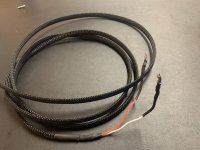
The two wire harness you make will look like this:
image.jpg
This will plug into the BCM in the cab under the kick panel. Make it long, 10’ is plenty, you’ll cut to length after you pull through and meet up with your jumper harness at the driver side frame rail.
 
The two wire harness you make will look like this:
View attachment 7592
This will plug into the BCM in the cab under the kick panel. Make it long, 10’ is plenty, you’ll cut to length after you pull through and meet up with your jumper harness at the driver side frame rail.
That is plenty helpful. I do have the KOADTECH cable too. I thought though that you would have to remove the instrument cluster. I must be thinking of the Autel 12+8 cable and where that connects too. I will be using the alfaobd app to complete.
 
For the jumper harness I used leds from Diode Dynamics so I left the ends factory and used the supplied pigtails from DD. It’s all a perfect water tight fit. For the end with the 16 pin connector, cut this off. Here you will solder bullet connectors on the positive white-orange and white-yellow wires. These connect with the two from the BCM. Now terminate your two black ground wires with ring terminals to the common ground already existing on your frame rail. Done. Program BCM with alpha obd. There are proven write ups on line for this process and related features such as high beam dropout. image.jpg
 
The two wire harness you make will look like this:
View attachment 7592
This will plug into the BCM in the cab under the kick panel. Make it long, 10’ is plenty, you’ll cut to length after you pull through and meet up with your jumper harness at the driver side frame rail.
Looks like you used PEX braided sleeving? 1/4"?
 
Okay thanks, I will get to work on the harness for the jumper, and then one for the jumper to the BCM. One more question. Where did you go through the cab at? The little nipple that is sticking out under the steering column, that is outlined in the instructions for the remote control kit if you have to install the hood latch with the sensor.
 
Hood latch cable seal or or you can use the area where the clutch pedal used to be.
 
That is plenty helpful. I do have the KOADTECH cable too. I thought though that you would have to remove the instrument cluster. I must be thinking of the Autel 12+8 cable and where that connects too. I will be using the alfaobd app to complete.

The Autel cable and the Infotainment bypass module plug into the SGM behind the cluster on HD trucks. More useful for 1500 trucks.

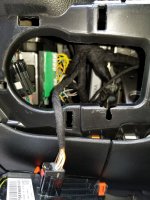
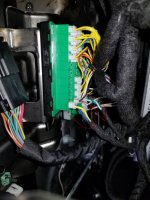
As already indicated, the KoadTech cable plugs into the CAN bus headers that are behind the headlight switch.
20200422_130635.jpgKaodTech plugs.jpg
 
Use the AlfaOBD Known Working Settings Google Drive folder others have setup. It’s just a couple settings depending on what config you want.
 
Back
Top