
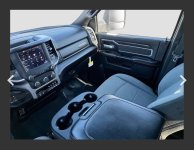
can any one help me I have a 2023 larime with a jump seat I bought a business center console and the extension wire for under the seat but I can’t get the wires in the dash to plug in so I’m wondering if there is an extension harness are if there is anything I can do?
Ram Heavy Duty Forum
You are using an out of date browser. It may not display this or other websites correctly.
You should upgrade or use an alternative browser.
You should upgrade or use an alternative browser.
2019-2024 2500 / 3500 Jumpseat to Center Console Swap
- Thread starter Musclelogic
- Start date
big_gray_towpig
New Member
I need some help. I have a '23 Tradesman that I'm attempting to swap the jump seat out for a full console from a '22 Bighorn.
The Tradesman has -
- USB/ 1 aux port on the dash panel
- 110v outlet on the dash panel
- usb port in the arm rest
- no rear ports for the back seat.
Bighorn console has -
- usb/aux ports at the dash
- usb in the arm rest
- front 110v outlet in the console
- rear usb ports
- rear 110v outlet
I got the "H" connector from under the driver seat rerouted and moved to the front with room length to spare. I removed the cubby, the lower panel on the drivers side and the radio stack. Cut all the cable ties and freed up the usb cable and the square connector harness that went to the hub and rerouted and got some extra length. Plugged in the "H" connector, the usb out of the dash to the port beside it and left the square plug unplugged for testing because it has to be extended because my console has the offset right usb ports.
Here is where things go very wrong... when I hit the start button to see if it had power, the console (female) usb port instantly went up in smoke?? I killed power and unplugged it but the female port is toast. The dash side cable is looking rough but works fine. My question is what would cause it?
The Tradesman has -
- USB/ 1 aux port on the dash panel
- 110v outlet on the dash panel
- usb port in the arm rest
- no rear ports for the back seat.
Bighorn console has -
- usb/aux ports at the dash
- usb in the arm rest
- front 110v outlet in the console
- rear usb ports
- rear 110v outlet
I got the "H" connector from under the driver seat rerouted and moved to the front with room length to spare. I removed the cubby, the lower panel on the drivers side and the radio stack. Cut all the cable ties and freed up the usb cable and the square connector harness that went to the hub and rerouted and got some extra length. Plugged in the "H" connector, the usb out of the dash to the port beside it and left the square plug unplugged for testing because it has to be extended because my console has the offset right usb ports.
Here is where things go very wrong... when I hit the start button to see if it had power, the console (female) usb port instantly went up in smoke?? I killed power and unplugged it but the female port is toast. The dash side cable is looking rough but works fine. My question is what would cause it?
mamamckown
New Member
- Messages
- 1
- Reaction score
- 0
- Points
- 1
Would you be able to sell all items needed and the console? My husband has a 2024 2500 big horn and is wanting to get rid of his jumpseat for the full console.Just sharing some information i've found after swapping my 2024 Ram 2500 crew cab from the factory jumpseat to a full feature center console with all features working.
View attachment 79892
You'll need the following parts from the dealer, to mount the console and close the holes left on the dash from the jumpseat and trim being removed.
View attachment 79893
For the 2023-2024 trucks, absolutely DO NOT BUY the infotainment jumper harness, it's junk and doesn't provide full power, front and rear usb to work correctly. Instead order the following harness from the dealer:
View attachment 79894
The above harness allows the console swap to be a full 100% plug and play into even a base model tradesman.
DO NOT follow the infotainment install and unplug the USB hub and USB input at the back of the hub facing outward on the console. You absolutely must plug in the factory USB cable from the lower dash, into the single USB female port on the front right hand USB connector, by the console harness plug. The rectangular connector from the OEM USB hub on the lower dashboard is left disconnected, you can tuck it up into your dashboard.
Hopefully this information helps, as i've now supplied over 26, 2024 center consoles for people to install in their trucks.
View attachment 79895
Attachments

Boxerrider
Active Member
- Messages
- 99
- Reaction score
- 111
- Points
- 33
110v to the usb?Here is where things go very wrong... when I hit the start button to see if it had power, the console (female) usb port instantly went up in smoke?? I killed power and unplugged it but the female port is toast. The dash side cable is looking rough but works fine. My question is what would cause it?
Any chance this got answered? Looking to do an install in a 2021 tradesman.Would be interested in learning what that part number is…
Has anyone done this with a floor t-case shifter? I imagine some cutting of the console would be required. Or maybe you could do a shifter extension with a sideways bent to get the shifter further left and out of the “pocket”
Ive been happy with my bench seat, but it does feel like a bit of a waste of space compared to the full center consoles, even though I do have the armrest storage, under seat storage, and cupholders on the floor console (4th gen floor console installed).

Sk3tch720
New Member
- Messages
- 1
- Reaction score
- 0
- Points
- 1
I have a 2019 Ram 3500 Laramie black leather seats. I have the jump seat and I want to swap it for a console. My jump seat has the real 110v outlet, rear seat heater buttons, and rear usb ports. Would be willing to sell or trade and would include all dash pieces (drawer and trim) mounting brackets and hardware. If anyone would like to trade me please message! Really want a console.

Jcs1998
New Member
- Messages
- 3
- Reaction score
- 0
- Points
- 1
Where does that harness plug into? Under the drivers seat?Just sharing some information i've found after swapping my 2024 Ram 2500 crew cab from the factory jumpseat to a full feature center console with all features working.
View attachment 79892
You'll need the following parts from the dealer, to mount the console and close the holes left on the dash from the jumpseat and trim being removed.
View attachment 79893
For the 2023-2024 trucks, absolutely DO NOT BUY the infotainment jumper harness, it's junk and doesn't provide full power, front and rear usb to work correctly. Instead order the following harness from the dealer:
View attachment 79894
The above harness allows the console swap to be a full 100% plug and play into even a base model tradesman.
DO NOT follow the infotainment install and unplug the USB hub and USB input at the back of the hub facing outward on the console. You absolutely must plug in the factory USB cable from the lower dash, into the single USB female port on the front right hand USB connector, by the console harness plug. The rectangular connector from the OEM USB hub on the lower dashboard is left disconnected, you can tuck it up into your dashboard.
Hopefully this information helps, as i've now supplied over 26, 2024 center consoles for people to install in their trucks.
View attachment 79895
Jcs1998
New Member
- Messages
- 3
- Reaction score
- 0
- Points
- 1
Did you ever figure this out?I'm doing a console swap and I watched the infotainment way of doing it. Can you explain what you meant with the usb hub and input? By the way the part numbers came in clutch!! Thanks!
Where did you source your console?Did you ever figure this out?
Jcs1998
New Member
- Messages
- 3
- Reaction score
- 0
- Points
- 1
EbayWhere did you source your console?
Thank youEbay
h.aguirre1001
New Member
- Messages
- 1
- Reaction score
- 0
- Points
- 1
Hi Rammer249 is the jump seat still availableIve got the leather laramie jumper seat in seek of the full console no logos on the 24’s its just black leather. Truck has 5k miles on it seats brand new if anyone would like to trade.
burnttoastburgos
New Member
- Messages
- 7
- Reaction score
- 0
- Points
- 1
not to undermine anyone, but if he does not, I have one. 189 miles, never sat on. brand new.
If you’re still looking for one. I’ll have one available soon.You don't happen to have the jump seat from a Laramie trim, do you? I am looking to get rid of this console in favor of a 6th seat
I assume this all should work for my 22 2500 Laramie? Eventually would like to convert to the 12” screen vs this 8.4” screen .Just sharing some information i've found after swapping my 2024 Ram 2500 crew cab from the factory jumpseat to a full feature center console with all features working.
View attachment 79892
You'll need the following parts from the dealer, to mount the console and close the holes left on the dash from the jumpseat and trim being removed.
View attachment 79893
For the 2023-2024 trucks, absolutely DO NOT BUY the infotainment jumper harness, it's junk and doesn't provide full power, front and rear usb to work correctly. Instead order the following harness from the dealer:
View attachment 79894
The above harness allows the console swap to be a full 100% plug and play into even a base model tradesman.
DO NOT follow the infotainment install and unplug the USB hub and USB input at the back of the hub facing outward on the console. You absolutely must plug in the factory USB cable from the lower dash, into the single USB female port on the front right hand USB connector, by the console harness plug. The rectangular connector from the OEM USB hub on the lower dashboard is left disconnected, you can tuck it up into your dashboard.
Hopefully this information helps, as i've now supplied over 26, 2024 center consoles for people to install in their trucks.
View attachment 79895