
What's new
Ram Heavy Duty Forum

Register a free account today to become a member! Once signed in, you'll be able to participate on this site by adding your own topics and posts, as well as connect with other members through your own private inbox!

AlfaOBD - Windows Version changing settings on your truck

Wpg_Ram

Active Member
Messages
251
Reaction score
101
Points
43
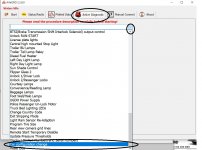
Hey guys, so was at the dealership getting some warranty work and they told me they re-flashed my truck with some upadates and now a bunch of stuff was acting funny (I did the LED headlight swap, added fogs, just a ton of other stuff). So no worries, I pulled out my trusty laptop (because I use an Iphone) and fired up the Alfa software .... Well, for the life of me I couldn't remember how the heck to change settings because its been so long and dear google was no help. So figured that I would do a super quick post for people that are newbies using it or that need it after ages of not using it.

To change settings:

1) Connect to your truck
2) Click on Active Diagnostic
3) The drop down menu, scroll to the bottom and select Car Configuration Change

The rest is pretty self explanatory and other people have put wicked lists of what you can do and what does not work.

Im sure if I ever need to remember, this post will come in handy for myself. Hope it helps someone else too!
 

Attachments

  • AlfaOBD Windows.jpg
    AlfaOBD Windows.jpg
    212 KB · Views: 105
Hey guys, so was at the dealership getting some warranty work and they told me they re-flashed my truck with some upadates and now a bunch of stuff was acting funny (I did the LED headlight swap, added fogs, just a ton of other stuff). So no worries, I pulled out my trusty laptop (because I use an Iphone) and fired up the Alfa software .... Well, for the life of me I couldn't remember how the heck to change settings because its been so long and dear google was no help. So figured that I would do a super quick post for people that are newbies using it or that need it after ages of not using it.

To change settings:

1) Connect to your truck
2) Click on Active Diagnostic
3) The drop down menu, scroll to the bottom and select Car Configuration Change

The rest is pretty self explanatory and other people have put wicked lists of what you can do and what does not work.

Im sure if I ever need to remember, this post will come in handy for myself. Hope it helps someone else too!

I wish you posted this a few weeks ago, took me a day to figure it out . The UI for the windows version is horrible.


Sent from my iPhone using Tapatalk
 
I wish you posted this a few weeks ago, took me a day to figure it out . The UI for the windows version is horrible.


Sent from my iPhone using Tapatalk
I was in the exact same boat! I like the search feature, but man after seeing the windows phones app it kinda makes me wish they had one for the iphone also.
 
I wish I saw this yesterday. Just bought AlphaOBD yesterday and have never used it. Took me like 2 hours to find the right settings haha.
 
Back
Top