
I have Alfaobd on a windows laptop and I have spent over an hour searching for the Fog Light Dropout with Highbeams Disable option in the Body Control Module menu and I cannot find that option in the list. Can someone PLEASE tell me what I am doing wrong. It is a 2019 RAM 2500 and I am selecting RAM 2500 (DJ/DR) - Body Computer - My 2019 PowerNet. When I go to Active Diagnostic and click on the drop down menu, I see Fog Light Left and Fog Light Right but nothing about Fog Light Dropout. I am connected to my MX and using a bypass cable. Thanks.
Ram Heavy Duty Forum
You are using an out of date browser. It may not display this or other websites correctly.
You should upgrade or use an alternative browser.
You should upgrade or use an alternative browser.
Trouble with Fog light dropout in Alfaobd
- Thread starter tmansrew
- Start date

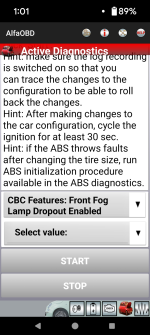
Thanks for the reply, Jeremy, but I don't see "CBC Features" anywhere. I have "Body Computer" selected in the Function box, then I click on and open the Active Diagnostic button (car with hood open) and it gives me a box with a drop down menu, but I don't see "Front Fog lamp dropout" anywhere in the list of options??You’re looking for “Front Fog Lamp Dropout Enabled” under “CBC Features”.


John Jensen
Well-Known Member
- Messages
- 1,274
- Reaction score
- 1,154
- Points
- 113
Like AH64ID said.
Here is the process, just use your 2500 settings instead of my 3500 settings
Fog Lights On With High Beams:
Car Model> Ram 3500> Function> Body Computer> Control Unit> My2020+ Powernet>
Connect> Select Hood Open icon> Select Procedure to Start>
Car Configuration Change> Select option>
CBC Features: Front Fog Lamp Dropout Enabled> Front Fog Lamp Dropout Enabled> "No"
Here is the process, just use your 2500 settings instead of my 3500 settings
Fog Lights On With High Beams:
Car Model> Ram 3500> Function> Body Computer> Control Unit> My2020+ Powernet>
Connect> Select Hood Open icon> Select Procedure to Start>
Car Configuration Change> Select option>
CBC Features: Front Fog Lamp Dropout Enabled> Front Fog Lamp Dropout Enabled> "No"
That was it, guys. I selected Car Config Change and it brought up the menu I needed to find the Fog light dropout option. Thanks for the help! Now to try to get my tire size changed to match my tires.Like AH64ID said.
Here is the process, just use your 2500 settings instead of my 3500 settings
Fog Lights On With High Beams:
Car Model> Ram 3500> Function> Body Computer> Control Unit> My2020+ Powernet>
Connect> Select Hood Open icon> Select Procedure to Start>
Car Configuration Change> Select option>
CBC Features: Front Fog Lamp Dropout Enabled> Front Fog Lamp Dropout Enabled> "No"
John Jensen
Well-Known Member
- Messages
- 1,274
- Reaction score
- 1,154
- Points
- 113
Here's how:That was it, guys. I selected Car Config Change and it brought up the menu I needed to find the Fog light dropout option. Thanks for the help! Now to try to get my tire size changed to match my tires.
xxxxxxxxxxxxxxxxxxxxxxxxxxxxxxxxxxxxxxxxxxxxxxxxxxxxxxxxxxxxxxxxxxxxxxxxxxxxxxxxxYZ
How to Change Tire Size - Odometer Correction:
Car Model> Ram 3500> Function> Body Computer> Control Unit> My2020+ Powernet>
Connect> Select Hood Open icon> Select Procedure to Start> Program Tire Size>
Select from the options: 1-Use the menu to select a preprogrammed size or
2-Input by tire circumference in mm (do not use inches)> Start
xxxxxxxxxxxxxxxxxxxxxxxxxxxxxxxxxxxxxxxxxxxxxxxxxxxxxxxxxxxxxxxxxxxxxxxxxxxxxxxxxYZ
ABS Module Initialization:
It has been reported that it is no longer required to run the ABS Module
Initialization routine after the Odometer Correction. If necessary, here's how:
Car Model> Ram 3500> Function> ABS> Select Control Unit>
ABS Bosch/Continental/Teves/TRW Powernet MY2019+ Powernet>
Connect> Select Hood Open icon> Select Procedure to Start>
ABS Initialization> "Start"

Here's how:
xxxxxxxxxxxxxxxxxxxxxxxxxxxxxxxxxxxxxxxxxxxxxxxxxxxxxxxxxxxxxxxxxxxxxxxxxxxxxxxxxYZ
How to Change Tire Size - Odometer Correction:
Car Model> Ram 3500> Function> Body Computer> Control Unit> My2020+ Powernet>
Connect> Select Hood Open icon> Select Procedure to Start> Program Tire Size>
Select from the options: 1-Use the menu to select a preprogrammed size or
2-Input by tire circumference in mm (do not use inches)> Start
xxxxxxxxxxxxxxxxxxxxxxxxxxxxxxxxxxxxxxxxxxxxxxxxxxxxxxxxxxxxxxxxxxxxxxxxxxxxxxxxxYZ
ABS Module Initialization:
It has been reported that it is no longer required to run the ABS Module
Initialization routine after the Odometer Correction. If necessary, here's how:
Car Model> Ram 3500> Function> ABS> Select Control Unit>
ABS Bosch/Continental/Teves/TRW Powernet MY2019+ Powernet>
Connect> Select Hood Open icon> Select Procedure to Start>
ABS Initialization> "Start"
You will also have to clear any DTC.
Here to say thanks, again, to everyone for the help you gave me in this thread! Got everything done I had on the short list. I am going to go back in and tweak the tire size as my speedo is reading 2-3 miles more than the gps. Also got the Jscan app on my iphone and programmed a key fob I had bought a while back. Worked like a charm! This place is great! Thanks, again for your time!
Hello All,
I have a 2022 3500 Limited RAM HD, the option to change the Front Fog Lamp Dropout function does not exist. Following the directions below its not there. I Looked about everywhere else I thought.
Fog Lights On With High Beams:
Car Model> Ram 3500> Function> Body Computer> Control Unit> My2022+ Powernet>
Connect> Select Hood Open icon> Select Procedure to Start>
Car Configuration Change> Select option>
CBC Features: Front Fog Lamp Dropout Enabled> This doesnt exist.
Front Fog Lamp Dropout Enabled> "No"
Can anyone help?
Thanks,
Robert
I have a 2022 3500 Limited RAM HD, the option to change the Front Fog Lamp Dropout function does not exist. Following the directions below its not there. I Looked about everywhere else I thought.
Fog Lights On With High Beams:
Car Model> Ram 3500> Function> Body Computer> Control Unit> My2022+ Powernet>
Connect> Select Hood Open icon> Select Procedure to Start>
Car Configuration Change> Select option>
CBC Features: Front Fog Lamp Dropout Enabled> This doesnt exist.
Front Fog Lamp Dropout Enabled> "No"
Can anyone help?
Thanks,
Robert
John Jensen
Well-Known Member
- Messages
- 1,274
- Reaction score
- 1,154
- Points
- 113

fshelly257
New Member
- Messages
- 2
- Reaction score
- 0
- Points
- 1
2020 Ram 3500 Bighorn (6.7 Cummins), AlphaOBD, MX+
Do I need the bypass cable ? Ive tried to do the foglight dropout and it just keeps saying default is set to yes.
Do I need the bypass cable ? Ive tried to do the foglight dropout and it just keeps saying default is set to yes.
dieselscout80
Well-Known Member
- Messages
- 1,125
- Reaction score
- 773
- Points
- 113
I am almost 100% certain that you have to use the bypass cable.2020 Ram 3500 Bighorn (6.7 Cummins), AlphaOBD, MX+
Do I need the bypass cable ? Ive tried to do the foglight dropout and it just keeps saying default is set to yes.
I did when I enabled fogs with high beams.
fshelly257
New Member
- Messages
- 2
- Reaction score
- 0
- Points
- 1
OK, Thank you. I just got the programmer and learning as I go.... through frustration.. LOLI am almost 100% certain that you have to use the bypass cable.
I did when I enabled fogs with high beams.
I amalmost100% certain that you have to use the bypass cable.
I did when I enabled fogs with high beams.
Bypass is 100% required for any changes.