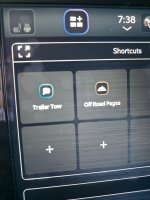
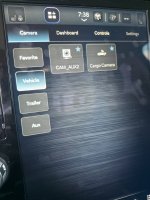
See post 75. They are different cameras, have different keyed connectors, and are not interchangeable.Got my truck. 2025 UC 8.4" does not have any aux camera soft keys.
Can someone pull out their 3rd brake light and see if these 2 camera (Reverse & Cargo)View attachment 85873 connections are the same/interchangeable? It's 2 philips screws and takes about 15 seconds to remove.
Ram Heavy Duty Forum
You are using an out of date browser. It may not display this or other websites correctly.
You should upgrade or use an alternative browser.
You should upgrade or use an alternative browser.
FINISHED.........Digital Tow Mode Camera Connection from Bumper to Bed
- Thread starter Webracin
- Start date

PyroJoe
Active Member
- Messages
- 228
- Reaction score
- 159
- Points
- 43
I'd like to see a pic of the 2 cameras thoughSee post 75. They are different cameras, have different keyed connectors, and are not interchangeable.
Here’s two pics of the camera for the digital rear view mirror:I'd like to see a pic of the 2 cameras though

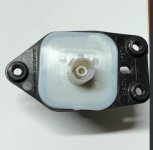
Here’s a pic of the cargo camera for surround view equipped:
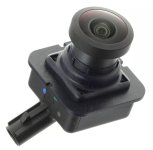
And here’s a pic of the analog camera for non-surround view:
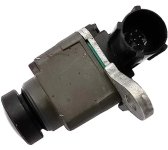
PyroJoe
Active Member
- Messages
- 228
- Reaction score
- 159
- Points
- 43
Thank you! This gives me some hope. The surround style cargo cam appears to have the same connection as the rear view cam.
On a different note, I noticed the DRVM assembly appears to also have a camera aiming out the windshield. Any ideas what this is, or if it's accessible for us to see on screen?
I know they used to say if you got the DRVM, you'd lose your auto-brights. But I don't have auto-brights anyway.
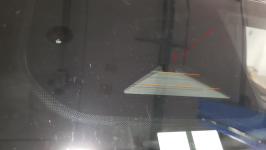
On a different note, I noticed the DRVM assembly appears to also have a camera aiming out the windshield. Any ideas what this is, or if it's accessible for us to see on screen?
I know they used to say if you got the DRVM, you'd lose your auto-brights. But I don't have auto-brights anyway.
It’s a different keyed fakra connector, but either way, it doesn’t matter. The rear view camera for the digital mirror is only capable of working with the digital mirror camera processor, and the surround view cargo camera is only capable of working with the surround view camera processor. Even though they’re both digital cameras, they have different protocols and are proprietary to their camera processors.Thank you! This gives me some hope. The surround style cargo cam appears to have the same connection as the rear view cam.
That’s the camera radar for part of the driver assist system (adaptive cruise and lane assist). It also handles the auto high beam function if the truck is configured for it. There’s no way to display what it “sees”.On a different note, I noticed the DRVM assembly appears to also have a camera aiming out the windshield. Any ideas what this is, or if it's accessible for us to see on screen?
I’m so sorry. I’m reading back through all these posts as we picked up a new trailer and found that you had a question. You probably figured it out by now but we suspended the cable over a bungee cord between two compartment door catches. I placed the camera inside the trailer at the top of the rear picture window by mounting under the cabinet that runs across the rear end of the trailer just above this rear lounge window. Didn’t find it to be too high.How did you suspend the wire up there like you did? This is mine on a test run in a parking lot. And I mounted my camera above my rear window, I think it's a little too high. Where did you mount yours?
PyroJoe
Active Member
- Messages
- 228
- Reaction score
- 159
- Points
- 43
Has anyone come up with a nice quick attach method for the camera on the trailer so you can take it off when you're not using it? Since I'll be using mine on the flatbed where I haul cars and hay bales, I will definitely have to remove the camera while loading/unloading.
PyroJoe
Active Member
- Messages
- 228
- Reaction score
- 159
- Points
- 43
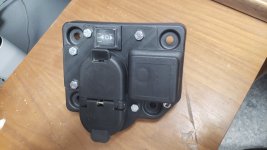
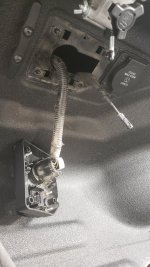
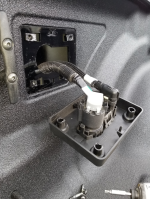
Got my trailer port relocated to the bed where it should have been to begin with. Also added a 2-way momentary switch for the electric tonneau so I don't have to worry about carrying a fob. This setup is so TIGHT, it makes the factory setup feel kind of trashy. These ports are snug and fit like they should. I also added 2 drain holes to the bottom of the factory plastic piece because when I first removed it, it was already full of dirt that had no way to escape. I imagine that given enough time, it'd rust through the bed.
I put a LOT of thought into this design, making it so that NO cutting of the bed metal is required, and with the intention of being able to mass-produce these. This prototype is 3D printed. I have material figured out so I can laser cut/weld this out of stainless steel. However, now that the 3D print is installed, it feels very sturdy to me.
If anyone would like to order one, please PM me or email [email protected]
If there's minimal interest, I'm willing to 3D print more. If there's lots of interest, I will get things set up for laser cutting stainless.
There's plenty of camera cable to route this way, as you can see. You just have to remove a few zip ties upstream.
The only tools you'll need for this mod are a marker, dremel, drill, and deburring tool.


I put a LOT of thought into this design, making it so that NO cutting of the bed metal is required, and with the intention of being able to mass-produce these. This prototype is 3D printed. I have material figured out so I can laser cut/weld this out of stainless steel. However, now that the 3D print is installed, it feels very sturdy to me.
If anyone would like to order one, please PM me or email [email protected]
If there's minimal interest, I'm willing to 3D print more. If there's lots of interest, I will get things set up for laser cutting stainless.
There's plenty of camera cable to route this way, as you can see. You just have to remove a few zip ties upstream.
The only tools you'll need for this mod are a marker, dremel, drill, and deburring tool.
Last edited:
I would be interested in one of these. I am not thrilled about cutting metal on a vehicle. It looks like the 12 pin connector was kept. Mine has both the 7 and 12 pin now. Is there anyway to use 7 pin instead?Got my trailer port relocated to the bed where it should have been to begin with. Also added a 2-way momentary switch for the electric tonneau so I don't have to worry about carrying a fob. This setup is so TIGHT, it makes the factory setup feel kind of trashy. These ports are snug and fit like they should. I also added 2 drain holes to the bottom of the factory plastic piece because when I first removed it, it was already full of dirt that had no way to escape. I imagine that given enough time, it'd rust through the bed.
I put a LOT of thought into this design, making it so that NO cutting of the bed metal is required, and with the intention of being able to mass-produce these. This prototype is 3D printed. I have material figured out so I can laser cut/weld this out of stainless steel. However, now that the 3D print is installed, it feels very sturdy to me.
If anyone would like to order one, please PM me or email [email protected]
If there's minimal interest, I'm willing to 3D print more. If there's lots of interest, I will get things set up for laser cutting stainless.
There's plenty of camera cable to route this way, as you can see. You just have to remove a few zip ties upstream.
The only tools you'll need for this mod are a marker, dremel, drill, and deburring tool.
View attachment 87782View attachment 87778View attachment 87779View attachment 87780View attachment 87782
I would be interested in one of these. I am not thrilled about cutting metal on a vehicle. It looks like the 12 pin connector was kept. Mine has both the 7 and 12 pin now. Is there anyway to use 7 pin instead? Or did you use a new connector for the 7pin?
PyroJoe
Active Member
- Messages
- 228
- Reaction score
- 159
- Points
- 43
I did realize after posting this that there are 2 styles of plugs - my 4pin, and the style with the trailer surround view camera system. I would have to find a trailer camera style plug to study and see if it's the same shape and fits the same or not. The hole cutout in the metal part of the bed matches the shape of my 4pin style connector, and I can't imagine they'd make 2 different bumpers, so I would think both styles would fit my adapter plate the same.

No, he has the 7/4-pin (no surround).I would be interested in one of these. I am not thrilled about cutting metal on a vehicle. It looks like the 12 pin connector was kept. Mine has both the 7 and 12 pin now. Is there anyway to use 7 pin instead?
I did realize after posting this that there are 2 styles of plugs - my 4pin, and the style with the trailer surround view camera system. I would have to find a trailer camera style plug to study and see if it's the same shape and fits the same or not. The hole cutout in the metal part of the bed matches the shape of my 4pin style connector, and I can't imagine they'd make 2 different bumpers, so I would think both styles would fit my adapter plate the same.
It's not the same.
This wouldn't work for anyone with a 7/12-pin (surround) setup without more cutting. That bed cutout is intended to house both types and with the 7/12-pin setup, all the space is consumed.
I was thinking replace the 12 pin with the camera connector. I do not use it, nor do I plan to do so.No, he has the 7/4-pin (no surround).
It's not the same.
This wouldn't work for anyone with a 7/12-pin (surround) setup without more cutting. That bed cutout is intended to house both types and with the 7/12-pin setup, all the space is consumed.
View attachment 87902
PyroJoe
Active Member
- Messages
- 228
- Reaction score
- 159
- Points
- 43
Interesting - the 4 feet/shoulders on your plastic bezel also look melted like mine.
So, it appears clear to me the 12pin trailer camera connector won't fit since that plugs in on the bottom of the connector. With my bezel, it'd position that plug where there's sheet metal on the bed. You could make my bezel work, but you'd have to open up the hole in the metal part of your bed.
So, it appears clear to me the 12pin trailer camera connector won't fit since that plugs in on the bottom of the connector. With my bezel, it'd position that plug where there's sheet metal on the bed. You could make my bezel work, but you'd have to open up the hole in the metal part of your bed.
I was thinking replace the 12 pin with the camera connector. I do not use it, nor do I plan to do so.
You would have to replace the 7/12-pin in the bed with a 7/4-pin, and add the coax mount like pyrojoe did, they're molded as one piece.
The 12-pin camera cable feed cable is only plugged into either the bed OR the bumper anyway, so just move it to the bumper to protect it, and swap out the 7/12-pin for a 7/4-pin.
If you want an alternative trailer cam that works off AUX2 -
Concerning the VisionWorks Camera system. I see on their website they offer a wired or wireless version that plugs into the 12pin connector for Aux 1 or Aux 2. Does this provide full time viewing driving at highway speeds or only temporary 8 seconds views? was it plug and play or was their other programming involved for the display to accept the signal from the visionworks camera?If you want an alternative trailer cam that works off AUX2 -
Camera VisionWorks

sstoner911
Well-Known Member
- Messages
- 1,430
- Reaction score
- 845
- Points
- 113
My kit came with the wired and wireless option. Completely plug and play.Concerning the VisionWorks Camera system. I see on their website they offer a wired or wireless version that plugs into the 12pin connector for Aux 1 or Aux 2. Does this provide full time viewing driving at highway speeds or only temporary 8 seconds views? was it plug and play or was their other programming involved for the display to accept the signal from the visionworks camera?
It's only going to give you the 8 seconds or whatever Uconnect is designed to allow while driving at highway speeds. I don't really need or want to view it full time but thats just me. I will pull it up if Iam wanting to see if someone is in out of view of my mirrors.
If you want full time viewing you would need the digital mirror with the tow camera that uses the FARKA.
Concerning the VisionWorks Camera system. I see on their website they offer a wired or wireless version that plugs into the 12pin connector for Aux 1 or Aux 2. Does this provide full time viewing driving at highway speeds or only temporary 8 seconds views? was it plug and play or was their other programming involved for the display to accept the signal from the visionworks camera?
My kit came with the wired and wireless option. Completely plug and play.
It's only going to give you the 8 seconds or whatever Uconnect is designed to allow while driving at highway speeds. I don't really need or want to view it full time but thats just me. I will pull it up if Iam wanting to see if someone is in out of view of my mirrors.
If you want full time viewing you would need the digital mirror with the tow camera that uses the FARKA.
Temporary view unless you use a black box like NAViKS. This is a limitation of the UConnect radio and is not "progammable." I think perhaps a Tazer can do it as well. In either case, the boxes are simulating 0MPH so navigation input and camera selection is available at any speed. You don't specify your truck MY so accurate comments are limited.
The 12-pin is Analog so anything you plug in will work on AUX2. Depends on trailer surround setup if AUX1 will work.
sstoner911
Well-Known Member
- Messages
- 1,430
- Reaction score
- 845
- Points
- 113
Temporary view unless you use a black box like NAViKS. This is a limitation of the UConnect radio and is not "progammable." I think perhaps a Tazer can do it as well. In either case, the boxes are simulating 0MPH so navigation input and camera selection is available at any speed. You don't specify your truck MY so accurate comments are limited.
The 12-pin is Analog so anything you plug in will work on AUX2. Depends on trailer surround setup if AUX1 will work.
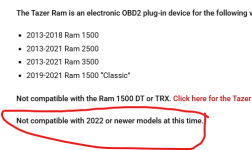
The VisionWorks is on AUX 2, Not sure how to determine if my AUX 1 works and how to use AUX 1 . Not sure if Tazer is compatible with 2002+ trucks, you can select 2024 year and add it to your cart but they have a note on the page that states it wont work on 2022+. They do have a video on a 2023 Ram 2500 BETA version? So not really sure if it works for anything on the 2022 +
One of the features is:
• cycle cameras/video inputs (with Tazer
plugged in)
To me that means it still has the timer limit.
Anytime I want to to pull up any 360 cams while in motion or the trailer cam in motion, I just use the "Trailer Tow" App Screen. I usually have it up anyway when towing as it provides TTPMS and temps as well.