What's new
Ram Heavy Duty Forum

Register a free account today to become a member! Once signed in, you'll be able to participate on this site by adding your own topics and posts, as well as connect with other members through your own private inbox!

Google is updating Android Auto to fit all screen sizes!

For sure. I still drive my daughter's ford and my other daughters hyundai sometimes (both wired AA only} so I'm trying the "charge only" solution specific to one vehicle right now (my Ram). That's a good tip for those that drive one car though!

I do think I need to delete my wife's phone though. Before I have a chance to back out of the garage, and before the AI box has booted to carplay, her phone connects wireless AA from inside the house and I get an angry text. I'll just give her the cord next time as needed when she wants to play her dumb Taylor Swift on a road trip.
I see multiple vehicles in my phone, I see the Ram and then I see the Chevy, I believe there is a blocked vehicle list, to where you can block AA on the Ram but keep the ability for the other vehicles.
 
Thanks for checking on x. I have my box on the way to test out. I charge my phone through a quad lock charger powered from the the dash cig outlet. Hopefully that will avoid the data issue and it will just work. I am hopeful, if this works well I will be able to not use a separate tablet for nave when camping/off road.:)

Shawn
 
Thanks for checking on x. I have my box on the way to test out. I charge my phone through a quad lock charger powered from the the dash cig outlet. Hopefully that will avoid the data issue and it will just work. I am hopeful, if this works well I will be able to not use a separate tablet for nave when camping/off road.:)

Shawn
Good luck! Let me know if Google maps lets you interact with it
 
I tried a plug in box and couldn't get it to connect wirelessly reliably. So fed up with ram for not including full screen Android Auto...

I decided to try the Phoenix radio solution. It replaces the entire radio and buttons. It's an extreme solution and while not perfect, it works much better for me than the little box did.

If there's interest I can throw a review up of the positives and negatives.

1000001973.jpg
 
Ok so I have gone about 2 weeks with my AI box now. I have only had 1 time where it failed to connect, and that was fixed by simply rebooting the box (unplug, replug).

Notes on my config:
  • Samsung Galaxy S24 Ultra
  • Configured my phone through Uconnect as "charge only" so it never initiates wired AA when I just want to charge, this has been working great
  • I am using the double USB-A connection so the box has enough juice
  • I set "SpeedPlay" as the startup app in the AI box's Android software, so that it will start Carplay without me pushing any buttons
Questions for others that bought this box:
  • Are you having reliable power using just a single USB-C port or does it reboot sometimes? I'd like to do this to reduce wire clutter but I'm worried it might put my box into a weird state again where it keeps doing the screen calibration again.
  • Does your Google Maps allow you to touch/interact? If so, what phone do you have and what version of maps? (Side note: As mentioned before, google maps through the AI box DOES let me interact on our Mach E that uses portrait mode. It is something specific to the Uconnect that I haven't figured out a workaround other than using Waze)

As a fun aside, went out with the wife yesterday and of course her phone connected wireless AA first before the AI box booted. So we had to listen to Chappell Roan but hey, happy wife. But it was so laughable how tiny the little map was when her AA showed on the display in coolwalk tiled mode. It made me so happy that I never have to see that again when I connect with my phone!
 
Just got mine in the mail today, I will be setting it up in the next few days

Shawn
 
Ok so I have gone about 2 weeks with my AI box now. I have only had 1 time where it failed to connect, and that was fixed by simply rebooting the box (unplug, replug).

Notes on my config:
  • Samsung Galaxy S24 Ultra
  • Configured my phone through Uconnect as "charge only" so it never initiates wired AA when I just want to charge, this has been working great
  • I am using the double USB-A connection so the box has enough juice
  • I set "SpeedPlay" as the startup app in the AI box's Android software, so that it will start Carplay without me pushing any buttons
Questions for others that bought this box:
  • Are you having reliable power using just a single USB-C port or does it reboot sometimes? I'd like to do this to reduce wire clutter but I'm worried it might put my box into a weird state again where it keeps doing the screen calibration again.
  • Does your Google Maps allow you to touch/interact? If so, what phone do you have and what version of maps? (Side note: As mentioned before, google maps through the AI box DOES let me interact on our Mach E that uses portrait mode. It is something specific to the Uconnect that I haven't figured out a workaround other than using Waze)

As a fun aside, went out with the wife yesterday and of course her phone connected wireless AA first before the AI box booted. So we had to listen to Chappell Roan but hey, happy wife. But it was so laughable how tiny the little map was when her AA showed on the display in coolwalk tiled mode. It made me so happy that I never have to see that again when I connect with my phone!
I'm really curious why the touch doesn't work with Google maps, because well it does work. I noticed when I click the search button it changed color while I'm touching it, but nothing opens. I don't know if it's a glitch or if for some reason it's that way by design?
 
I'm really curious why the touch doesn't work with Google maps, because well it does work. I noticed when I click the search button it changed color while I'm touching it, but nothing opens. I don't know if it's a glitch or if for some reason it's that way by design?

Definitly not by design! I keep going back to the data point that it works on our Mach E when going through wireless AA -> AI box wired Carplay -> Mach E portrait mode touchscreen. Google maps comes up with the proper icons and responds to touching the search.

In our Uconnect, like you said, it recognizes we've touched the search magnifying glass but does nothing. The only touch I can get it to respond to is the X to close an in progress Nav session (that was started on the phone).

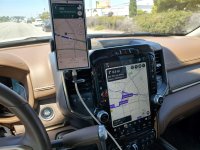
By the way, my phone lets me do simultaneous Nav on Waze (AA screen) and google maps on the phone. I have a phone mount so I can see both at the same time. I've pitted them against each other. I definitely like google maps better because you clearly get alternate route choices, while waze just gives you what it feels is fastest. And even though the parent company has access to all the same data (google) they don't always give the same route!! Doing this 3 times so far I've found google maps is more accurate in the time as well. Also, Waze is very needy, constantly asking "is [thing reported] still there???" with a popup. Probably a way to turn that off but I'm still in the new phase where I don't hate it yet. But at this point, google maps is the superior product and I'd like it to work right.

EDIT: added pic of Google maps vs Waze
 

Attachments

  • 20240807_125144.jpg
    20240807_125144.jpg
    458.5 KB · Views: 44
Last edited:
I tried a plug in box and couldn't get it to connect wirelessly reliably. So fed up with ram for not including full screen Android Auto...

I decided to try the Phoenix radio solution. It replaces the entire radio and buttons. It's an extreme solution and while not perfect, it works much better for me than the little box did.

If there's interest I can throw a review up of the positives and negatives.

View attachment 75660
I'd like to hear how it's going for you. I'm sick of waiting for them to update with full screen AA. Though I typically don't trust third party android installations, it seems like a reputable company.
 
Yeah, that Phoenix radio looks awesome, but expensive. And I hate to tear apart my 4 month old truck. I reached out to Ramcares to get a status update on UC5 and full screen AA. He said they're working on it but with no time line on completion. Crazy that UC5 has been out for a couple of years and still no full screen AA.
 
You really may as well give up waiting. I’m not sure Stellantis, FCA, DC, or any previous incarnation has ever added features to their systems after release.
 
I know we may be in for a long wait for full screen AA, already are, but here's a link to change.org for petitioning Stellantis to make full screen AA a priority. It may help RAM realize there's a lot of owners who want this update. I'm not on any social media for sharing this, so feel free to forward this link to other RAM owners. Thanks

 
Last edited:
I know we may be in for a long wait for full screen AA, already are, but here's a link to change.org for petitioning Stellantis to make full screen AA a priority. It may help RAM realize there's a lot of owners who want this update. I'm not on any social media for sharing this, so feel free to forward this link to other RAM owners. Thanks

Signed!
 
Hello all, so I bit the bullet and will test out 2 devices, and send back the one that doesn't work or works "less good" (perhaps laggy, or some other quality). Both are under $70.

First one is the Carlinkit 4.0. It needs to be the 4.0 because the 5.0 will only do wired carplay to wireless, or wired AA to wireless. The 5.0 will not do wired carplay to wireless AA, so we have to use this older model. This device is ONLY Carplay or AA, it does not have a separate Android option, meaning it is a "2 in 1" solution. I don't really care about the whole separate Android OS as I won't be using it to stream videos while parked or whatever.

Second one is this thing (https://www.amazon.com/gp/product/B0D91NLXN8/ref=ppx_yo_dt_b_asin_title_o01_s00?ie=UTF8&th=1). This one is a "4 in 1" solution, meaning it also has an Android OS (version 11 only but I don't care) and I believe it can mirror an iphone screen, which I also don't care about. The key is that it still is ONLY wired Carplay as the connection. Most of the modern 2024 quad-core versions of these things will do native wired AA which we don't want for our Rams because we already have a nerfed half-screen version of it. This one has a Qualcomm quad-core CPU which I hope will be better than the Allwinner CPUs that the other ones were using (like the Play2Video versions).

Of all the online images and reviews of these devices I have never seen one show a portrait mode layout like our Rams. So I have no idea how this will go. Maybe it will still only give half a screen, not sure. My phone has latest AA with coolwalk I know for a fact because it worked with tiles on large screens on 2 different Fords we had (Mach E 17" portrait and F150 14" landscape).

Do you have a newer link for the "AI box" you're using, or the actual name of it? That link sends me to an error page on Amazon.
 
Do you have a newer link for the "AI box" you're using, or the actual name of it? That link sends me to an error page on Amazon.
I do get asked this a lot in DM's. The original one that worked for me was VOPERIZ brand and no longer available. Then I was having connecting issues and thought it had died so I tried to order a new one and the brand seemed to have changed but I believe it is the exact same brand but they added tiktok and the housing was slightly different. (regardless, it was a Uconnect issue I was having that day and the original and new box now both work). That being said, I now have a spare that works great.

The newer one I got is ALSO no longer available. I believe the company has updated it yet again by adding mirroring and a new housing, but the pictures of the software still appear to be the exact same lineage. If I were to gamble and order one it would be this: https://www.amazon.com/Carplay-Wireless-Supports-Suitable-Equipped/dp/B0DWXT73D3
 
I do get asked this a lot in DM's. The original one that worked for me was VOPERIZ brand and no longer available. Then I was having connecting issues and thought it had died so I tried to order a new one and the brand seemed to have changed but I believe it is the exact same brand but they added tiktok and the housing was slightly different. (regardless, it was a Uconnect issue I was having that day and the original and new box now both work). That being said, I now have a spare that works great.

The newer one I got is ALSO no longer available. I believe the company has updated it yet again by adding mirroring and a new housing, but the pictures of the software still appear to be the exact same lineage. If I were to gamble and order one it would be this: https://www.amazon.com/Carplay-Wireless-Supports-Suitable-Equipped/dp/B0DWXT73D3
I assume the google maps interface is still broken on the newer version you got?
 
Correct! The new one behaves exactly like the original one. I am still using Waze as my workaround.
I wonder if that's why Uconnect won't update for full screen AA, something about the way they have the UI coded for android just won't work right if they open it up to full screen. Idk whatever the problem is, I'm sure it could be fixed if Stellantis put some pressure on them.
 
Back
Top