What's new
Ram Heavy Duty Forum

Register a free account today to become a member! Once signed in, you'll be able to participate on this site by adding your own topics and posts, as well as connect with other members through your own private inbox!

Making a 270 degree surround camera system 360 on a chassis cab 4500/5500

gprguy

Well-Known Member
Messages
837
Reaction score
2,837
Points
93
Location
Kitsap Peninsula, WA
I'm getting ready to hook up the rear camera(s) on my 4500 chassis cab and am running into a little mystery - I am hoping @Jimmy07 can shed some light.

Factory surround system which for the chassis cabs comes as a 270 degree (no rear) camera setup with a rear camera and pigtail in the upfitter bag. I have two fakra connections in the wire bundle at the back of the chassis - the white one for the rear connector, and the extension for the DRVM trailer camera that I ran from the back corner of the cab.

Hooking up the provided camera to the white one that's part of the rear chassis harness works, but it shows up as a separate "rear" camera. The rear quadrant for the surround still shows as blacked out. That made me wonder if there was a separate coax for the rear surround, but from what I can see on TA there's just the one and it goes to the CVPM under the driver's seat. I checked there and all 6 connections are hooked up, including the rear.

IMG_7153.jpeg

So that leads me to think there's just the one rear camera and it's going to the CVPM despite not showing up as a surround camera.

Is there a way to switch it to be "in surround mode"? Will running a calibration of the surround system do that? Or is this just permanently a 270 degree setup with a separate rear view?

Given that it's going on the back of a flatbed, I don't think I am going to be able to angle it downwards too much. Certainly not the 50" minimum height in the up fitters guide, so it may be best left as is - but I want to know the options before I start making mounts.

I should mention - I don't have the CHMSL hooked up at the moment at all, so those two cameras are offline. Still working on relocating it, I don't know if that might be confusing things. I don't think that would matter since it's just the cargo camera and the DRVM camera is an entirely separate system..
 
Did a little more digging and still a mystery. I verified that it's the same CVPM in the chassis cabs as a regular HD truck, so it must be a programming thing. I was expecting the rear camera to show up as the rear quadrant of the surround view, and just be out of sync/alignment until a calibration was done. I wasn't expecting a totally separate camera.

I may plug AlfaOBD into it tomorrow and poke around.
 
Refresh my memory, it’s been a long time since I’ve seen the camera behaviors on a chassis cab:
Originally, without the camera hooked up, what was the behavior on the screen when you put the truck in reverse? Does the surround view automatically pop up on the left side of the screen (with the rear blacked out), and just blue on the right side of the screen saying camera not available?

With the rear camera plugged in, when in reverse, does the surround view automatically pop up on the left side (rear still blacked out), with the rear camera view on the right? Or does the rear camera view pop up in the whole camera screen area with no surround view on the left side?
 
I believe what you describe is correct (although I don't remember if the rear camera comes up as blue when no rear camera is installed), but I will take a couple of photos today to verify.
 
Alright, if you put it in reverse and the surround is on the left (with rear blacked out), and rear camera image is on the right, I’ll explain how a fresh install of the surround view camera system works on a truck that wasn’t originally equipped with in to try to deduce what’s going on.

When I install all the parts of the surround view system, and correctly configure the bcm for it, the four cameras need to be calibrated.
Until ALL FOUR cameras are successfully calibrated, the only thing that the surround view side of the screen will show is the overhead view of the truck with black all around.
The individual camera view images will display on the right, function when you press the individual view buttons, but the surround view won’t show any images around the truck at all until all four cameras get calibrated.

Once the 4 camera calibrations are done, I can unplug the rear camera anytime, and everything will work except the rear being blacked out on the overhead surround view. Once I plug it back in, the rear image on the surround view reappears.

With that, we know that the CVPM in the C&C’s have had their cameras calibrated in order to get the 270° image to show, and we know the CVPM and cameras are the same no matter what trim or vehicle line.
So, the only thing I can think of is, the CVPM knows to behave differently based on what vehicle line and/or chassis type the BCM is reporting to it (ie: VehConfig 1: Vehicle Line- DP vs D2 or DJ, and/or VehConfig 3: Chassis Type).

If that is the case, you can try setting VehConfig 1: Vehicle Line to D2, reboot the radio a few times, and see what happens. I’m not sure if doing that will affect anything else though, because that means the BCM is telling all the other modules on the truck that they’re a D2 also. While most of them definitely don’t care, I know the occupant restraint control module is vehicle line specific part numbers, but not sure how much that matters.
 
What about just attempting a calibration without making any changes? Perhaps calibrating it at the factory with only 3 cameras tells it to leave the missing camera out.
 
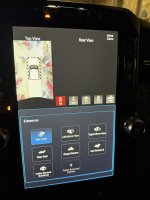
So what you described is basically the situation, it shows a black screen with no rear camera hooked up but it does pull up the "panel" so to speak when put in reverse:

IMG_7157.jpeg

And with the camera hooked up (and just sitting on the hitch crossbar:

IMG_7158.jpeg

Again, the CHMSL cameras are not hooked up at the moment but I doubt that's relevant.

Your theory about it being tied to the vehicle line makes the most sense to me. I'm not likely to change that since I suspect I will also lose some of the nice chassis cab features like the sticky exhaust brake button. But I appreciate the help thinking through this - now I know there's only one rear bumper level camera, and I can design a housing for it and angle it however I want without having to take the surround stitching into consideration.

@jsalbre I'll probably end up testing that at some point anyway as I'll need to recalibrate when I relocate the front camera on to the (eventual) AEV bumper. I'll try to remember to report back here if that changes anything with the rear, I should have it properly mounted by then.

Thanks as always Jimmy.
 
So what you described is basically the situation, it shows a black screen with no rear camera hooked up but it does pull up the "panel" so to speak when put in reverse:

View attachment 80560

And with the camera hooked up (and just sitting on the hitch crossbar:

View attachment 80561

Again, the CHMSL cameras are not hooked up at the moment but I doubt that's relevant.

Your theory about it being tied to the vehicle line makes the most sense to me. I'm not likely to change that since I suspect I will also lose some of the nice chassis cab features like the sticky exhaust brake button. But I appreciate the help thinking through this - now I know there's only one rear bumper level camera, and I can design a housing for it and angle it however I want without having to take the surround stitching into consideration.

@jsalbre I'll probably end up testing that at some point anyway as I'll need to recalibrate when I relocate the front camera on to the (eventual) AEV bumper. I'll try to remember to report back here if that changes anything with the rear, I should have it properly mounted by then.

Thanks as always Jimmy.
Ok, now that I see that the CVPM is “overlaying” an overhead picture of a cab with a white square as the “bed” (signifying a chassis cab truck), then the vehicle line in the BCM is definitely telling the CVPM what to show and how to behave. If the vehicle line was D2, the overhead truck image would be a cab with DRW bed, and DJ would be a cab with SRW bed, etc.
 
Have you rebooted/reset the system with the camera plugged in?

P.S. If you wan to make the surround disappear/reappear, you could try to use AlfaOBD to set: CustSetMenu 3: Forward Facing Camera Gridlines CSM Present is also set to YES. It sure does that on my 3500 if I try to enable them.
 
Ok, now that I see that the CVPM is “overlaying” an overhead picture of a cab with a white square as the “bed” (signifying a chassis cab truck), then the vehicle line in the BCM is definitely telling the CVPM what to show and how to behave. If the vehicle line was D2, the overhead truck image would be a cab with DRW bed, and DJ would be a cab with SRW bed, etc.
Makes total sense. Maybe this info will be useful for someone with a regular truck that would like access to the chassis cab things. I know if I had one I'd try it to get the persistent exhaust brake button. That was one of my only gripes with my 3500.

Have you rebooted/reset the system with the camera plugged in?
No, but I think I am going to leave it be. To a degree it doesn't make sense for me anyway, the surround cameras need a certain height so they have some lookdown to get a shot of the pavement - tailgate latch height. There's no way I'd ever get it that high on the back edge of my flatbed, so I am probably better off using it as a hitch cam / am I about to back into a parking spot pole cam. I originally was confused because the CVPM had the rear connector hooked up so I was hunting for a second coax thinking there must be a separate rear camera and rear surround camera..
 
I'm not likely to change that since I suspect I will also lose some of the nice chassis cab features like the sticky exhaust brake button.

The setting for EB memory is in the ECM, so it’s highly unlikely you would lose that feature.
 
Back
Top