What's new
Ram Heavy Duty Forum

Register a free account today to become a member! Once signed in, you'll be able to participate on this site by adding your own topics and posts, as well as connect with other members through your own private inbox!

TPMS (TIS) sensors for trailer (SOLVED - see 1st post) aka TTPMS - Trailer TPMS

Just completed the install on my 2023 3500 mega. Slightly different process, but overall close enough. The upper seat belt mount needs to be removed to get the cover off. Held by a torx bolt. Be careful not to drop the 2 little screws that hold the upper panel and when you remove the coat hook, a little square plastic piece fell out and will need to be put back in.

In addition OBD JSCAN works for enabling the sales code. Now time to pair the sensors already installed in the trailer tires and paired to my 2021.
 
As @Big Baloo mentioned, not really hard, just tedious... take your time and go slow and the headliner shouldn't be too horrible.
I got the gateway module mounted and plugged in with no issues. Enabled VehConfig 8-Trailer TPM via Alpha OBD. The TTPS screen shows up on the trailer dash display. Have not mounted the receiver yet however my question is this, is there any other Alpha OBD settings that need to be enabled to get the receiver working or does it work and communicate with the gateway module once plugged in. Also, how are the sensors configured ? Is there something in the settings screen to do that.
 
I got the gateway module mounted and plugged in with no issues. Enabled VehConfig 8-Trailer TPM via Alpha OBD. The TTPS screen shows up on the trailer dash display. Have not mounted the receiver yet however my question is this, is there any other Alpha OBD settings that need to be enabled to get the receiver working or does it work and communicate with the gateway module once plugged in. Also, how are the sensors configured ? Is there something in the settings screen to do that.

I made a YouTube video for the TTPMS settings and configuring the sensors. The first six minutes of the video is setting up the AlophaOBD connection. I recommend watching that portion of the video even if you have done it already because there are a few gotchas.

 
I made a YouTube video for the TTPMS settings and configuring the sensors. The first six minutes of the video is setting up the AlophaOBD connection. I recommend watching that portion of the video even if you have done it already because there are a few gotchas.

Very nice video. Thanks for the quick reply.
 
Update, I successfully installed the modules in my truck and the sensors in my RV tires. I connected my seven pin to get my RV to show as connected on the truck. I was able to go through the TTPMS setup and paired all four sensors. The sensors displayed the correct PSI and I thought all was good. When I returned to my RV about a week later and connected up the TTPMS sensors were not visible and the system was asking to setup everything again. Is this a common issue and has anyone been successful in having the sensors remain paired between power cycles on the truck. A bit frustrated to say the least.
 
Update, I successfully installed the modules in my truck and the sensors in my RV tires. I connected my seven pin to get my RV to show as connected on the truck. I was able to go through the TTPMS setup and paired all four sensors. The sensors displayed the correct PSI and I thought all was good. When I returned to my RV about a week later and connected up the TTPMS sensors were not visible and the system was asking to setup everything again. Is this a common issue and has anyone been successful in having the sensors remain paired between power cycles on the truck. A bit frustrated to say the least.
My trailer tires have been paired since 2020, and they have never disconnected. Did you install Mopar sensors or aftermarket sensors in the tires? I used Mopar sensors.
 
My trailer tires have been paired since 2020, and they have never disconnected. Did you install Mopar sensors or aftermarket sensors in the tires? I used Mopar sensors.
Mopar sensors.
 
I have a 2019 RAM 3500 Limited. I have the connection behind the rear license plate on the back bumper. When I search for the parts listed it says (2020 to 2024) will this not work for my 2019?
 
Weirdly enough - I built a "TTPMS receiver" extension cord, using Deutsch connectors that match the receiver/truck ... and I was able to pair the sensors in minutes... and then I removed the extension, put the receiver back where it belongs...and it works just fine.

And then - after disconnecting my trailer and hooking it back up... TTPMS didn't work again.
 
Last edited:
Weirdly enough - I built a "TTPMS receiver" extension cord, using Deutsch connectors that match the receiver/truck ... and I was able to pair the sensors in minutes... and then I removed the extension, put the receiver back where it belongs...and it works just fine.

And then - after disconnecting my trailer and hooking it back up... TTPMS didn't work again.
I do not understand how this system works. I switched trailer names in the Uconnect menu drove the trailer around the block and it picked up all four wheel sensors. I did not unplug the trailer just left and came back an hour later, and none of the sensors read on the display. I've tried changing the name and they don't come back alive. I have pinged them with a TMS scanner they are definitely awake. But to change the name on the trailer, you have to come to a stop. This is such a ******** system.
 
It seems that after stopping and restarting the truck you have to go in to the settings and select a different trailer and then go back to the trailer you have paired before it starts working again. My issue now is that as I start driving all four sensors are working and displaying the psi however after an hour or so the sensors start dropping out randomly until three or all four no longer read at all (just the red dash). I also notice that the set PSI reverts back to 50 PSI and I have to go back into the settings to set it back to 80 PSI. This system is a great idea however has been very poorly implemented and overall I am very disappointed. Ram needs to step up and provide software updates to the modules and/or a repeater/booster we can install in the front of the trailer so it will work reliably. Rant over
 
It seems that after stopping and restarting the truck you have to go in to the settings and select a different trailer and then go back to the trailer you have paired before it starts working again. My issue now is that as I start driving all four sensors are working and displaying the psi however after an hour or so the sensors start dropping out randomly until three or all four no longer read at all (just the red dash). I also notice that the set PSI reverts back to 50 PSI and I have to go back into the settings to set it back to 80 PSI. This system is a great idea however has been very poorly implemented and overall I am very disappointed. Ram needs to step up and provide software updates to the modules and/or a repeater/booster we can install in the front of the trailer so it will work reliably. Rant over
I just wish I knew how the system interacted between the trailer module, the you connect, the body control, module, etc. Of course, if we knew that I meant maybe their software engineers could fix it
 
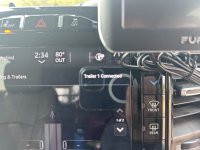
In case anybody is interested, I unhooked the trailer last night got up this morning plugged in the trailer. It tells me on uconnect that trailer one is connected. Not a big deal. I go driving and it tells me that tire sensors don't match the trailer. Next stop a couple hours down the road. I do the name switch thingy count to five after hitting cargo, then back to trailer one, which is the only trailer I own… Start driving sensors don't match the trailer configuration. What a piece of crap.
 
Oh, and if I disconnect the trailer plug, going to the rest stop use the restroom. Spend about 10 minutes. Come back out start the truck and in the dashboard pages for trailers. It still tells me the trailer one is connected. Which makes no sense is it is physically not connected.
 
The thing that makes no sense is even when I unhook the trailer. It says trailer number one connected.

And I don't have any funny adapters or anything else hooked to a plug.
 

Attachments

  • IMG_7388.jpeg
    IMG_7388.jpeg
    323.3 KB · Views: 14
I have tried installing the trailer TPMS to three different rams now, one was a 2022, 2023 and now my current 2024 - all seems to be having the same issue.

I can successfully pair the sensors but after a few days of driving the EVIC goes back to " Trailer Tire System not configured".

Searching the web I see people have had this issue, but the threads do not offer any insight to a fix.

Anyone know the magic to make this TTPMS work?
 
I have tried installing the trailer TPMS to three different rams now, one was a 2022, 2023 and now my current 2024 - all seems to be having the same issue.

I can successfully pair the sensors but after a few days of driving the EVIC goes back to " Trailer Tire System not configured".

Searching the web I see people have had this issue, but the threads do not offer any insight to a fix.

Anyone know the magic to make this TTPMS work?
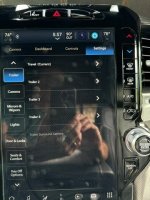
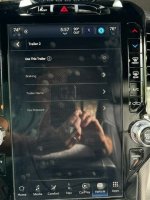
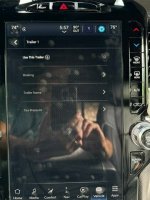
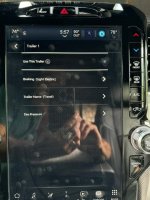
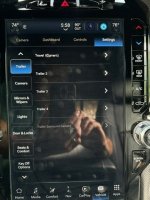
Others on this incredibly long tread, including @truemanrst , have posted that they have had some luck with a workaround for getting the TTPMS to work after stopping & restarting their truck. In the steps & photos below, I paired with Trailer 1 which I renamed Travel.

1. Go to the Settings-Trailer screen – Travel (Current)
2. Select a different trailer than the one paired with your TTPMS, i.e. Trailer 2
3. Select “Use This Trailer”
4. Go back to the Settings-Trailer screen – Trailer 2 (Current)
5. Select the trailer paired with your TTPMS, i.e. Travel or Trailer 1
6. Select “Use This Trailer”
7. Go back to the Settings-Trailer screen – Travel (Current)

This workaround has worked for me a couple of times, but I’m not sure about long-term.

1-Settings-Trailer Screen - Travel (Current).jpg 2-Select Trailer 2.jpg 3-Select Use This Trailer.jpg 4-Settings-Trailer Screen - Trailer 2 (Current).jpg 5-Select Trailer 1.jpg 6-Select Use This Trailer.jpg 7-Settings-Trailer Screen - Travel (Current).jpg
 
Others on this incredibly long tread, including @truemanrst , have posted that they have had some luck with a workaround for getting the TTPMS to work after stopping & restarting their truck. In the steps & photos below, I paired with Trailer 1 which I renamed Travel.

1. Go to the Settings-Trailer screen – Travel (Current)
2. Select a different trailer than the one paired with your TTPMS, i.e. Trailer 2
3. Select “Use This Trailer”
4. Go back to the Settings-Trailer screen – Trailer 2 (Current)
5. Select the trailer paired with your TTPMS, i.e. Travel or Trailer 1
6. Select “Use This Trailer”
7. Go back to the Settings-Trailer screen – Travel (Current)

This workaround has worked for me a couple of times, but I’m not sure about long-term.

View attachment 77911 View attachment 77912 View attachment 77913 View attachment 77914 View attachment 77915 View attachment 77916 View attachment 77917
I guess I kinda stumbled on this today, the trailer TPMS came back but it reverted back to 50 psi vs the 80 psi I had previously set as the target pressure.

Not sure why this TTPMS is so funky when installed after the fact.
 
Back
Top