What's new
Ram Heavy Duty Forum

Register a free account today to become a member! Once signed in, you'll be able to participate on this site by adding your own topics and posts, as well as connect with other members through your own private inbox!

New to the HD forums, but not to RAM.

lpsouth1978

Member
Messages
20
Reaction score
29
Points
13
Hello all, I just purchased a new 2024 RAM 2500 Big Horn last night. Came from a '21 1500 Laramie. I use the truck primarily for pulling our TT and wanted something more capable. I did give up some comforts, but they were all things I don't really need and most won't be missed. I look forward to learning from the group here and upgrading a few things on my HD RAM. Pics will be posted soon.
 
Sounds like a nice setup, welcome aboard!
 
I'm hoping I can get some help from all of you here. I have a pair of Course Motorsports charging phone mounts that were in my '21 1500. I got them installed and plugged them in to the USB ports below the radio (same setup I had in my 1500) but they don't seem to work as charge only ports. The radio continuously displays a message that says "USB ERROR: Device_No_Response" every few seconds, while cycling charge on and off. Is there a way to make these ports work with the charging mounts I have? Or will I need to come up with a different solution?
 
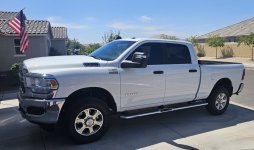
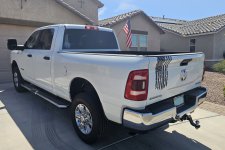
Ok, I finally got some pics of my new 2500. Nothing super special, but it is mine and I love it. So far I have only added a few things including:

- DeeZee Tailgate assist
- Deployable bed step
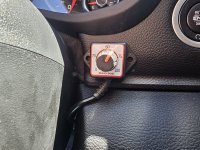
- Bully Dog Throttle controller
- Course Motorsports Magsafe charging phone mounts
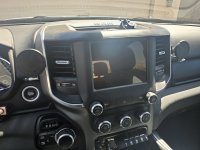
- Screen Protector
- a few decals

The only things I 100% plan on adding in the future is a Tonneau cover, and Airlift 5000 airbags in the rear (since the truck is mainly used to pull the TT). I am still on the fence about getting new wheels and tires. It was one of the first things I did to my 1500, but it was my daily driver, this is not.

20240816_105923.jpg20240816_105942.jpg20240816_110025.jpg20240816_110036.jpg
 
I'm hoping I can get some help from all of you here. I have a pair of Course Motorsports charging phone mounts that were in my '21 1500. I got them installed and plugged them in to the USB ports below the radio (same setup I had in my 1500) but they don't seem to work as charge only ports. The radio continuously displays a message that says "USB ERROR: Device_No_Response" every few seconds, while cycling charge on and off. Is there a way to make these ports work with the charging mounts I have? Or will I need to come up with a different solution?

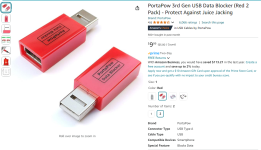
Data blocker.


1723867860092.png

1723867946965.png
 
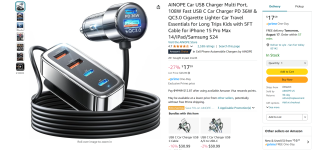
I purchased the PortaPow USB C data blocker cables you linked, but they did not work for me. They blocked the data, but my chargers would not charge or get ANY power when plugged into them. Have a feeling that was because the data blockers are not compatible with quality cables that support 100W+. I ended up getting the 12V USB hub below, plugging it in above the radio, and hiding it all behind the radio. Works great, both phone mounts work with fast charging at the same time, looks quite clean, and leaves the OEM USB's below the stereo open.

Screenshot 2024-08-16 230412.png
 
I purchased the PortaPow USB C data blocker cables you linked, but they did not work for me. They blocked the data, but my chargers would not charge or get ANY power when plugged into them. Have a feeling that was because the data blockers are not compatible with quality cables that support 100W+. I ended up getting the 12V USB hub below, plugging it in above the radio, and hiding it all behind the radio. Works great, both phone mounts work with fast charging at the same time, looks quite clean, and leaves the OEM USB's below the stereo open.

While the c-c cable says 100W+ cables are not compatible, it's not just the data blocker at issue, it's also the port. They're not rated for that high power.

They work fine for our phones and tablets and what was available 4 years ago when needed.

This one claims to support USB-C PD up to 240W.

 
I have the usb and usb-c ports below as well on the tradesman. I like to use those ports to charge the phone while I use it for navigation. Only issue is it mutes the ringer and speaker audio for whatever reason. It may send it to the vehicle as hands free? If I plug these in then would the phone operate as it should just being on charge?
 
I have the usb and usb-c ports below as well on the tradesman. I like to use those ports to charge the phone while I use it for navigation. Only issue is it mutes the ringer and speaker audio for whatever reason. It may send it to the vehicle as hands free? If I plug these in then would the phone operate as it should just being on charge?

They are intended to provide a charge only port.

I use them to keep my phone and tablet from connecting AA to the UC4 (wired only AA). Yes, that can be disabled, but there are occasion I want to use AA and in that case I can just move the cable over to another port and let it connect.
 
While the c-c cable says 100W+ cables are not compatible, it's not just the data blocker at issue, it's also the port. They're not rated for that high power.

They work fine for our phones and tablets and what was available 4 years ago when needed.

This one claims to support USB-C PD up to 240W.

I actually purchased those as well, but have not tried them yet. I am cool with the way I have it setup right now, so I figure I will keep them in the truck so others can plug in, and not connect to my AA, when they need to charge.
 
I actually purchased those as well, but have not tried them yet. I am cool with the way I have it setup right now, so I figure I will keep them in the truck so others can plug in, and not connect to my AA, when they need to charge.

I picked up a set as well to check.

I'm going to see if they actually work on a PD charger as claimed but I don't have anything that outputs or uses 100W USB-C.
 
Back
Top