What's new
Ram Heavy Duty Forum

Register a free account today to become a member! Once signed in, you'll be able to participate on this site by adding your own topics and posts, as well as connect with other members through your own private inbox!

Google is updating Android Auto to fit all screen sizes!

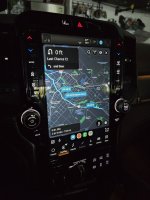
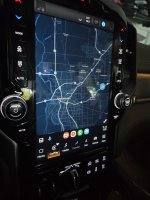
More updates: Waze and RV Life both work full screen as Nav apps, and touches work. Not sure what's wrong with Google maps. Testing On X next...

Is anyone else going to buy this thing? We need to work together to figure out a consistent power up method. I haven't figured one out yet and it's kind of a showstopper.
 

Attachments

  • 20240724_192708.jpg
    20240724_192708.jpg
    399.3 KB · Views: 31
  • 20240724_192842.jpg
    20240724_192842.jpg
    343.6 KB · Views: 31
More updates: Waze and RV Life both work full screen as Nav apps, and touches work. Not sure what's wrong with Google maps. Testing On X next...

Is anyone else going to buy this thing? We need to work together to figure out a consistent power up method. I haven't figured one out yet and it's kind of a showstopper.
I'm waiting to buy one based on your wonderful research. I really appreciate you sharing your experience. If it doesn't boot up correctly I'm out.
 
Last update for the night.

Confirmed nav apps that work in full, 1/2, and 3/4 screen modes: RV Life, Waze, On X

Nav app that shows up but you can't touch: Google maps

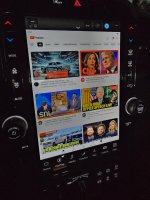
Also tested YouTube for the heck of it, works in full portrait mode (video shows top half, comments or other thumbnails below)
 

Attachments

  • 20240724_195458.jpg
    20240724_195458.jpg
    370.3 KB · Views: 34
  • 20240724_195546.jpg
    20240724_195546.jpg
    373.6 KB · Views: 34
  • 20240724_194151.jpg
    20240724_194151.jpg
    477.9 KB · Views: 34
Last update for the night.
I'm waiting to buy one based on your wonderful research. I really appreciate you sharing your experience. If it doesn't boot up correctly I'm out.
I'll work on that tomorrow again. The Ram's USB-C is not high output current like our other cars, and this little AI box comes with a special USB power leaching cable where it can use the power from 2 USB-A ports. It reboots a lot if only using the Ram's USB-C. It was fine in our Mach E (I didn't have a choice since it only has one USB-A). Anyway, it seems stable with the double USB-A.

It has no LED's for about 5-10 seconds, then blinks green LED when it is ready to be wired Carplay. The Ram connects quickly to my phone using wireless AA first though. Once that happens, I have to go in and select Carplay, then try to connect my phone to AA through the AI box. It will BT but not trigger a new AA instance. So far, I have found the workaround is completely unpair from the AI box, turn off wifi on my phone, kill android auto, re-enable wifi, then re-pair BT to the AI box and it will force a new AA connection.

I think if I completely "forget" my phone from the Uconnect, that might be the only way so the AI box can boot Carplay first. I will have to experiment more. I really didn't want to have to do this because this AI box may not be 100% reliable, while AA direct to Uconnect is (just nerfed to stupid ass half screen).
 
This may be stupid, but if you plan to run the AI box "forever" then why not just connect the phone to the AI box exclusively?
 
This may be stupid, but if you plan to run the AI box "forever" then why not just connect the phone to the AI box exclusively?
I did that, but then plugged my phone in to charge it and it "re-introduced" itself again and started a wired AA session. That's because I use the data USBC port to charge. So I either have to use a non-data port (from under center console lid, or the 12V up in the dashcam area), or tell Uconnect my phone is "charge only" in the phone list. I also unpaired it from Uconnect so it doesn't connect as BT.

I'll be testing this setup over the next week for reliability and consistency.
 
uconnect can be highly annoying with that. I've tried to connect other devices, like BT earbuds, for charging only, and uconnect will constantly pop up warnings the device isn't compatible with uconnect, yet gives no way to ignore for that device for the duration of the trip, let alone forever, it just keeps popping warnings.

I'm very interested in the outcome of your experiment, as it is very interesting, but while I work in tech, I'm at the point in my life that I've got no interest in trying to hack together devices that I don't have complete control over via open source or other paths. I've been holding off changing my 8" screen to the 12" because of the lack of fullscreen AA, and I honestly don't even know how much I want that considering the security and privacy implications of AA, but if I'm willing to give it a pass, I'm interested in a fullscreen mode.
 
Went on an errand today so I had 2 successful starts without my phone trying native AA to the Uconnect before Carplay has had a chance to start up. It took a little while but Carplay connected. My wireless AA actually connects to the AI box first before Carplay start on the display. Apparently the box is visible as an AA client even if not displaying on the Uconnect screen as carplay.

Which brings me to an annoyance: The data port USB's stay powered (hot) for about 1hr after the truck is turned off. So at home, my phone keeps randomly reconnecting to wireless AA to the AI box and starts streaming music to nowhere. So its fine if you are going to a store, work, restaurant, but once you get home you need to pull power from the AI box. A little annoying but not a showstopper.

No failures, no random "restart to screen calibration" today. I think what caused that was me tinkering around adding carplay home screens which are different size than full screen carplay. Also testing in my Mach E changed the resolution again. I think it is now good and remembers the full portrait aspect without rebooting itself.

Is that enough for the next person to order one? Could use a small group for when we find issues and come up with workarounds. It was $69 on Amazon after the $20 coupon.

 
I did that, but then plugged my phone in to charge it and it "re-introduced" itself again and started a wired AA session. That's because I use the data USBC port to charge. So I either have to use a non-data port (from under center console lid, or the 12V up in the dashcam area), or tell Uconnect my phone is "charge only" in the phone list. I also unpaired it from Uconnect so it doesn't connect as BT.

I'll be testing this setup over the next week for reliability and consistency.

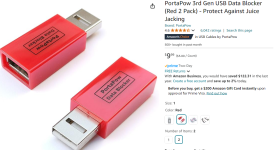
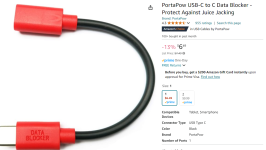
Or just get a data blocker adapter, that's what I use to PREVENT AA from running on my phone when charging from the USB port on UC4.

That said, I had a 2024(?) Wagoneer for a rental last week and I could not get AA from lighting up my WiFi/BT and connecting to that damn UC5 once my phone was paired.


1721968608935.png
or
1721968646849.png
 
Or just get a data blocker adapter, that's what I use to PREVENT AA from running on my phone when charging from the USB port on UC4.

That said, I had a 2024(?) Wagoneer for a rental last week and I could not get AA from lighting up my WiFi/BT and connecting to that damn UC5 once my phone was paired.


View attachment 75445
or
View attachment 75446
Interesting device! Didn't know that existed. Did you already try defining your phone as "charge only" in the Uconnect phone list? I might try this device if that menu option doesn't work reliably.
 
Went on an errand today so I had 2 successful starts without my phone trying native AA to the Uconnect before Carplay has had a chance to start up. It took a little while but Carplay connected. My wireless AA actually connects to the AI box first before Carplay start on the display. Apparently the box is visible as an AA client even if not displaying on the Uconnect screen as carplay.

Which brings me to an annoyance: The data port USB's stay powered (hot) for about 1hr after the truck is turned off. So at home, my phone keeps randomly reconnecting to wireless AA to the AI box and starts streaming music to nowhere. So its fine if you are going to a store, work, restaurant, but once you get home you need to pull power from the AI box. A little annoying but not a showstopper.

No failures, no random "restart to screen calibration" today. I think what caused that was me tinkering around adding carplay home screens which are different size than full screen carplay. Also testing in my Mach E changed the resolution again. I think it is now good and remembers the full portrait aspect without rebooting itself.

Is that enough for the next person to order one? Could use a small group for when we find issues and come up with workarounds. It was $69 on Amazon after the $20 coupon.
I'm unclear which device you've been having the best luck with, can you provide the amazon link?
 
Interesting device! Didn't know that existed. Did you already try defining your phone as "charge only" in the Uconnect phone list? I might try this device if that menu option doesn't work reliably.
I'd have to look, but I don't think that's an option in UC4. I also do occasionally use AA and can do so by just moving the cord.

I also have a tablet running Torque that I use on longer trips so between having that, my Tireminder TPMS on the screen on my phone, and the media and whatever else showing on the UC4, I'm pretty set.
 
No worries, On X is an off road nav app.

This looks promising, at least better than what ram is doing lol

Shawn
 
Mine should be here tomorrow.
Great! I'm very interested to see if your google maps loses touch/interaction like mine. It is not the fault of the wirelessAA->Carplay->Uconnect translation layer, because touch and interaction works in our Mach E (also portrait mode) using the same AI box. It may just be some weird combination of my Galaxy S24 Ultra and the combination.

I'd have to look, but I don't think that's an option in UC4. I also do occasionally use AA and can do so by just moving the cord.

I also have a tablet running Torque that I use on longer trips so between having that, my Tireminder TPMS on the screen on my phone, and the media and whatever else showing on the UC4, I'm pretty set.

Nice, I love Torque! I learned a lot about how my hybrid F150 works by watching the powers and battery SOC%. I have a phone mount where I kept Torque stats displayed, along with elevation. My TMPS is a cheap china design with a little screen I mounted below my cluster on top of the steering wheel support. We have more gauges and information than a fricken airline pilot

No worries, On X is an off road nav app.

This looks promising, at least better than what ram is doing lol

Shawn
In a previous post I shared images of it working full screen. I had to subscribe to a 7day trial I will cancel so I can test it, so if you have any questions you have 5 more days to ask LOL. Appears to work great, just note that the AI box interface does not support 2 finger gestures (pinch, twist) but you can zoom using +/- and 1 finger pan.

More updates and discoveries:
  • Still working flawlessly through a 2 stop errand trip today
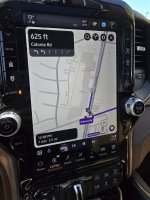
  • Tested skip track steering wheel buttons and they work. However, the physical Mute button no longer works as a "pause" when playing media. It is now a true Mute. That's a bummer. To get a pause button while in full screen mode I enabled "Taskbar Widgets" in AA config options. You get audio controls instead of apps shortcuts, see image
  • The 12" digital cluster Nav is now able to show a map even while AA is showing maps. I don't think this worked when using AA->Uconnect directly? It must allow it with Carplay and not AA. It doesn't show "next turn" but shows the map.
 

Attachments

  • 20240726_124156.jpg
    20240726_124156.jpg
    463.5 KB · Views: 22
My box showed up today, plugged it in, let it do it's updates and figure itself out. Paired my phone for Android Auto and everything just worked.

Google maps however only let's my hit the "x" to stop navigation, other than that I can't get touch to work for anything else in maps.

@daemonic3 are you able to get any app other than maps in full screen? I tried to get the radar app to open full screen and it only gives me half screen.

PXL_20240727_205704692.jpg
PXL_20240727_205925613.jpg
 
My box showed up today, plugged it in, let it do it's updates and figure itself out. Paired my phone for Android Auto and everything just worked.

Google maps however only let's my hit the "x" to stop navigation, other than that I can't get touch to work for anything else in maps.

@daemonic3 are you able to get any app other than maps in full screen? I tried to get the radar app to open full screen and it only gives me half screen.

View attachment 75502
View attachment 75503
Nice! Glad it was easy for you!

I am very familiar with the portrait mode AA layout, from owning a Mach E for over 2 years. Only nav apps can do full and 3/4 screen view, and always take the top window. All other apps when maximized are the bottom half of the screen. So, if the app is "nav" category it can be up top and full screen. I verified Google maps, RV Life, On X, and Waze all work full screen. I've never had an audio app do full screen.

And yes, in my other posts I noted that Google maps I can't interact with on the Ram. The only touch it registers is x'ing out of a route as you noted. I can interact with it on the phone and view it on Uconnect but that's it. I'll be evaluating Waze as an alternative in the meantime.

I can't express how satisfying it is to see AA use the full screen and not get angry every time I see the forced tiny AA native to Uconnect5. It's such a small thing but knowing how it *should* work just made me so pissed every time I drive. With this workaround I will love my Ram even more now!
 
you can also go to your android auto settings in your phone and add the vehicle to the blocked list, so even when you connect via usb, it wont use AA. I had to do this for my Mother who has a new suburban and didn't want the AA. She wanted basic Bluetooth capabilities and ability to charge her phone.
 
you can also go to your android auto settings in your phone and add the vehicle to the blocked list, so even when you connect via usb, it wont use AA. I had to do this for my Mother who has a new suburban and didn't want the AA. She wanted basic Bluetooth capabilities and ability to charge her phone.
For sure. I still drive my daughter's ford and my other daughters hyundai sometimes (both wired AA only} so I'm trying the "charge only" solution specific to one vehicle right now (my Ram). That's a good tip for those that drive one car though!

I do think I need to delete my wife's phone though. Before I have a chance to back out of the garage, and before the AI box has booted to carplay, her phone connects wireless AA from inside the house and I get an angry text. I'll just give her the cord next time as needed when she wants to play her dumb Taylor Swift on a road trip.
 
Back
Top