What's new
Ram Heavy Duty Forum

Register a free account today to become a member! Once signed in, you'll be able to participate on this site by adding your own topics and posts, as well as connect with other members through your own private inbox!

2024 2500 Rebel Trailer Tow Camera Question (I have the camera kit)

jleslie1234

New Member
Messages
16
Reaction score
12
Points
3
Hi all.

I’ve got in hand the TRAILER CAMERA KIT RAM HEAVY DUTY 2500/3500 (68586112AA). Plug it into the driver side bumper port and it immediately works as described.

Here’s my question (maybe @Jimmy07 has quick answer?)

I have a rooftop tent in bed. It partially blocks the 3rd brake light camera for digital rear view. I want to put the 68586112AA kit at the rear of the rack. It works. The problem is I have 30’ of cable and the signal extender etc. I’d rather just buy the right fakra cable and shorten the run? Any suggestions short of bundling the cable under truck and having to “loop” the coax plug from bumper and down and around to bed?

I also tow a trailer with a large jeep. I want to be able to use the actual 68586112AA kit for the trailer and swap wiring and camera mount when I tow. I’d rather wire that kit to trailer and use another solution for the truck side.

I hope that makes sense.

I have identified the box under driver seat. I can remove the port on bumper with the coax. The camera does plug into a the body harness that connected to coax port but no signal.

I’m missing knowledge on what makes the camera come to life? Is it the coax port? The signal extender box?

All the plugs on the kit are “keyed” with small tabs so they only assemble one way.

Let me know if anyone has thoughts. I appreciate it.
 
I have a rooftop tent in bed. It partially blocks the 3rd brake light camera for digital rear view. I want to put the 68586112AA kit at the rear of the rack. It works. The problem is I have 30’ of cable and the signal extender etc. I’d rather just buy the right fakra cable and shorten the run? Any suggestions short of bundling the cable under truck and having to “loop” the coax plug from bumper and down and around to bed?
It looks like the longer OEM cable (from the repeater to the camera) is RG58. If you want to go this route, you could try buying a shorter RG58 cable with the appropriate fakra connectors on it.
Screenshot 2024-06-30 at 9.57.41 AM.png

I also tow a trailer with a large jeep. I want to be able to use the actual 68586112AA kit for the trailer and swap wiring and camera mount when I tow. I’d rather wire that kit to trailer and use another solution for the truck side.
If your tent spends a significant amount of time in your bed, what I would recommend is getting a 2nd CHMSL (Center High Mounted Stop Light) camera and appropriate cable(s) to connect it to the box under the driver's seat. Unplug the cable to your existing CHMSL camera, and plug your new one in. This leaves your trailer camera kit available to install on your trailer.

I have identified the box under driver seat. I can remove the port on bumper with the coax. The camera does plug into a the body harness that connected to coax port but no signal.

I’m missing knowledge on what makes the camera come to life? Is it the coax port? The signal extender box?
What you're missing here is the repeater box. This box must be installed somewhere between the camera and the truck for the camera to work.

On my truck I actually ended up installing the repeater module in the truck under the driver's seat. This allows me to have a single coax cable on my trailer, from the truck bumper to the camera.
 
Very helpful. I appreciate the response.

The repeater being inline is an important point that I was missing. Putting it upstream is a good idea.

I considered getting a second CHMSL or moving the existing but I couldn’t seem to source any sort of “box” to mount the camera inside and didn’t really like the 3D printed option I’ve seen. Moving the extra camera I have in hand would be easy if I could figure out the wire types and connection types. Your diagram is helpful!

Does anyone have info on the order of plugs on the driver seat module. Four of them are labeled (front rear right left I believe) and there are two unmarked

Is there some sort of standard of connector types or words to use to sear for the fakra connectors? I count at least 4 different keyed connectors. Or maybe a place to shop for shorter cables
 
Decided to stay simple. Posting info for future folks if useful

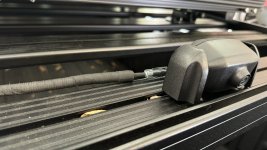
I mounted camera to Front Runner rack with M8 bolts. Had to drill out camera mount to 3/8.

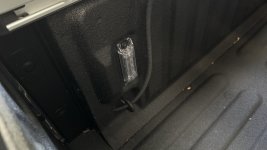
Ran cable along rack, out existing hole in bed to lower rear corner and underneath to spare area.

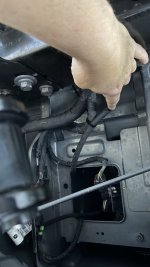
Plugged into bumper port and soft loop over bumper to meet up with other cable run.

Plugged both runs into extender.

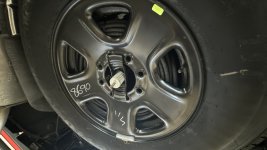
Lowered spare and put all the extra cable inside the spare being careful that the runs cleared over an edge of the spare on top.

When I need to use it for jeep trailer I’ll just take it all down and zip tie to back of trailer/jeep.

FWIW
 

Attachments

  • IMG_0679.jpeg
    IMG_0679.jpeg
    219 KB · Views: 29
  • IMG_0678.jpeg
    IMG_0678.jpeg
    275.3 KB · Views: 27
  • IMG_0677.jpeg
    IMG_0677.jpeg
    235.8 KB · Views: 26
  • IMG_0676.jpeg
    IMG_0676.jpeg
    238.6 KB · Views: 25
  • IMG_0675.jpeg
    IMG_0675.jpeg
    311.2 KB · Views: 25
  • IMG_0674.jpeg
    IMG_0674.jpeg
    345.1 KB · Views: 27
  • IMG_0673.jpeg
    IMG_0673.jpeg
    384 KB · Views: 31
I realize this is probably too late to help you, but wanted to add this info just in case it may help anyone else in the future.

I considered getting a second CHMSL or moving the existing but I couldn’t seem to source any sort of “box” to mount the camera inside and didn’t really like the 3D printed option I’ve seen.
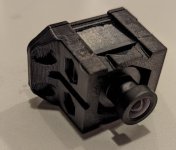
When I did this, I ended up 3d printing an adapter so the CHMSL camera could fit in the OEM trailer housing. Files can be found here: https://www.printables.com/model/697059-2023-ram-2500-camera-adapter
camera mounted.jpg
camera.jpg

Does anyone have info on the order of plugs on the driver seat module. Four of them are labeled (front rear right left I believe) and there are two unmarked
You may be looking at the wrong module. Here's a picture of the correct module. The video inputs are labeled RHOSM (Right Hand OutSide Mirror), LHOSM (Left Hand OutSide Mirror), CHMSL (Center High Mounted Stop Light), and TRAILER (trailer). Then RVDM (Rear View Digital Mirror) is the video output that goes to the mirror.
PXL_20230329_171652824 (1).jpg
 
Thanks. That housing is nice. But I’d need a second one or have to take it apart when towing? And during winter I take the tent off.

Great solution though!!!

I was looking at the wrong module. Which helps. I tried unplugging each cable and it wasn’t affecting the cameras I was looking for. I saw the module I your picture but it seemed like you’d have to take the seat out to really mess with it.

Appreciate the info. Maybe this thread will help somebody!
 
I realize this is probably too late to help you, but wanted to add this info just in case it may help anyone else in the future.


When I did this, I ended up 3d printing an adapter so the CHMSL camera could fit in the OEM trailer housing. Files can be found here: https://www.printables.com/model/697059-2023-ram-2500-camera-adapter
View attachment 74565
View attachment 74566


You may be looking at the wrong module. Here's a picture of the correct module. The video inputs are labeled RHOSM (Right Hand OutSide Mirror), LHOSM (Left Hand OutSide Mirror), CHMSL (Center High Mounted Stop Light), and TRAILER (trailer). Then RVDM (Rear View Digital Mirror) is the video output that goes to the mirror.
View attachment 74567
That is a really clean solution! Well done. I plan to use this information to build a solution to mount to the rear of a Dethloff contour rack. The roof top tent will otherwise block my CHMSL camera. Thanks CortexMO!
 
Back
Top