
How did you suspend the wire up there like you did? This is mine on a test run in a parking lot. And I mounted my camera above my rear window, I think it's a little too high. Where did you mount yours?Here is how I made the connection between our fifth wheel and truck until I can come up with a more permanent solution. Over 800 miles and doing great. Don't know how I lived without a rear view camera on our trailer this long.
View attachment 40586
Ram Heavy Duty Forum
You are using an out of date browser. It may not display this or other websites correctly.
You should upgrade or use an alternative browser.
You should upgrade or use an alternative browser.
FINISHED.........Digital Tow Mode Camera Connection from Bumper to Bed
- Thread starter Webracin
- Start date

dalesonger
New Member
- Messages
- 3
- Reaction score
- 0
- Points
- 1
Very nice.. I broke my bumper connector..I have been reading for hours and still cant find where anyone has successfully moved or purchased parts to allow for the connection of the digital rear view for the trailer to the bed of the truck for those of us that have 5th wheels or Gooseneck trailers. Thought I would open up a new post and see if anyone has had success. I have purchased a 10' fakra cable and a 15' TNC RG58 cable to see if it can be added to the 50' cable and maintain image stability, as my setup is a 42' 5th wheel, and I don't think 50' will be enough. Both of these cables work and the image is stable. I personally like the TNC cable as it is more weather resistant and robust compared to the Fakra cable.
Bumper blank part number is 68526870AA ($10.46)
Bumper coax connector
68508681AA ($97.00)
10' Fakra cable - Used for connection on camera side
https://www.amazon.com/gp/product/B07M7TG6V2/ref=ppx_yo_dt_b_asin_title_o02_s00?ie=UTF8&th=1
15' TNC RG58 cable - Used for connection on truck side
https://www.amazon.com/dp/B00O07116...t_i_093BFMEMPBRKB7ERR5VD?_encoding=UTF8&psc=1
All complete and works Awesome!!!
- Remove the entire plug from the bumper (this is done from the back side. Use a flat blade screwdriver and pry up on the metal tabs and it should push through).
- Disconnect the Fakra cable from the back of the plug (little tab on the side of the Fakra cable. Just push in and pull).
- Under the truck follow the Fakra cable to the bumper brace. There are 2 push pin zip ties holding it in place. Pry up on those to release the cable.
- View attachment 32344 Yellow is push pin location and Green is Digital Trailer Rear View (back side of bumper) location.
- Route the cable over the frame towards the fender well.
- View attachment 32345You can see the 2 push pins (black arrow) and a blue terminator in the picture.
- Route the cable to the bed following the yellow arrows in Step 7.
- I have not cut the whole yet, as I wanted to make sure the cable was long enough. It is long enough, and this is a picture of the cut I will be doing as well as the cable.
- View attachment 32346 Yellow arrow is Fakra cable for Digital Trailer Rear View. Blue arrow shows existing slot in the bed.
- View attachment 32347
- The measurements for the cuts are:
- View attachment 32195
- Created a 3d printed spacer as the bed metal is not as thick as the bumper. You can use wood, plastic anything that is 1/4" thick.
- View attachment 32348View attachment 32349
- View attachment 32350 Spacer installed inside fenderwell (Yellow arrow). Wire tie (Black arrow) for strain relief.
It was an easy fix for those of us that pull 5th wheels and Goosenecks. It took me about an hour to map all this out, and about an hour and a 1/2 of cutting, filing, painting the bare metal, and putting it back together. You can use any material you want to make the spacer, I just have access to a 3D printer, so thought I would use it.
Decided to try a test and connected both the 15' TNC RG58 cable and the 10' Fakra cable to each end of the main cable, so now I have a total of 75' which is more than enough for my 42' 5th wheel.
View attachment 32354 Blue arrow is 10' Fakra Z cable and Yellow arrow is the 15' TNC RG58 cable. Both are listed above.
All looks good with these lengths!
View attachment 32355
Guess I will try and order another..
wonder what the other Fakra connector under the side of the truck along side the one we unplug to move it in side the bed.
Also.. I bought the Amazon extension cable..
This seems like the thread of people that would know what the trailer side of the tow mode camera coax termination is. My cable is damaged And shorting the camera feed and I need to terminate it. However I have no idea what type of cable it is or ends I need etc.
Any help is appreciated
Any help is appreciated
If your talking about the camera end, it's a Fakra connector, but if your talking about the other end that comes from the camper to the truck, that is a coax TNC.This seems like the thread of people that would know what the trailer side of the tow mode camera coax termination is. My cable is damaged And shorting the camera feed and I need to terminate it. However I have no idea what type of cable it is or ends I need etc.
Any help is appreciated
This shows both ends of the camper cable.
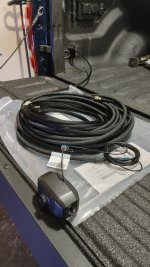
Last edited:
Lucky Devil
Well-Known Member
Is there a way to just swap harnesses so the 12 pin in the bed can be used? I have no need for the bumper camera coax port. Currently I have my trailer backup camera wired to a 12 pin and plugged in but have to go through the camera options and choose Aux2 to view the review / backup camera. The goal is to have the review mirror always active as the backup camera when driving.

Is there a way to just swap harnesses so the 12 pin in the bed can be used? I have no need for the bumper camera coax port. Currently I have my trailer backup camera wired to a 12 pin and plugged in but have to go through the camera options and choose Aux2 to view the review / backup camera. The goal is to have the review mirror always active as the backup camera when driving.
No, they are separate systems.
The DRVM uses the digital "Tow Mode Camera" connected via coax (fakra) on the bumper (left side).
The 12-pin is either trailer surround and/or AUX that uses analog feeds to the radio display. The 12-pin is available on the bumper, and if equipped with the 5th wheel prep, in the bed - though the cable has to be swapped behind the bumper to one or the other.
If you want to have the camera on the DRVM, you need to use the (digital) Tow Mode Camera kit that connects to the coax.
FYI, If you frequently need to select the AUX2 cam, you could put that button on the bottom row of the radio screen (assuming you have 12" display).

- Messages
- 5,221
- Reaction score
- 5,436
- Points
- 113
FYI, If you frequently need to select the AUX2 cam, you could put that button on the bottom row of the radio screen (assuming you have 12" display).
This is one of the features I lost with my 8.4" UC5 and really miss it.

Agreed. I hate that you can’t change the icons/“apps” on the bottom of the UC5 screen.This is one of the features I lost with my 8.4" UC5 and really miss it.
I wish automotive companies would hire competent UI engineers.
Agreed. I hate that you can’t change the icons/“apps” on the bottom of the UC5 screen.
I wish automotive companies would hire competent UI engineers.
Hell, just a couple of 13 year old's would do better.

PyroJoe
Active Member
- Messages
- 228
- Reaction score
- 160
- Points
- 43
Anyone know if you could swap the 3rd brake light from the Tow Mode package for a Cargo Cam 3rd brake light and be able to plug the "rear camera" cable into the cargo cam?
Cargo cam wasn't an available option on my build, but I want it and don't need the "rear view cam". They're holding cargo cam hostage in 2025, only offering it with 12"+ screens for some reason.
2 of my ideas are either to swap in a Cargo Cam 3rd brake light and just plug into that, or 3D print/machine a shim for the Rear Cam so it aims down at my gooseneck ball.
3rd idea is maybe there will be an option eventually to just swap in the combination Cargo/Rear View 3rd brake light, wiring the cargo cam into the UC5 8.4".
If an aftermarket camera can plug into the Tow Mode connection, I could also just place an extra camera on my tonneau cover housing aiming at the ball (but it sounds like the Mopar connection is proprietary and not adaptable).
Cargo cam wasn't an available option on my build, but I want it and don't need the "rear view cam". They're holding cargo cam hostage in 2025, only offering it with 12"+ screens for some reason.
2 of my ideas are either to swap in a Cargo Cam 3rd brake light and just plug into that, or 3D print/machine a shim for the Rear Cam so it aims down at my gooseneck ball.
3rd idea is maybe there will be an option eventually to just swap in the combination Cargo/Rear View 3rd brake light, wiring the cargo cam into the UC5 8.4".
If an aftermarket camera can plug into the Tow Mode connection, I could also just place an extra camera on my tonneau cover housing aiming at the ball (but it sounds like the Mopar connection is proprietary and not adaptable).

sstoner911
Well-Known Member
- Messages
- 1,522
- Reaction score
- 907
- Points
- 113
Anyone know if you could swap the 3rd brake light from the Tow Mode package for a Cargo Cam 3rd brake light and be able to plug the "rear camera" cable into the cargo cam?
Cargo cam wasn't an available option on my build, but I want it and don't need the "rear view cam". They're holding cargo cam hostage in 2025, only offering it with 12"+ screens for some reason.
2 of my ideas are either to swap in a Cargo Cam 3rd brake light and just plug into that, or 3D print/machine a shim for the Rear Cam so it aims down at my gooseneck ball.
3rd idea is maybe there will be an option eventually to just swap in the combination Cargo/Rear View 3rd brake light, wiring the cargo cam into the UC5 8.4".
If an aftermarket camera can plug into the Tow Mode connection, I could also just place an extra camera on my tonneau cover housing aiming at the ball (but it sounds like the Mopar connection is proprietary and not adaptable).
If you want an alternative trailer cam that works off AUX2 -
Camera VisionWorks
Attachments
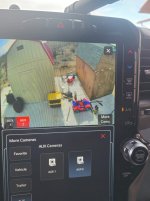
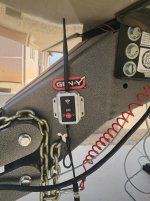

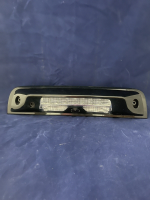
They are different cameras.If anyone happens to remove their CHMSL, I'd like to see if the camera connections are the same for both the Cargo and RearView cams please. I can't find a good pic of the backside.
View attachment 85699
The cargo view cameras are also different between each other depending if the truck is equipped with surround view or not.
PyroJoe
Active Member
- Messages
- 228
- Reaction score
- 160
- Points
- 43
If the cargo cam won't be compatible with the DRVM, I might just look at figuring out how to get a cargo cam to connect and work with my 2025 8.4" Uconnect.They are different cameras.
The cargo view cameras are also different between each other depending if the truck is equipped with surround view or not.
For the surroundview-style cargo cam vs the standard cargo cam, is there a difference in wideview vs. standard, or HD vs SD?
There isn’t much of a difference with image quality. The cargo camera with the surround view camera system has a dotted center line, that’s really the only difference.If the cargo cam won't be compatible with the DRVM, I might just look at figuring out how to get a cargo cam to connect and work with my 2025 8.4" Uconnect.
For the surroundview-style cargo cam vs the standard cargo cam, is there a difference in wideview vs. standard, or HD vs SD?
You can’t use the surround view system cargo camera if the truck isn’t equipped with surround view system anyway, so it doesn’t matter.
Also, unless your truck has the Aux camera soft keys in the camera section on the radio screen, there’s no way to add another camera to the truck anyway, because there is currently no way to program it to work.
PyroJoe
Active Member
- Messages
- 228
- Reaction score
- 160
- Points
- 43
I'll update you Thursday when I get my truck. I doubt I have them. Best I can decipher, only the trucks with the 12-pin bumper plug got the Aux Camera soft keys.There isn’t much of a difference with image quality. The cargo camera with the surround view camera system has a dotted center line, that’s really the only difference.
You can’t use the surround view system cargo camera if the truck isn’t equipped with surround view system anyway, so it doesn’t matter.
Also, unless your truck has the Aux camera soft keys in the camera section on the radio screen, there’s no way to add another camera to the truck anyway, because there is currently no way to program it to work.
As far as reprogramming goes, I'd imagine once the 2025's are cracked open, you'd be able to just add the factory cargo cam option back to the screen rather than relying on an aux input?
sstoner911
Well-Known Member
- Messages
- 1,522
- Reaction score
- 907
- Points
- 113
I'll update you Thursday when I get my truck. I doubt I have them. Best I can decipher, only the trucks with the 12-pin bumper plug got the Aux Camera soft keys.
As far as reprogramming goes, I'd imagine once the 2025's are cracked open, you'd be able to just add the factory cargo cam option back to the screen rather than relying on an aux input?
I don't know if this is an option for you, as you could lose some options depending on how your truck is equipped. I did order an adapter to mount this aftermarket mirror to the OEM windshield mount. I did lost my Auto high beams...but since the windshield has ceramic tint it never worked 100% anyway. This kit is from EchoMaster. The camera will go in to IRR mode at night if light levels are to low. It also will dispaly grid lines when in reverse, but I have that turned off.


PyroJoe
Active Member
- Messages
- 228
- Reaction score
- 160
- Points
- 43
Got my truck. 2025 UC 8.4" does not have any aux camera soft keys.
Can someone pull out their 3rd brake light and see if these 2 camera (Reverse & Cargo) connections are the same/interchangeable? It's 2 philips screws and takes about 15 seconds to remove.
Can someone pull out their 3rd brake light and see if these 2 camera (Reverse & Cargo)
connections are the same/interchangeable? It's 2 philips screws and takes about 15 seconds to remove.