What's new
Ram Heavy Duty Forum

Register a free account today to become a member! Once signed in, you'll be able to participate on this site by adding your own topics and posts, as well as connect with other members through your own private inbox!

TPMS (TIS) sensors for trailer (SOLVED - see 1st post) aka TTPMS - Trailer TPMS

I was reading the Manuel a bit ago an it said that after you let 5psi out of the tire the truck would give you an alarm sound then you move to the next tire, but didnt you say sometimes the alarm wouldn't come on at just a loss of only 5psi but the tire actually got down to 5psi, or am I all jacked up on Tennessee dew
With me, It may have been some lag time in the beeping as each tire seem to be different for some reason. Some times it would beep in about 10 or so seconds after I started to let the air out and others wouldn't beep until the tire was almost flat. I guess that might be why I had to do it several times.
 
With me, It may have been some lag time in the beeping as each tire seem to be different for some reason. Some times it would beep in about 10 or so seconds after I started to let the air out and others wouldn't beep until the tire was almost flat. I guess that might be why I had to do it several times.
Ok, that makes sense, I was thinking the reason why it might have done that for you was because you pulled the Orpheus out of the valve stem. I'm going to try it ( eventually) by just purging the air out a little at a time. Living in an RV, I don't have a good air compressor , just a portable an it will fill my tires up to the 80psi but you have to give it a break after 10 minutes. Takes forever, but it's just for emergency use
 
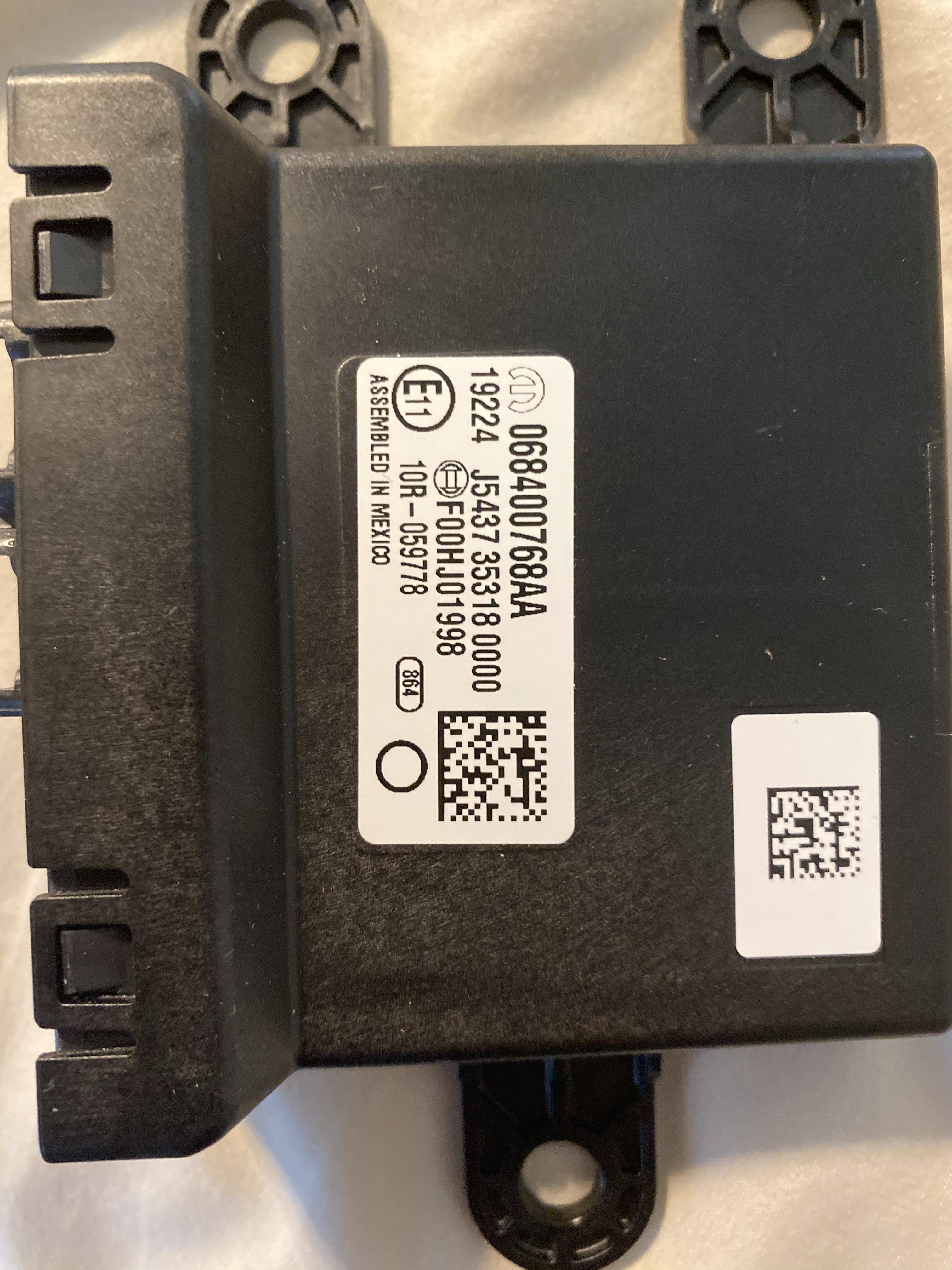
So I thought I was getting the TIM, but got this instead? Is this correct?
d75724bbe69d950829a31f4f0544788f.jpg


Sent from my iPhone using Tapatalk
 
That figures. Have we heard if there was a shortage of TIM’s too??


Sent from my iPhone using Tapatalk
 
Does anyone have any pics of what to look for under the back truck bed for a module? I don't want to start pulling down headliner if there is something I can seek out by the rear bumper which from what I've gathered on this thread should be the RF module. I picked up on a module behind where the license plate is on the backside of the bumper with a part number of 68-186637aa but the cross-reference on that shows as Antenna Passive Entry which I would assume could be for the tailgate passive entry or could be for the entire truck.

I'm trying to determine if my 2019 is equipped for TTPMS and after plugging in my 7-pin I got nothing on the trailer section of the radio or on the Commerical settings on the center dash system. The dealer advised on delivery it 'should' be equipped but no actual way to confirm and this feature would be awesome as we could give up 1 item on the dash for our 3rd party TTPMS system.

Thanks in advance,
Miguel in Phoenix
 
The dealer is wrong. There are zero production 2019 that came with TTPMS.

The feature was released for 2020 factory orders in the US on 2-5-20.

Review the thread, plenty of pics, the TPMS module 4-pin plug is behind the bumper on the driver side side of the license plate area. All the parts need to be installed and the 2020 TTPMS features need to be enabled using AlhpaOBD or suitable recode tool and a security bypass cable.

You're correct on the passive entry antenna, that's a much smaller module than the TTPMS receiver and is for the tailgate passive entry.
 
Last edited:
Thanks, Brutal, I went back in time to page 14 and found a picture, the connector on my 2019 is there, wasn't tucked up as bad as some have said, didn't have to lower the spare but got a quick pic of it and compared to the other images on here and viola, we have a cable, now just need to figure out if picking up the receiver and sensors will make it all come together or if I have to dust off my BTooth ODB programmer :)

Really appreciate the help, great forum!
 
now just need to figure out if picking up the receiver and sensors will make it all come together or if I have to dust off my BTooth ODB programmer :)

You need these Mopar parts:
  • 1x TPMS receiver part # 68375990AC
  • (1x 4-pack of TPMS sensors part # 68433188AA) OR (4x TPMS sensors part # 68375992AA) whichever is cheaper and available
  • 1x Trailer Interface Module (TIM) gateway part # 68404893AB
  • 1x Wiring jumper part # 68412666AA
Some of those parts may be difficult to obtain right now because they seem to be on backorder.

You also will need:
  • AlfaOBD for Windows
  • Security bypass cable like the one from KAOdTECH.
  • Bluetooth OBD-II adapter like the OBDLink MX/MX+

I believe someone also said your truck's UConnect system needs to be version 19.43.1a.
 
Last edited:
I believe someone also said your truck's UConnect system needs to be version 19.43.1a.

Thanks for the parts list, one more question before I waste any more of my time and money... my truck while superbly loaded only came with UConnect 8.4 no Nav, which is fine as my previous 2500 had pretty much the same radio.

The system is running FW/SW 184822/00185001/00185001 so based on the statement of 19.43.1a am I out of luck or is that based on the 12" display system? I already checked the site and it shows that no updates are available for my system.

With the 30 pages of posts in this thread, it's not well documented if anyone that's gotten this working on 2019 has which radio combo... hence my question.

Thanks!
Miguel
 
Thanks for the parts list, one more question before I waste any more of my time and money... my truck while superbly loaded only came with UConnect 8.4 no Nav, which is fine as my previous 2500 had pretty much the same radio.

The system is running FW/SW 184822/00185001/00185001 so based on the statement of 19.43.1a am I out of luck or is that based on the 12" display system? I already checked the site and it shows that no updates are available for my system.

With the 30 pages of posts in this thread, it's not well documented if anyone that's gotten this working on 2019 has which radio combo... hence my question.

Thanks!
Miguel


The uconnect website is a joke, the update page on it doesn't actually work, I think they just leave it up so people think they have a little control over the product they paid for. You either have to pray you get an OTA update, OR go to your dealer and tell them your radio is acting up, and the dealer should have access to firmware updates and should be able to upload one for you... If they give you a hard time you can see if you qualify for this recall: https://www.consumerreports.org/car...ep-ram-recall-rearview-backup-camera-display/ which should bring you up to the latest firmware release.

In my 12" Uconnect I had firmware 18.45.40, with a build date of november 2018, and this firmware was too old and did not support the TTPMS features. Since i added my 12" Uconnect after i bought the truck local dealers were giving me a hard time about updating the firmware, but I was able to squeeze one of them by referencing the Recall, and that brought me up to firmware 19.43.1a or newer, and that unlocked the Trailer TPMS menus in my Uconnect.

Edit: just checked the recall update brought my radio to 20.04.19 with a build date of January 2020
 
Last edited:
The uconnect website is a joke, the update page on it doesn't actually work, I think they just leave it up so people think they have a little control over the product they paid for. You either have to pray you get an OTA update, OR go to your dealer and tell them your radio is acting up, and the dealer should have access to firmware updates and should be able to upload one for you... If they give you a hard time you can see if you qualify for this recall: https://www.consumerreports.org/car...ep-ram-recall-rearview-backup-camera-display/ which should bring you up to the latest firmware release.
I thought Uconnect updates were done OTA?
 
Does anyone have any pics of what to look for under the back truck bed for a module? I don't want to start pulling down headliner if there is something I can seek out by the rear bumper which from what I've gathered on this thread should be the RF module. I picked up on a module behind where the license plate is on the backside of the bumper with a part number of 68-186637aa but the cross-reference on that shows as Antenna Passive Entry which I would assume could be for the tailgate passive entry or could be for the entire truck.

I'm trying to determine if my 2019 is equipped for TTPMS and after plugging in my 7-pin I got nothing on the trailer section of the radio or on the Commerical settings on the center dash system. The dealer advised on delivery it 'should' be equipped but no actual way to confirm and this feature would be awesome as we could give up 1 item on the dash for our 3rd party TTPMS system.

Thanks in advance,
Miguel in Phoenix

If you would like any additional assistance, our team is always available via private message!

Alison
RamCares
 
How do we initiate an OTA update?


Sent from my iPhone using Tapatalk
There's a discussion in the Uconnect thread about this and the best I can make of it is when you're driving in your truck it automatically will update at some point. You could be in your truck for 15-20 minutes or you could be in your truck for hours before you get a message that an update is available. I suppose an update can be done at the dealership as well but I don't know how successful people have been with this.
 
How do we initiate an OTA update?


Sent from my iPhone using Tapatalk

You can't initiate one, which is absurd to me, on a product you paid good money for, there should totally be a "Check for Updates" button somewhere in the settings, or the website update checker should actually work, but it doesn't. The only way to force an update, if you haven't been blessed by the Uconnect OTA gods, is to go to the dealership and request one, it'll help if you have a complaint about the radio. However even asking the dealership is hit & miss depending on who you happen to ask in the service department.
 
Thanks for the parts list, one more question before I waste any more of my time and money... my truck while superbly loaded only came with UConnect 8.4 no Nav, which is fine as my previous 2500 had pretty much the same radio.

The system is running FW/SW 184822/00185001/00185001 so based on the statement of 19.43.1a am I out of luck or is that based on the 12" display system? I already checked the site and it shows that no updates are available for my system.

With the 30 pages of posts in this thread, it's not well documented if anyone that's gotten this working on 2019 has which radio combo... hence my question.

Thanks!
Miguel
I guess the better question would be, is TTPMS available on all trim options with all radios. Like @g00fy said, it took an update for his 12” radio for it to display the necessary settings. But, that firmware is only for the 12” radios, and 8.4s will have different firmwares between the nav and non-nav. I guess the first thing you could try is, enable the settings with AlfaOBD and see if the settings menu shows up in your radio.
 
I guess the better question would be, is TTPMS available on all trim options with all radios. Like @g00fy said, it took an update for his 12” radio for it to display the necessary settings. But, that firmware is only for the 12” radios, and 8.4s will have different firmwares between the nav and non-nav. I guess the first thing you could try is, enable the settings with AlfaOBD and see if the settings menu shows up in your radio.

It should be available on all 8.4 Radios, since i remember when i was optioning my truck, if you wanted the towing tech package on the tradesman, it included the most basic 8.4" radio in the package to support all the features.
 
Back
Top