
Ram Heavy Duty Forum
You are using an out of date browser. It may not display this or other websites correctly.
You should upgrade or use an alternative browser.
You should upgrade or use an alternative browser.
TPMS (TIS) sensors for trailer (SOLVED - see 1st post) aka TTPMS - Trailer TPMS
- Thread starter ghaynes754
- Start date


Got to have it. That's why we get the service trailer pressure system error.So will this be just an alternative way?
Sent from my iPhone using Tapatalk
@g00fy Any word? Us quarantined people need something to be excited about!
I'm still waiting to hear back, but, my parts guy made an interesting comment. He said he's working with another guy who's trying to retrofit surround view into his 2015, and that guy is far more technical than I am and he asked that guy about my project and if he had any input.
Apparently, the TIM is mainly a security gateway, I assume up prevent the very off possibly of someone hacking the can bus system through the TTPMS plug in the rear bumper. That being said in theory, the TIM could be bypassed by jumping the correct wires at the plug that's already in the headliner. His only suggestion was that a fuse be put in just in case there's ever a short in the wiring.
I would test this out, but unfortunately I'm still waiting to get the uconnect update that will give me access to the TTPMS settings.

thestuarts
Well-Known Member
- Messages
- 500
- Reaction score
- 512
- Points
- 93
I wish I has the wiring diagram for the 2019 3500
I ordered the 2019 3500 service manual from tech authority for ~$120, but it hasn't arrived, yet. Does the tech authority service manual usually contain wiring diagrams?
Hey guys, i know I'm not into this topic like you all are. But i was just going through some of the wiring diagrams i have that i saved from the body builder site. Have you looked there, lots of good infoI wish I has the wiring diagram for the 2019 3500
No, the $120 cd version usually doesn’t contain the wiring schematics. I have access to them, it’s just a pain to post them because I can’t link them.I ordered the 2019 3500 service manual from tech authority for ~$120, but it hasn't arrived, yet. Does the tech authority service manual usually contain wiring diagrams?
Like @g00fy said above, there’s a theory that the TIM might not even be needed. It seems to only be a gateway between CAN C and private CAN. His hands a tied right now because he can’t get all the settings to show up in the radio. Anybody who has the TPM installed at the bumper AND has all the settings in the cluster and radio can try this to prove or disprove if the TIM is needed- find this connector in the headliner that the red arrow is pointing to-
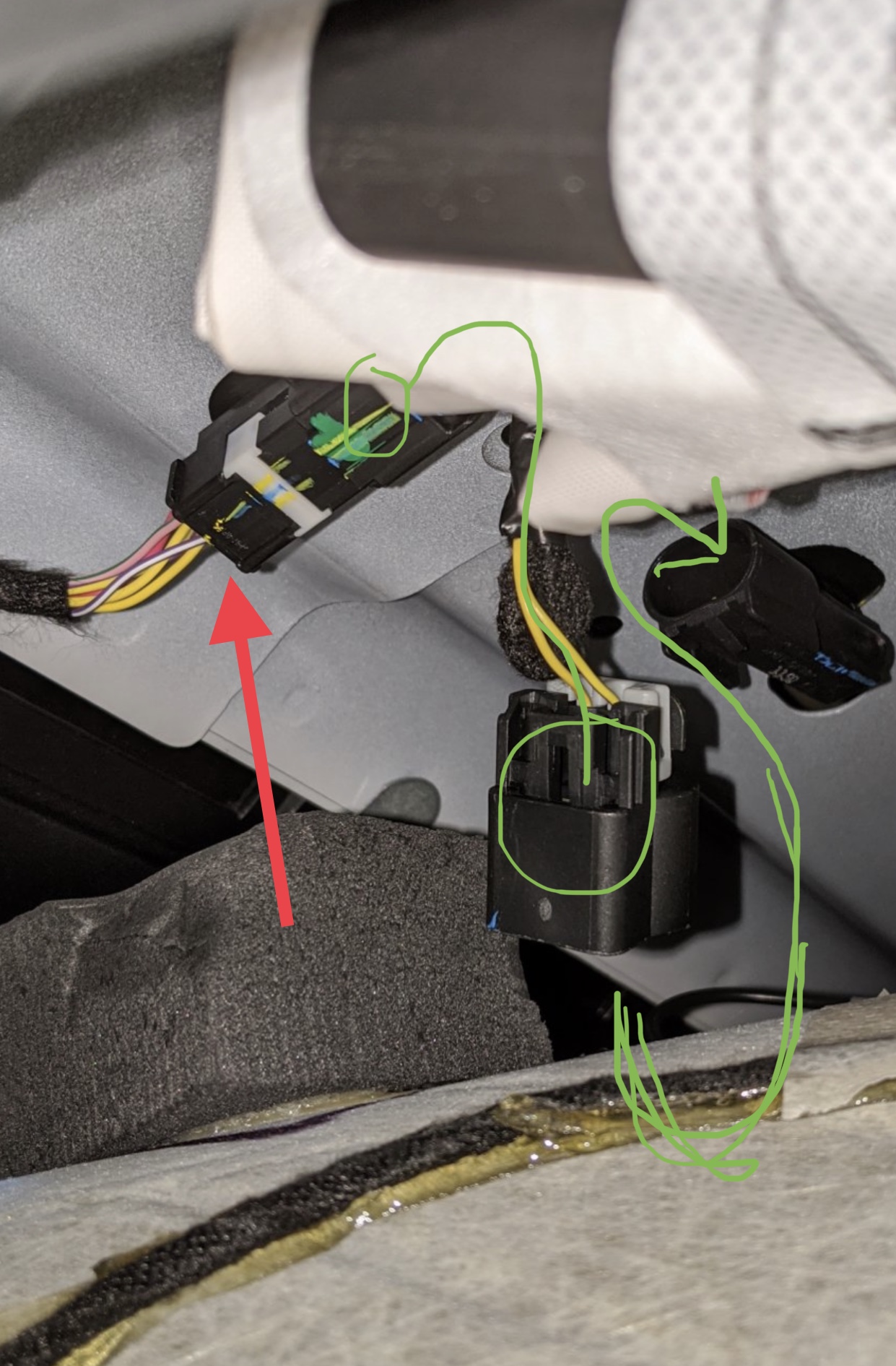
De-pin the two yellow wires and tape them together. Then de-pin the purple/white stripe wire and the yellow/purple stripe wire and tape those two together. Once you enable the P/T Chassis Net setting, this method will effectively bypass the TIM and bring the entire TTPMS online (if there is truly no need for the TIM). There is no need for a fuse because the TPM batt+ is already fused at the PDC. When you de-pin the two yellow wires, don’t mix them up if they have to be re-inserted into the connector.
Here’s the schematic for a non cab n chassis truck-
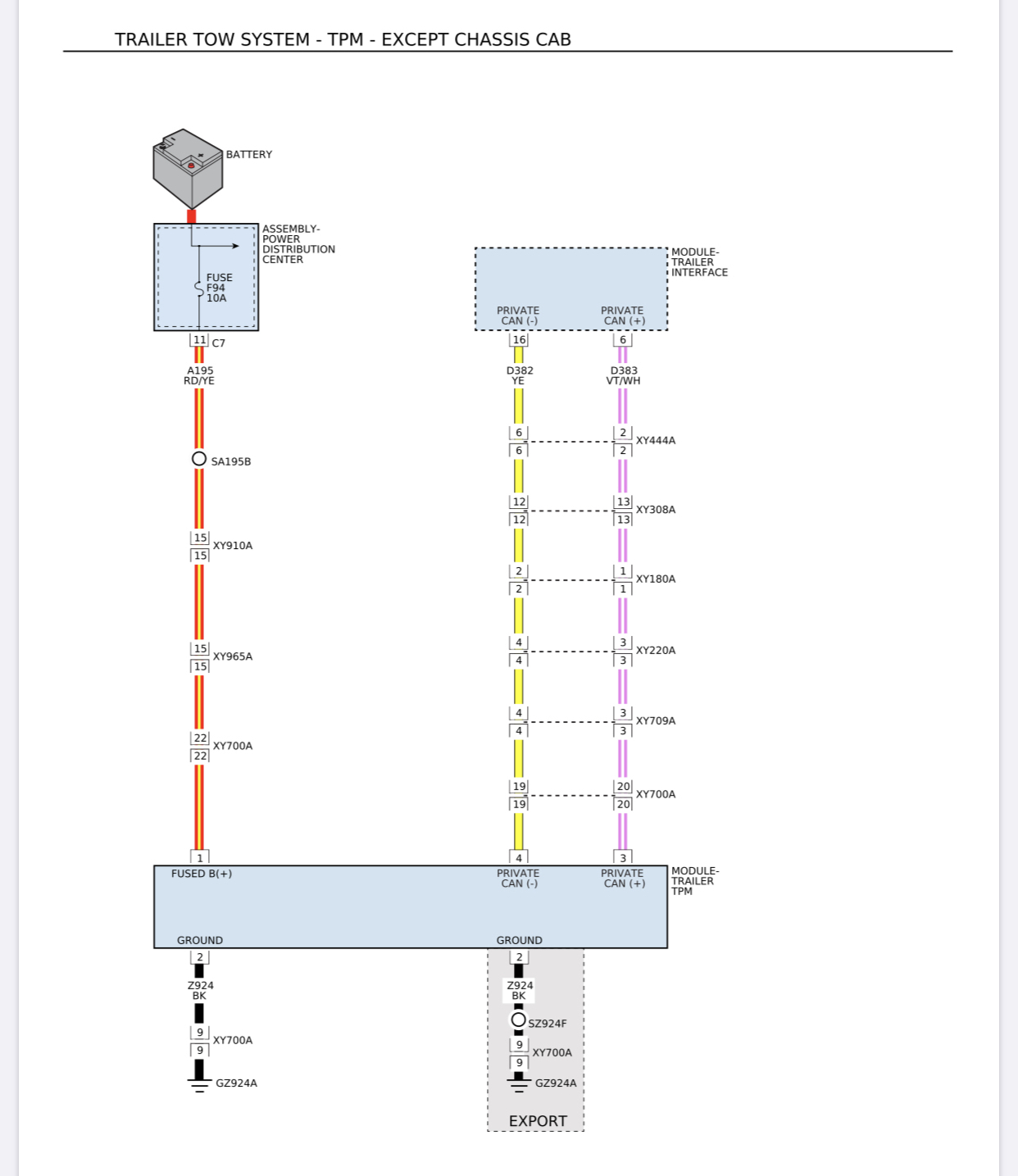
As you can see, it is incomplete, and they probably uploaded it before they fully released the feature. I had to start with the connector views, and chase down all those circuits and in-line connectors for the missing circuits on the schematic.
As you can see, it is incomplete, and they probably uploaded it before they fully released the feature. I had to start with the connector views, and chase down all those circuits and in-line connectors for the missing circuits on the schematic.

No, the $120 cd version usually doesn’t contain the wiring schematics. I have access to them, it’s just a pain to post them because I can’t link them.
Like @g00fy said above, there’s a theory that the TIM might not even be needed. It seems to only be a gateway between CAN C and private CAN. His hands a tied right now because he can’t get all the settings to show up in the radio. Anybody who has the TPM installed at the bumper AND has all the settings in the cluster and radio can try this to prove or disprove if the TIM is needed- find this connector in the headliner that the red arrow is pointing to-
De-pin the two yellow wires and tape them together. Then de-pin the purple/white stripe wire and the yellow/purple stripe wire and tape those two together. Once you enable the P/T Chassis Net setting, this method will effectively bypass the TIM and bring the entire TTPMS online (if there is truly no need for the TIM). There is no need for a fuse because the TPM batt+ is already fused at the PDC. When you de-pin the two yellow wires, don’t mix them up if they have to be re-inserted into the connector.
I have the bumper receiver plugged in and can get the pressure options to show up in my 12" Uconnect so I can try this after I get my truck back from the dealer.
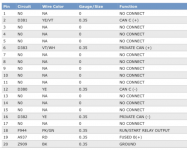
Can you indicate what pin these are as well based on your earlier diagram posted? Just want to confirm we're talking about tying CAN C (+) and PRIVATE CAN (+) together and CAN C (-) and PRIVATE CAN (-) together.
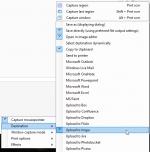
Jimmy, assuming Windows desktop, check out Greenshot to do easy screen/area image captures and there's settings to dump them locally, copy to clipboard, upload to an Imgur account (my favorite), etc. It install and can run with Windows startup and replaces the PRT SCRN key (or your choice)
Correct, you want to tie the private can c wires to the regular can c wires. Except, that connector is not the one you’re dealing with in the headliner. That is the missing jumper that plugs into the TIM. This is the one you’ll be messing with-I have the bumper receiver plugged in and can get the pressure options to show up in my 12" Uconnect so I can try this after I get my truck back from the dealer.
Can you indicate what pin these are as well based on your earlier diagram posted? Just want to confirm we're talking about tying CAN C (+) and PRIVATE CAN (+) together and CAN C (-) and PRIVATE CAN (-) together.
View attachment 3880
Jimmy, assuming Windows desktop, check out Greenshot to do easy screen/area image captures and there's settings to dump them locally, copy to clipboard, upload to an Imgur account (my favorite), etc. It install and can run with Windows startup and replaces the PRT SCRN key (or your choice)
View attachment 3878
View attachment 3879
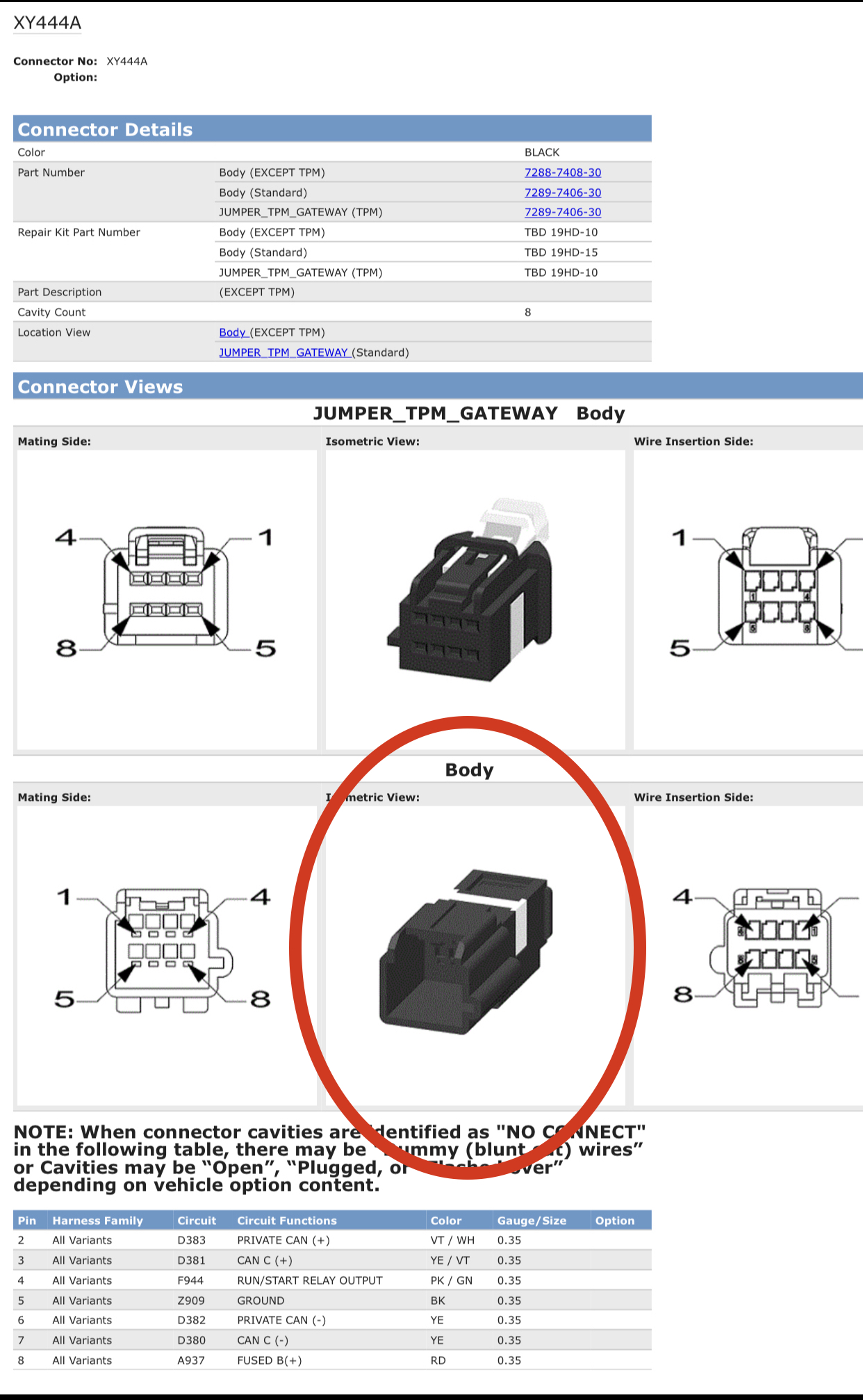
So, pins 2&3 together, and pins 6&7 together.
thestuarts
Well-Known Member
- Messages
- 500
- Reaction score
- 512
- Points
- 93
Nope. No wiring diagrams. The site even states that no traditional diagrams are included.
No, the $120 cd version usually doesn’t contain the wiring schematics. I have access to them, it’s just a pain to post them because I can’t link them.
Thanks for crushing my dreams.

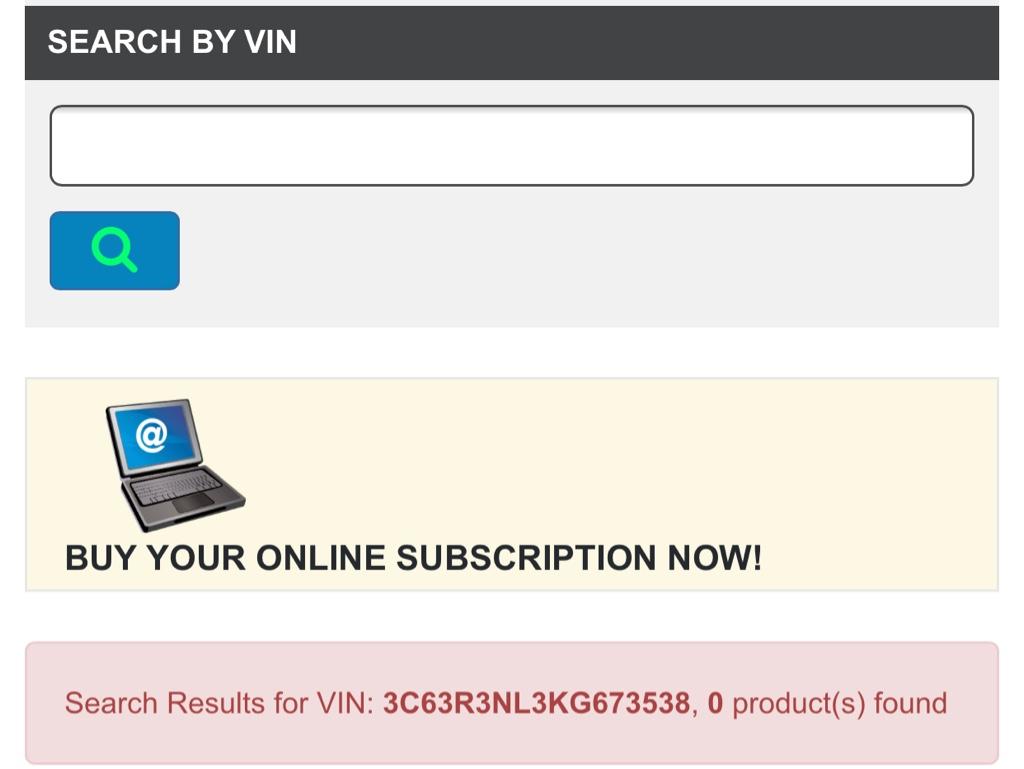
If I pay for a subscription to the online version of tech authority, does it include wiring diagrams? Stated another way, who do I have to pay to get access to the wiring diagrams?
Yes, you can get a 1,3,7 day subscription to techauthority and it has wiring diagrams.Thanks for crushing my dreams.
If I pay for a subscription to the online version of tech authority, does it include wiring diagrams? Stated another way, who do I have to pay to get access to the wiring diagrams?


1FastHemi
Well-Known Member
- Messages
- 410
- Reaction score
- 324
- Points
- 63
Excuse me but, I may be jumping ahead of the game a little. I just wanted to mention it before I forgot it.
Pairing The Sensors To The Truck:
Once you guys get all the wiring and connections and stuff figured out, Here is how I got my TTPMS to show the tire pressure on each wheel. This took me 3 time to get it programmed correctly so be patient.
1. Get all your tire sensors mounted in your trailer rims First. Mine came in a packet of 4 with the truck when I purchased it with Part Numbers.
2. Make sure the trailer wiring connector is hooked to the truck.
3. Start Engine and Leave truck engine running.
4. Bring up and turn to your trailer icon on the center dash cluster by speedometer.
5. On your stereo, go to settings and go into Trailer Tire Pressure Settings.
TOOLS NEEDED: A good Air Source, Tire Gage and a Valve Core Removal Tool. and a Stool to Sit on.
6. Click Start, follow the settings on screen. (some functions won't be available until after programming is finished)
7. You will start at the Left Front Tire on the trailer going to the Back Tire on the Same Side, then go the the Back Tire on the Right Side and ending with the Right Front Tire.
8. You will Start Letting the air pressure out possibly as low as 5 psi. (or you hear the horn blow once) put the valve stem core back in and go the next tire doing the same thing, only 1 tire at a time. Once you finish the Last Tire, Go back and follow the Instructions/Settings on the stereo screen and finish programming.
* * * DO NOT put Any Air Back in any of the tires until the Full Programming Process is Finished. Or The Programming will time out * * *
9. Check everything out good then take the trailer for a spin a few miles down the street to make sure it show up with the correct pressure in the Display by the Speedometer. If this fails, you may have to start over again.
I hope I didn't forget anything and If I did, Please don't shoot me... I wish you all luck.
BTW:
When I got all the above programmed, The Exhaust Brake will be normally OFF, Once you turn it ON, it will stay ON until you unhook the trailer and turn your engine off unless you Manually turn it off. At least this is what it did for me.
However the Tow Haul Button would not. I has to re-activate it each time I started the truck.
EDITED : Spelling & Added Link.. If I remember anything else I will come back here to update. this post.... check last edited date ------>
Pairing The Sensors To The Truck:
Once you guys get all the wiring and connections and stuff figured out, Here is how I got my TTPMS to show the tire pressure on each wheel. This took me 3 time to get it programmed correctly so be patient.
1. Get all your tire sensors mounted in your trailer rims First. Mine came in a packet of 4 with the truck when I purchased it with Part Numbers.
2. Make sure the trailer wiring connector is hooked to the truck.
3. Start Engine and Leave truck engine running.
4. Bring up and turn to your trailer icon on the center dash cluster by speedometer.
5. On your stereo, go to settings and go into Trailer Tire Pressure Settings.
TOOLS NEEDED: A good Air Source, Tire Gage and a Valve Core Removal Tool. and a Stool to Sit on.
6. Click Start, follow the settings on screen. (some functions won't be available until after programming is finished)
7. You will start at the Left Front Tire on the trailer going to the Back Tire on the Same Side, then go the the Back Tire on the Right Side and ending with the Right Front Tire.
8. You will Start Letting the air pressure out possibly as low as 5 psi. (or you hear the horn blow once) put the valve stem core back in and go the next tire doing the same thing, only 1 tire at a time. Once you finish the Last Tire, Go back and follow the Instructions/Settings on the stereo screen and finish programming.
* * * DO NOT put Any Air Back in any of the tires until the Full Programming Process is Finished. Or The Programming will time out * * *
9. Check everything out good then take the trailer for a spin a few miles down the street to make sure it show up with the correct pressure in the Display by the Speedometer. If this fails, you may have to start over again.
I hope I didn't forget anything and If I did, Please don't shoot me... I wish you all luck.
BTW:
When I got all the above programmed, The Exhaust Brake will be normally OFF, Once you turn it ON, it will stay ON until you unhook the trailer and turn your engine off unless you Manually turn it off. At least this is what it did for me.
However the Tow Haul Button would not. I has to re-activate it each time I started the truck.
EDITED : Spelling & Added Link.. If I remember anything else I will come back here to update. this post.... check last edited date ------>
Last edited by a moderator: