Ram Heavy Duty Forum
You are using an out of date browser. It may not display this or other websites correctly.
You should upgrade or use an alternative browser.
You should upgrade or use an alternative browser.
Update 19.43.1a
- Thread starter ITGuy
- Start date

EGT75
Member
- Messages
- 12
- Reaction score
- 26
- Points
- 13
I have 12" Uconnect. Truck advised up update available after putting truck in park this morning. Screen advised truck ignition needed to be off and in park.
Update completed in 15 mins.
Unfortunately my Bluetooth will no longer connect to any phone. Phone does not see the Uconnect either. Also all my favorites (xm) we overwritten.
My button placement of apps did survive.
Bass response and quality of xm seems better? Could be fooling myself though.
Was wondering what happened to all my preset XM channels. Mine updated yesterday.

Burn'n Oil
It's a metaphor!
For those loosing presets and other gizmo functionality after the update, I'd suggest you flash her up and hit the road for a half hr or so. Stop/restart the truck a couple of times and check the remote start too. Appears to be some residual gremlins from the update that sort themselves out after a bit.
crzysnake137
Active Member
- Messages
- 104
- Reaction score
- 133
- Points
- 43
Took Truck to dealer today and they told me no updates available?Hi, I would recommend visiting your dealership to have your truck updated. Please let me know if you need any assistance doing this.
Alison
RamTrucks

RamCares
RamCares Team
- Messages
- 1,373
- Reaction score
- 708
- Points
- 113
Took Truck to dealer today and they told me no updates available?
Hi,
I'm very sorry to hear this. I would like to open a case for you and get you to a Uconnect specialist. If you'd like, please send us your VIN, email, phone number, and mileage to get started.
Alison
RamCares
U
User_1648
Guest
I'm sure this has been asked before, but I can't find it - how do I determine which software version on the trucks 12" Uconnect is currently installed?
RamCares
RamCares Team
- Messages
- 1,373
- Reaction score
- 708
- Points
- 113
I'm sure this has been asked before, but I can't find it - how do I determine which software version on the trucks 12" Uconnect is currently installed?
Hi!
View System Info:
- From icon menu bar, simultaneously press and HOLD lower left and lower right icon.
- Press System Information
- Press Radio Part Information
- Software and Application version info can be found here
Please let me know if you have any questions.
Alison
RamCares

lovegolf44
Active Member
- Messages
- 455
- Reaction score
- 201
- Points
- 43
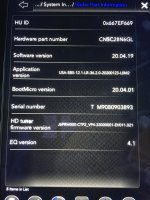
I took a pic of my screen, where does it say the Uconnect version? 

Burton12387
Active Member
I took a pic of my screen, where does it say the Uconnect version? View attachment 4127
“Software version”:
It’s in your picture.
Sent from my iPhone using Tapatalk
lovegolf44
Active Member
- Messages
- 455
- Reaction score
- 201
- Points
- 43
18.x or 19.x, I don't see it. Must be blind.“Software version”:
It’s in your picture.
Sent from my iPhone using Tapatalk
Burton12387
Active Member
18.x or 19.x, I don't see it. Must be blind.
20.04.19 is your software version.
Sent from my iPhone using Tapatalk
lovegolf44
Active Member
- Messages
- 455
- Reaction score
- 201
- Points
- 43
Well I thought so but I thought the most recent version is 19. X20.04.19 is your software version.
Sent from my iPhone using Tapatalk
Burton12387
Active Member
Well I thought so but I thought the most recent version is 19. X
Looks like you might have already gotten the VP4 Radio Software Recall, installed on your unit. That would explain the newer software version.
Sent from my iPhone using Tapatalk
lovegolf44
Active Member
- Messages
- 455
- Reaction score
- 201
- Points
- 43
It appears so.Looks like you might have already gotten the VP4 Radio Software Recall, installed on your unit. That would explain the newer software version.
Sent from my iPhone using Tapatalk
U
User_1648
Guest
Great...so now I'm two versions behind the times. 
Burn'n Oil
It's a metaphor!
I feel your pain...Great...so now I'm two versions behind the times.