What's new
Ram Heavy Duty Forum

Register a free account today to become a member! Once signed in, you'll be able to participate on this site by adding your own topics and posts, as well as connect with other members through your own private inbox!

TPMS (TIS) sensors for trailer (SOLVED - see 1st post) aka TTPMS - Trailer TPMS

Really need somebody who has the option from the factory to give us a log and their Vin so we can compare settings and find out exactly what extra hardware we need (if any).

I also wonder if, like the brake controller, there's an extra controller box that's required and not showing in the bodybuilder pdf which would appear to be only the "external" hard parts.

What I really wish is that FCA RAM would just come clean about this whole TTPMS option and what's required.
 
Well we're not sure if the TIM (trailer interface module) which is supposed to be located behind the headliner in the back of the cab us actually there in our trucks or if it also has to be added. That's why I need a Vin from a truck with factory ttpms so we can get a definitive list of part numbers we might need.
 
I'm gonna pull down the corner of my head liner today and see if the TIM there or if at least the wiring is there for it
 
Ok so got some bad news, and I got some good news...

Bad news, the TIM module is not present on my truck...

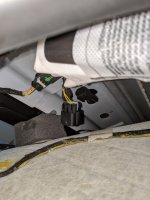
Good news, the corner of the head liner isn't too hard to pull apart, and the wiring harness is there plugged into a block off plate, so all we need to do is get the part number for the TIM and it should be plug and play after the Alfaobd settings are enabled.

IMG_20200412_151639.jpg
 
Again, if ANYONE ordered a truck with TTPMS from the factory, can you please PM me your VIN#, even if you haven't received the truck yet. I can give your VIN to a dealer parts adviser and he can tell me exactly what part numbers we need to order for this option.
 
Again, if ANYONE ordered a truck with TTPMS from the factory, can you please PM me your VIN#, even if you haven't received the truck yet. I can give your VIN to a dealer parts adviser and he can tell me exactly what part numbers we need to order for this option.

That seems to confirm threads I've read that indicates there's a module in the headliner as well.

Crap. More parts to buy.

Thanks for tearing into yours. Any chance you could get a wider shot on the headliner and trim you pulled? I do need to pull a cable from the front to the rear window for my dashcam anyway and if it's easier to pull a few panels than running a fish, that helps. Regardless, my youngest son used to work at Car Toys so I make him do all that stuff now. ;)
 
That seems to confirm threads I've read that indicates there's a module in the headliner as well.

Crap. More parts to buy.

Thanks for tearing into yours. Any chance you could get a wider shot on the headliner and trim you pulled? I do need to pull a cable from the front to the rear window for my dashcam anyway and if it's easier to pull a few panels than running a fish, that helps. Regardless, my youngest son used to work at Car Toys so I make him do all that stuff now. ;)

Sorry I buttoned it all up already, but I pulled the passenger rear hanger hook down, which is one screw. Popped the passenger C Piller trim off which is 1 screw and a bunch of pop clips, but you gotta be careful the wiring for the rear defroster and slider is all tangled in there. That gave me enough play to pull down the corner of the liner and take the picture. I'm sure if you pulled the A & B pillar trim off you'll be able to get enough play out of the liner to wedge your dash cam wire in there.
 
Sorry I buttoned it all up already, but I pulled the passenger rear hanger hook down, which is one screw. Popped the passenger C Piller trim off which is 1 screw and a bunch of pop clips, but you gotta be careful the wiring for the rear defroster and slider is all tangled in there. That gave me enough play to pull down the corner of the liner and take the picture. I'm sure if you pulled the A & B pillar trim off you'll be able to get enough play out of the liner to wedge your dash cam wire in there.

Is the plug location in the middle or closer to the passenger side? I need to fix the pass side A pillar trim anyway, they missed hooking the slot in the dash at the very front and there's a gap present. The stuff that's wrong on this truck build is annoying.

Interesting there's only two wires. Digital CANBUS?
 
Is the plug location in the middle or closer to the passenger side? I need to fix the pass side A pillar trim anyway, they missed hooking the slot in the dash at the very front and there's a gap present. The stuff that's wrong on this truck build is annoying.

Interesting there's only two wires. Digital CANBUS?
Man if i notice all the stuff you guys have, I'll stroke out an just send the dam thing back. Nothing more would p!$$ me off than to pay 85k an have a bunch of stuff that drives me crazy, that's beyond unacceptable from a quality perspective. I just not gonna have to fix a bunch of stuff after spending that much, ill just take my 26 2500 trade back an leave the lot
 
Is the plug location in the middle or closer to the passenger side? I need to fix the pass side A pillar trim anyway, they missed hooking the slot in the dash at the very front and there's a gap present. The stuff that's wrong on this truck build is annoying.

Interesting there's only two wires. Digital CANBUS?
It's directly above the passenger rear headrest.

Also I got a couple Vin numbers from other members and passed them on to my parts guy, as soon as he gives me a part number I'll post a link to it.
 
Well the dealer may say they can't, but Alfaobd says I can...View attachment 3486

All I need now is the hardware.
I got all the stuff to go in and change the config, but on my truck, it does not exist. I have tried everything.
2019 Laramie 3500
We picked it up at the end of May 2019. Maybe the settings are not there because it was one of the first few trucks built. Maybe I will have to pay the ransom and have the dealer enable it along with the trailer camera. I could change the trailer camera to yes, but it never shows up in Uconnect.
 
I got all the stuff to go in and change the config, but on my truck, it does not exist. I have tried everything.
2019 Laramie 3500
We picked it up at the end of May 2019. Maybe the settings are not there because it was one of the first few trucks built. Maybe I will have to pay the ransom and have the dealer enable it along with the trailer camera. I could change the trailer camera to yes, but it never shows up in Uconnect.

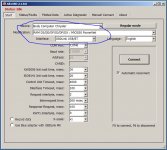
The options are not there under the 2019 BCM settings, in order to access the two settings that need to be enabled, you'll have to get the windows version of AlfaOBD. Once you have the windows version of AlfaOBD, connect to your ECU as you normally would, after it's connected click on the button for advanced mode, from there you can manually select a 2020 BCM, and then you go about changing the settings as you normally would under the active diagnostics tab.

I just typed that all out from memory w/o having alfaOBD in front of me so hopefully I didn't forget anything.

I'll take screen shots after work later and post them to make it easier.
 
I got all the stuff to go in and change the config, but on my truck, it does not exist. I have tried everything.
2019 Laramie 3500
We picked it up at the end of May 2019. Maybe the settings are not there because it was one of the first few trucks built. Maybe I will have to pay the ransom and have the dealer enable it along with the trailer camera. I could change the trailer camera to yes, but it never shows up in Uconnect.

Do you have the part number for the TIM that goes in the headliner?
 
Just asking a clarifier since I'm hoping to do this soon -- if I have a 2020, should I still be able to access the right settings via alfaOBD on an Android phone? Just want to be sure I get the right device and version.
 
My Vin is 3C63R3NL3KG673538 and it was built in Oct of 2019.


Sent from my iPhone using Tapatalk
 
Just asking a clarifier since I'm hoping to do this soon -- if I have a 2020, should I still be able to access the right settings via alfaOBD on an Android phone? Just want to be sure I get the right device and version.

That is correct, if you have a 2020 you should be able to access the settings via the ANDROID version of AlfaOBD.
 
The options are not there under the 2019 BCM settings, in order to access the two settings that need to be enabled, you'll have to get the windows version of AlfaOBD. Once you have the windows version of AlfaOBD, connect to your ECU as you normally would, after it's connected click on the button for advanced mode, from there you can manually select a 2020 BCM, and then you go about changing the settings as you normally would under the active diagnostics tab.

I just typed that all out from memory w/o having alfaOBD in front of me so hopefully I didn't forget anything.

I'll take screen shots after work later and post them to make it easier.
Yup, did all of that. Tried 2019, 2020, 2013-2017. None of the items are there. I did get the windows version per your post.

The problem was that I selected 2020 and it reverted to the 2019 modifications. You have to go back and change it after connecting to the 2020 model year modifications. Then they show up. Turn the truck off and back on and magic, they are enabled.

6.JPG
 
Just asking a clarifier since I'm hoping to do this soon -- if I have a 2020, should I still be able to access the right settings via alfaOBD on an Android phone? Just want to be sure I get the right device and version.

That is correct, if you have a 2020 you should be able to access the settings via the ANDROID version of AlfaOBD.

I was able to get to the options in Android AlphaOBD on my 2020.

AlphOBD has been updated to include the MY2020 PowerNet instead of trying to fake it and use older MY's.

Make sure you have a security bypass cable, I used the KAOdTech one and a BAFX ELM327 I already had.
 
Back
Top