What's new
Ram Heavy Duty Forum

Register a free account today to become a member! Once signed in, you'll be able to participate on this site by adding your own topics and posts, as well as connect with other members through your own private inbox!

AlfaOBD

Hi - I’m trying to get alpha obd setup so I can change tire size and maybe gas tank size.

My question: once I change the tire size and get it dialed in, do I need to leave the hardware attached or can I put everything back the way it was?
 
Hi - I’m trying to get alpha obd setup so I can change tire size and maybe gas tank size.

My question: once I change the tire size and get it dialed in, do I need to leave the hardware attached or can I put everything back the way it was?
you should only need it to make changes
 
Is there a good alternative to the KAOdTECH bypass cable they are out of stock at the moment?
 
Is there a good alternative to the KAOdTECH bypass cable they are out of stock at the moment?
google search yielded this

other members would have to report on it working, but it looks very similar to kaodtech

another one here looks closer with the 2 dongles but mentions 2018

Your mileage may vary, Please contact sellers and verify your application
 
Does anybody know if the bypass cable that is used by PROCAL SNAP is a suitable alternative?

I need to figure out how to turn my mirror functions on
 
Does anybody know if the bypass cable that is used by PROCAL SNAP is a suitable alternative?

I need to figure out how to turn my mirror functions on

It doesn't provide access to "all" the functions per @Jimmy07. Don't recall exactly what those are.

If it's not working, you need a proper bypass.
 
Totally new to this alfaOBD stuff. I have a 2016 2500 and want to change the tire pressure settings since I upgraded tires. What all do I need to do this? Modules? Cables? I tried searching this thread...but...it is a LONG one. I appreciate any and all help/advice!!
 
Totally new to this alfaOBD stuff. I have a 2016 2500 and want to change the tire pressure settings since I upgraded tires. What all do I need to do this? Modules? Cables? I tried searching this thread...but...it is a LONG one. I appreciate any and all help/advice!!
Just a note for others coming across this response- this will only apply to you, since you have a 2016, and the procedure is different than 2019+ owners.
You need AlfaOBD, obviously, and the MX+ (well, it doesn’t HAVE to be the MX+, but it’s recommended).
You do NOT need any type of bypass.
Aside from updating the tire pressures in the body computer, once that is done, you need to connect to the radio frequency hub and reset it. In order to do that, you’ll need the 4 digit PIN for the rf hub. AlfaOBD does have a function while connected to the rf hub that will pull up the PIN, but it doesn’t work all the time. If it doesn’t work for you, you can use the Chrysler PIN Puller app from the google play store.
 
Just a note for others coming across this response- this will only apply to you, since you have a 2016, and the procedure is different than 2019+ owners.
You need AlfaOBD, obviously, and the MX+ (well, it doesn’t HAVE to be the MX+, but it’s recommended).
You do NOT need any type of bypass.
Aside from updating the tire pressures in the body computer, once that is done, you need to connect to the radio frequency hub and reset it. In order to do that, you’ll need the 4 digit PIN for the rf hub. AlfaOBD does have a function while connected to the rf hub that will pull up the PIN, but it doesn’t work all the time. If it doesn’t work for you, you can use the Chrysler PIN Puller app from the google play store.
 
Thank you Jimmy07!
The information I was looking for wasn't in the 4th Gen forum so I posted here.
 
FYI - Just got an email from Kaodtech that the 19+ Ram HD security bypass cable is back in stock.
 
I'm looking for help on this. I installed the demo version of AlfaOBD and ordered the security bypass cable. In the meantime, I tried to get the app snyced with my 2022 Tradesman. After connecting my Samsung phone to the truck via bluetooth, I proceeded to connect the AlfaOBD app and after about 30 secs it indicates that a connection could not be established and also disconnects by phone from the truck. I saw that an OBDLink MX+ bluetooth interface is required (and maybe that's what I'm missing) but I can't seem to figure that part out. Is the OBDLink MX+ something that's available through the Google Play store? I did a quick search on Google Play and all I found is OBDLink app but not MX+. It would be helpful if the AlfaOBD came with detailed instructions. I plan to purchase the non-demo version of the app once I can get the demo version to work.

Thank you
 
I'm looking for help on this. I installed the demo version of AlfaOBD and ordered the security bypass cable. In the meantime, I tried to get the app snyced with my 2022 Tradesman. After connecting my Samsung phone to the truck via bluetooth, I proceeded to connect the AlfaOBD app and after about 30 secs it indicates that a connection could not be established and also disconnects by phone from the truck. I saw that an OBDLink MX+ bluetooth interface is required (and maybe that's what I'm missing) but I can't seem to figure that part out. Is the OBDLink MX+ something that's available through the Google Play store? I did a quick search on Google Play and all I found is OBDLink app but not MX+. It would be helpful if the AlfaOBD came with detailed instructions. I plan to purchase the non-demo version of the app once I can get the demo version to work.

Thank you
The OBDLink is a device you'll have to buy (or something similar) that connects your phone to the OBD port on your truck so that your phone apps can communicate with the trucks computers.
 
I use the wired OBDLink and AlfaOBD on Windows. If you are using the Android version of AlfaOBD then you get the Bluetooth version.

Hardware: (1) bypass cable connects to to (2) OBDLink via a OBD port that connects either by USB or Bluetooth to the

Software: (3) AlfaOBD software.

So for 2019+ you need three parts (numbered above). Two hardware and one software.
 
I'm looking for help on this. I installed the demo version of AlfaOBD and ordered the security bypass cable. In the meantime, I tried to get the app snyced with my 2022 Tradesman. After connecting my Samsung phone to the truck via bluetooth, I proceeded to connect the AlfaOBD app and after about 30 secs it indicates that a connection could not be established and also disconnects by phone from the truck. I saw that an OBDLink MX+ bluetooth interface is required (and maybe that's what I'm missing) but I can't seem to figure that part out. Is the OBDLink MX+ something that's available through the Google Play store? I did a quick search on Google Play and all I found is OBDLink app but not MX+. It would be helpful if the AlfaOBD came with detailed instructions. I plan to purchase the non-demo version of the app once I can get the demo version to work.

Thank you

AlfaOBD doesn't talk to the truck UConnect.

You need an OBD reader. OBDLink MX+ is the recommend and one of several "supported" readers but others work. Some ELM327 devices aren't fast enough for some functions so that's why everyone says to get the MX+.

It (MX+) also gives you an option to download one free platform specific license for Ford or GM.
 
Thanks everyone. I purchased the OBDLink EX cable off Amazon. It and the bypass cable arrive later this week.
 
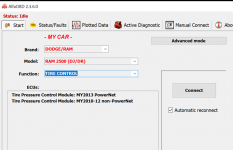
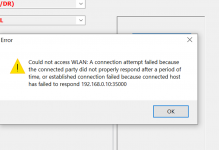
So I installed the bypass cable, downloaded and activated AlfaOBD on my laptop, and connected the EX cable. Everything appears to be connected correctly. I'm assuming I select Manual Connect but I don't know which connection I should be select (first image). These options are all foreign to me. I've tried various options and continue to receive a 'could not connect to WLAN error message (3rd image). Finally, for a 2022 truck should I be selecting the MY2013 PowerNet option (2nd image) for setting changes to my tire pressure? Thanks

AlfaOBD manual connection setting.jpg

1664063922812.png

1664064078860.png
 
Back
Top