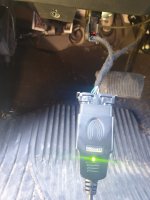
Super easy. Flash light helps. I had issues removing it, as the retainer clip on one didn't want to release correctly. After I got it out, I cut off the retainer clips and haven't had another issue. Total install time, if not mounting it permanent, is <5 minutes, having never done it before.In order to use alfaobd, you have to install some bypass kaodtech cable? Is the cable difficult to install?
Ram Heavy Duty Forum
You are using an out of date browser. It may not display this or other websites correctly.
You should upgrade or use an alternative browser.
You should upgrade or use an alternative browser.
Remote start added to 2020 Tradesman (SOLVED)
- Thread starter Kunkernator
- Start date

leeparnell89
Member
- Messages
- 64
- Reaction score
- 48
- Points
- 18
So I’m in the the install of the hood latch process. Accessing the BCM was horrible, no space and removing that amp thing looks to be a bear. My C11 had a purple with a white stripe wire in it. Thankfully I had some child labor on hand, no way my hand is fitting in there.
So I was able to conned the pin (or so I thought), got it all connected, the recommended security bypass cable in the odb port, with odblink lx, alfaodb on the pc and this isn’t very intuitive. Looks like I’m able to read the data fine but not sure how to get to settings the options?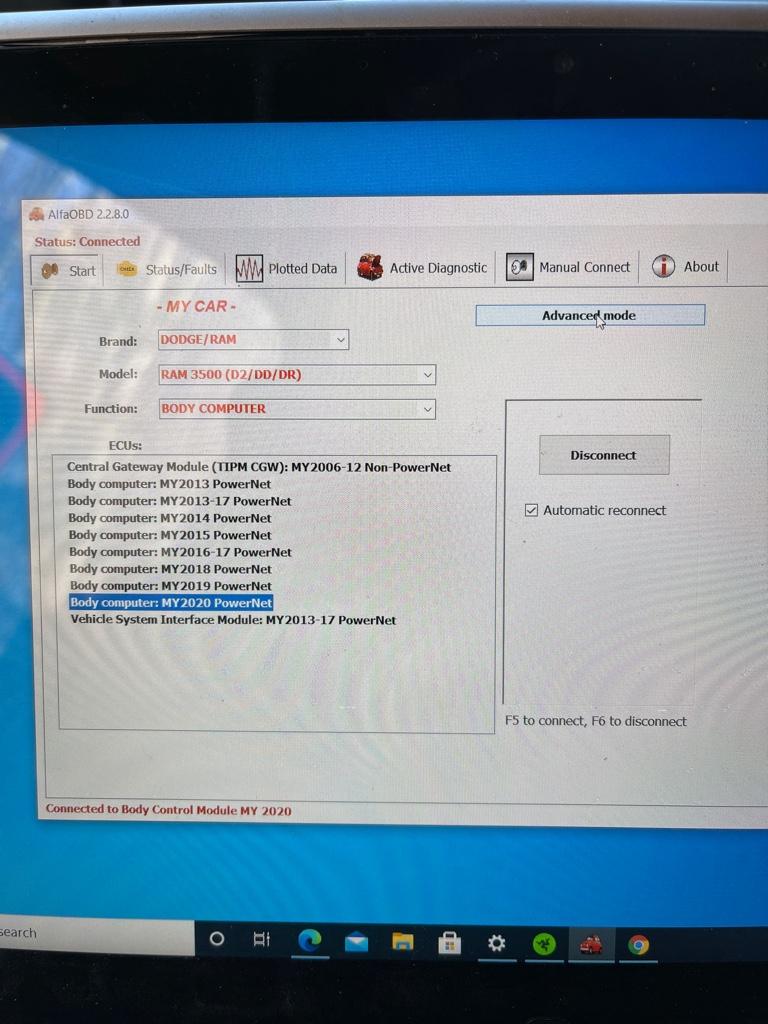
Really wish I tried the phone version as all the screenshots I’m seeing in the forums seem to refer to it and not this.
I found the section where remote start is detected (not present of course)
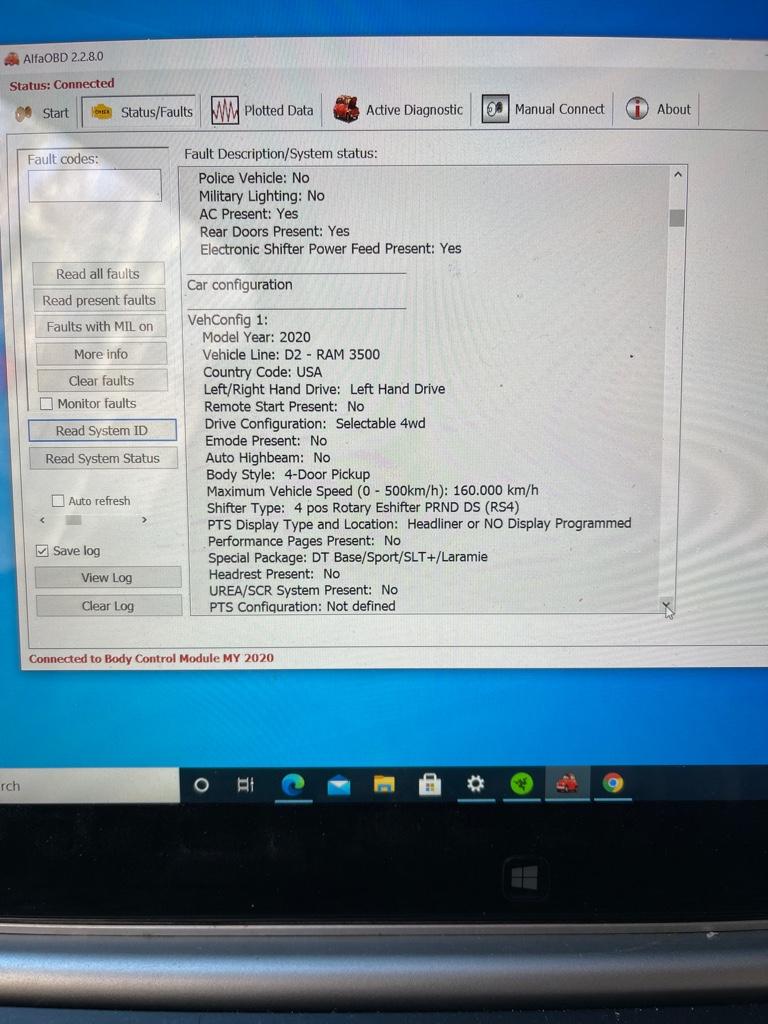
I did find the configuration section on the windows version here:
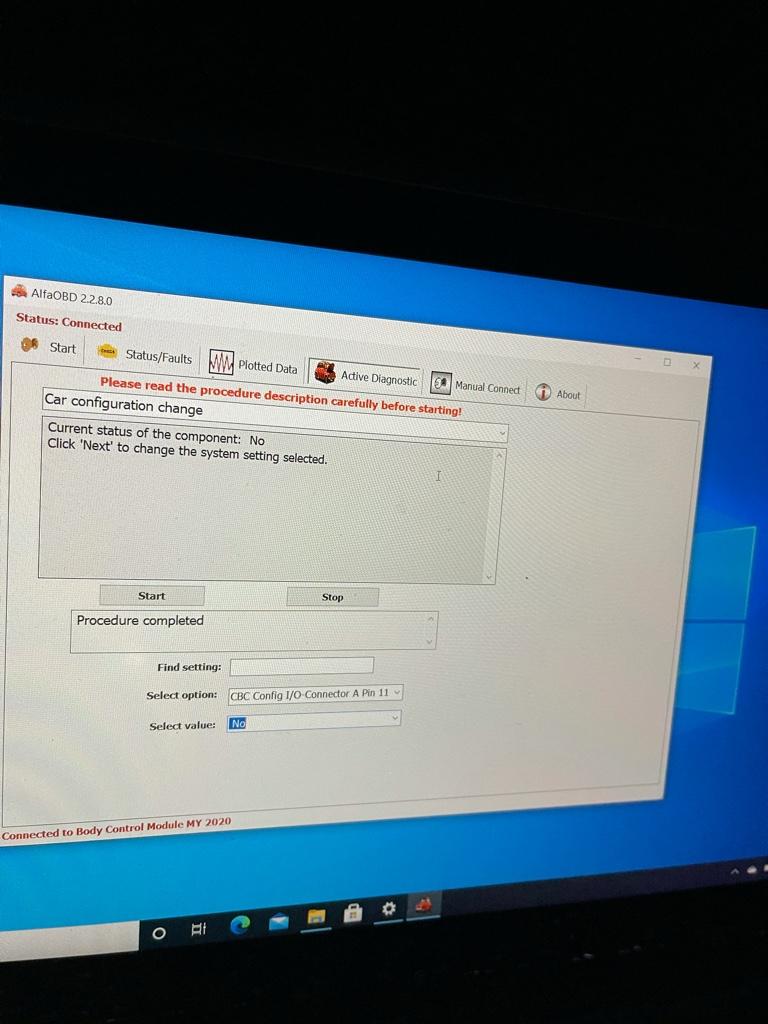
Basically you need to select the “active “ tab” and select “configuration “ on the drop down, second from the bottom.
I enabled the Remote Start, the horn on remote start. However after enabling the Hood Ajar sensor I’m getting a “hood ajar” warming light.
Looking at the instructions on the hood latch I got pin 11 on the a connector so not sure what’s going on at this point. Tomorrow I’m going to shove the boy back under the dash and we’ll try again. Should have I not enabled the “hood ajar “ at connector a pin 11 ?
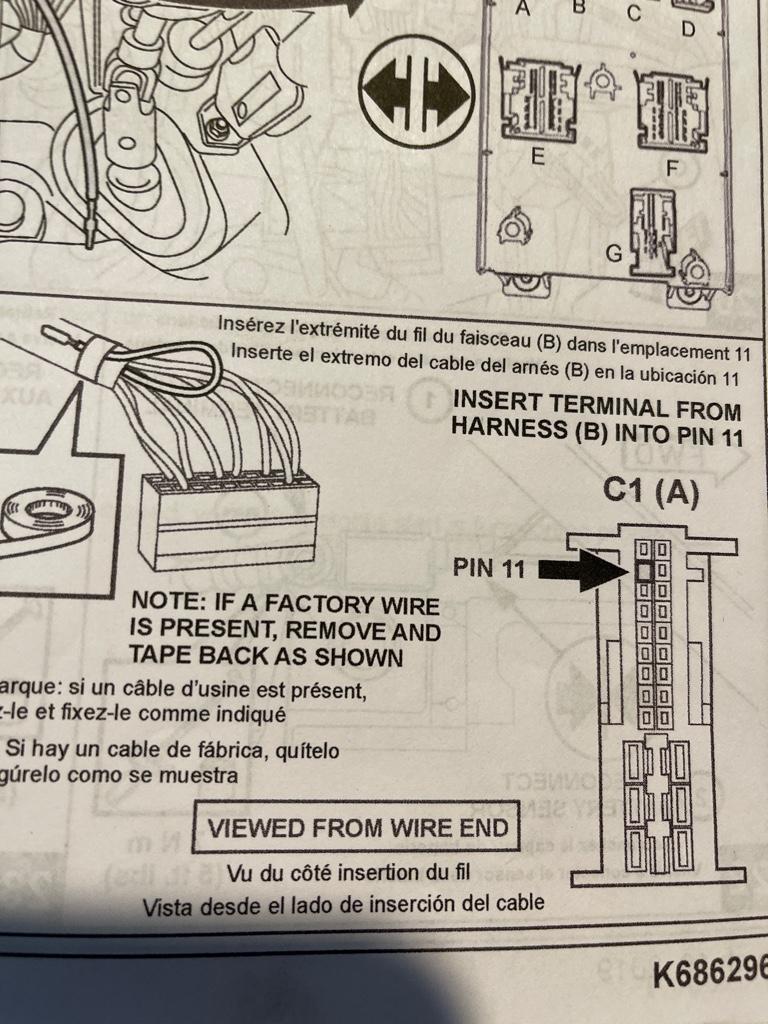
Sent from my iPhone using Tapatalk
 .
.Would anyone who’s done this with alpha on a windows computer mind helping walk me through it? I don’t have anything with google play so my only option was on my laptop and it’s not showing the options that I’m seeing others have through the mobile app. I don’t have the “car co figuration” option like heavyg603 does above and I’m lost as to where to go. It shows connected to my truck so I don’t think that’s the issue but who knows.
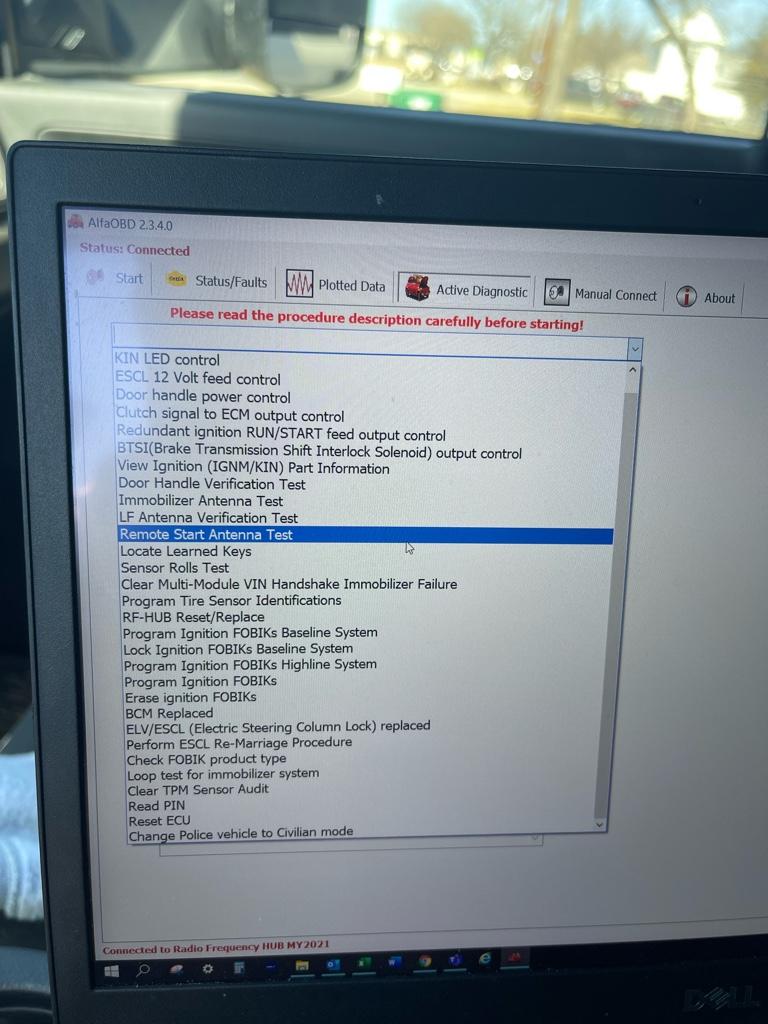
Sent from my iPhone using Tapatalk
You’re connected to the wrong module. You connect to the body computer, not the rf hub.Would anyone who’s done this with alpha on a windows computer mind helping walk me through it? I don’t have anything with google play so my only option was on my laptop and it’s not showing the options that I’m seeing others have through the mobile app. I don’t have the “car co figuration” option like heavyg603 does above and I’m lost as to where to go. It shows connected to my truck so I don’t think that’s the issue but who knows.
Sent from my iPhone using Tapatalk
leeparnell89
Member
- Messages
- 64
- Reaction score
- 48
- Points
- 18
You’re connected to the wrong module. You connect to the body computer, not the rf hub.
Thanks @Jimmy07, that did the trick. Drove around for a couple minutes and got over 30 mph after activating, but didn’t work when I got home. Figured I needed to drive it a little more and was planning on doing that today but low and behold the remote start worked this morning. Forever grateful for you guys that tinker and try these things that most think won’t work.
Sent from my iPhone using Tapatalk
Procharged392
New Member
- Messages
- 2
- Reaction score
- 0
- Points
- 1
I called my local dealer and provided 68475385AA they stated that superceded to 68538050AB which is on backorder with no ETA. Is this correct?

Christofo
Active Member
- Messages
- 133
- Reaction score
- 210
- Points
- 43
I sent an email to [email protected] on Feb 5th asking to have remote start enabled in the RAM app and it was finally added today for me.

H3LZSN1P3R
You're doing it wrong
Sounds about right since FOBs are back orderedI called my local dealer and provided 68475385AA they stated that superceded to 68538050AB which is on backorder with no ETA. Is this correct?

Jimmy Dean
Member
Can someone walk me through taking the key fob apart to solder buttons on? I have the battery out but I don't want to start randomly prying and break some small piece of plastic.
Jimmy Dean
Member
Can someone walk me through taking the key fob apart to solder buttons on? I have the battery out but I don't want to start randomly prying and break some small piece of plastic.
Found this video showing how in case anyone else had the same worries
Jimmy Dean
Member
settings the options?
Really wish I tried the phone version as all the screenshots I’m seeing in the forums seem to refer to it and not this.
I found the section where remote start is detected (not present of course)
I did find the configuration section on the windows version here:
Basically you need to select the “active “ tab” and select “configuration “ on the drop down, second from the bottom.
I enabled the Remote Start, the horn on remote start.
For anyone with a 2022 Tradesman doing this, I was successful today following the above procedures.
To recap, I had to do all of the following.
Purchase:
Micro-switches on Amazon - $9
AlfaOBD - $55
OBD EX (I bought the cable version, but MX+ bluetooth seems to be more common) - $50
KoadTech Bypass Cable -$55
Work:
1. Solder microswitches onto key fobs. (I also did tailgate release, worked immediately with no computer adjustments)
2. Install Bypass Cable
3. Start truck, hook up OBD cable, start AlfaOBD, connect, and change the following settings:
- VehConfig-1 Remote Start Present - YES
- BCM, Cust.Set.Menu 1-Sound Horn with Remote Start CSM Present- YES
- CBC I/O: Connector A Pin 11: Hood Ajar Switch Input Present- YES (It seems for 2022 this is already enabled because my truck came with the switch from the factory and it was already on YES)
5. Success! Both fobs worked perfectly immediately and I had none of the issues with not being able to unlock it afterwards (so far).
When I unlock it and get in, no codes, no issues. Display reads "Remote Start Active" and I just hit the start button and it's good to go.
Good luck to anyone else trying to add unlock some functionality to their truck!
Last edited:
commguy1981
New Member
- Messages
- 2
- Reaction score
- 1
- Points
- 3
Awesome info! Would it be possible to put the Amazon links in here?For anyone with a 2022 Tradesman doing this, I was successful today following the above procedures.
To recap, I had to do all of the following.
Purchase:
Micro-switches on Amazon - $9
AlfaOBD - $55
OBD EX (I bought the cable version, but MX+ bluetooth seems to be more common) - $50
KoadTech Bypass Cable -$55
Work:
1. Solder microswitches onto key fobs. (I also did tailgate release, worked immediately with no computer adjustments)
2. Install Bypass Cable
3. Start truck, hook up OBD cable, start AlfaOBD, connect, and change the following settings:
4. Disconnect AlfaOBD, unplug all the cables. Turn off truck. Turn on truck. Drive over 30 MPH. Turn off truck.
- VehConfig-1 Remote Start Present - YES
- BCM, Cust.Set.Menu 1-Sound Horn with Remote Start CSM Present- YES
- CBC I/O: Connector A Pin 11: Hood Ajar Switch Input Present- YES (It seems for 2022 this is already enabled because my truck came with the switch from the factory and it was already on YES)
5. Success! Both fobs worked perfectly immediately and I had none of the issues with not being able to unlock it afterwards (so far).
When I unlock it and get in, no codes, no issues. Display reads "Remote Start Active" and I just hit the start button and it's good to go.
Good luck to anyone else trying to add unlock some functionality to their truck!
Last edited by a moderator:
Christofo
Active Member
- Messages
- 133
- Reaction score
- 210
- Points
- 43
My truck is a 2022 with most options available on a Tradesman and did NOT have the switch.For anyone with a 2022 Tradesman doing this, I was successful today following the above procedures.
To recap, I had to do all of the following.
Purchase:
Micro-switches on Amazon - $9
AlfaOBD - $55
OBD EX (I bought the cable version, but MX+ bluetooth seems to be more common) - $50
KoadTech Bypass Cable -$55
Work:
1. Solder microswitches onto key fobs. (I also did tailgate release, worked immediately with no computer adjustments)
2. Install Bypass Cable
3. Start truck, hook up OBD cable, start AlfaOBD, connect, and change the following settings:
4. Disconnect AlfaOBD, unplug all the cables. Turn off truck. Turn on truck. Drive over 30 MPH. Turn off truck.
- VehConfig-1 Remote Start Present - YES
- BCM, Cust.Set.Menu 1-Sound Horn with Remote Start CSM Present- YES
- CBC I/O: Connector A Pin 11: Hood Ajar Switch Input Present- YES (It seems for 2022 this is already enabled because my truck came with the switch from the factory and it was already on YES)
5. Success! Both fobs worked perfectly immediately and I had none of the issues with not being able to unlock it afterwards (so far).
When I unlock it and get in, no codes, no issues. Display reads "Remote Start Active" and I just hit the start button and it's good to go.
Good luck to anyone else trying to add unlock some functionality to their truck!
H3LZSN1P3R
You're doing it wrong
Its hit or miss what options give you the hood ajar sensor, my 19 2500 Tman lvl 2 has the hood sensor from the factoryMy truck is a 2022 with most options available on a Tradesman and did NOT have the switch.
Jimmy Dean
Member
This is what I bought and one of the included types fit.Awesome info! Would it be possible to put the Amazon links in here?
QTETAK 200 Pcs 10 Value Micro Momentary Tactile Push Button Switch Tact Assortment Kit https://www.amazon.com/dp/B07LCBLB8N/ref=cm_sw_r_apan_i_5DEMK0WA355P0VQPJ1AZ?_encoding=UTF8&psc=1
commguy1981
New Member
- Messages
- 2
- Reaction score
- 1
- Points
- 3
Yup, I found the same and bought the same. Installed the switches and the tailgate worked right off the bat. Had to enable remote start via ALFAODB and it was good to go.This is what I bought and one of the included types fit.
QTETAK 200 Pcs 10 Value Micro Momentary Tactile Push Button Switch Tact Assortment Kit https://www.amazon.com/dp/B07LCBLB8N/ref=cm_sw_r_apan_i_5DEMK0WA355P0VQPJ1AZ?_encoding=UTF8&psc=1

.b0link
New Member
So, my tradesman does not have the switch, and does not appear to have the wiring for it. Does someone in here make a dummy switch or jumper that I could install without having to route all the way through the firewall and install onto the latch? What is my best option here as it seems like the only way to get latch wiring is through the kit, and the kit is seemingly backordered everywhere.
H3LZSN1P3R
You're doing it wrong
@Jimmy07 there is a spot under the fuse box he can put a resister and no need to run anything to the BCM correct?So, my tradesman does not have the switch, and does not appear to have the wiring for it. Does someone in here make a dummy switch or jumper that I could install without having to route all the way through the firewall and install onto the latch? What is my best option here as it seems like the only way to get latch wiring is through the kit, and the kit is seemingly backordered everywhere.

Mr.mossy23
New Member
- Messages
- 2
- Reaction score
- 0
- Points
- 1


Looks like it's not even seeing the OBD module. Verify you have a good connection to the OBD port off of the bypass cable. Make sure the cable is plugged into the ODB port well. Turn ignition to Aux. Your OBD module should have some sort of LED saying it has power.
Mr.mossy23
New Member
- Messages
- 2
- Reaction score
- 0
- Points
- 1