
Ram Heavy Duty Forum
You are using an out of date browser. It may not display this or other websites correctly.
You should upgrade or use an alternative browser.
You should upgrade or use an alternative browser.
12" Uconnect Split Screen
- Thread starter shauste
- Start date


iflyskyhigh
Well-Known Member
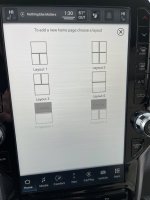
Yes. You can set up personalized pages from the “home” screen. There is an icon at the very bottom left of the Home page. Touch that and it will let you add, delete, and customize pages.

Crusty old shellback
Well-Known Member
- Messages
- 3,763
- Reaction score
- 6,166
- Points
- 113
I think Nav uses the complete screen. But other pages can be set as split screen, at least on my '21.
I have the radio on the upper half and Climate controls on the lower half.
I have the radio on the upper half and Climate controls on the lower half.
on my '22 12" i can do full screen nav or half screen, don't know if you can do quarter screen haven't tried that. on the bottom left of the home screen you need to select and make a new page with the layout you wish, then you select the different partitions to choose the content you wish in that section.
UC5 uses a different method than UC4. It’s replacement for home split screen is just like @iflyskyhigh described. You can create multiple Home Screen layouts, and swipe through them. You can set car play on top, but not on the bottom.On my 2019 1500, I was able to use a split screen mode. Is this possible with the 2022 2500 Ram?


Godzilla
Member
Hi Jimmy, on my screen I can only get Layouts 1-4, not the two Projection screens that you show in your first picture. I have a 2022 3500 with 12" UC5. I am accessing it with the touch screen icon at the bottom left of the screen (My Pages) and trying to modify so I can get CarPlay on the top box. Right now, I have the Nav widget in that slot - I have it set to three boxes, two quarters on bottom and half on top - and at times, the Nav screen disappears after a phone call through CarPlay which is running in the background. I don't see anywhere else in a menu to program this functionality and the dealership kind of quickly went through it with me - I have NOT yet read through the manuals; that is the plan for the next weekend that I am not jumping through flaming hoops elsewhere.UC5 uses a different method than UC4. It’s replacement for home split screen is just like @iflyskyhigh described. You can create multiple Home Screen layouts, and swipe through them. You can set car play on top, but not on the bottom.
View attachment 34378
View attachment 34380
View attachment 34379
Last edited:
You should be able to set nav to one half if you want. My default is nav on top, media on bottom.I think Nav uses the complete screen. But other pages can be set as split screen, at least on my '21.
I have the radio on the upper half and Climate controls on the lower half.
My only gripe is that you have to swipe away the "Favorites" or whatever on every start. Drives me nuts.
Godzilla
Member
Right... I can the nav to do that. Ideally, I'd like Apple CarPlay on the top half of the screen, then two separate widgets on each of the bottom quarters. I've just been so dang busy I've not been able to really dive into the workings of this and then, every time I get behind the wheel I tell myself - damn - I need to set this up more efficiently.You should be able to set nav to one half if you want. My default is nav on top, media on bottom.
My only gripe is that you have to swipe away the "Favorites" or whatever on every start. Drives me nuts.
iflyskyhigh
Well-Known Member
Hi Jimmy, on my screen I can only get Layouts 1-4, not the two Projection screens that you show in your first picture. I have a 2022 3500 with 12" UC5. I am accessing it with the touch screen icon at the bottom left of the screen (My Pages) and trying to modify so I can get CarPlay on the top box. Right now, I have the Nav widget in that slot - I have it set to three boxes, two quarters on bottom and half on top - and at times, the Nav screen disappears after a phone call through CarPlay which is running in the background. I don't see anywhere else in a menu to program this functionality and the dealership kind of quickly went through it with me - I have NOT yet read through the manuals; that is the plan for the next weekend that I am not jumping through flaming hoops elsewhere.
It will only allow you one personalized page with the nav and one with car play. If there is another page already using one of those widgets delete that page, and create a new page with the widget desired
Godzilla
Member
Alrighty… I’ll give it a go tomorrow. Thank you.It will only allow you one personalized page with the nav and one with car play. If there is another page already using one of those widgets delete that page, and create a new page with the widget desired
mountainears
Well-Known Member
- Messages
- 614
- Reaction score
- 463
- Points
- 63
I didn’t either. Just came across this. Had to add a page and saw there was an option to do that. Thanks.
Sent from my iPhone using Tapatalk
Sent from my iPhone using Tapatalk
