Ajbjorkman
Member
- Messages
- 41
- Reaction score
- 95
- Points
- 18
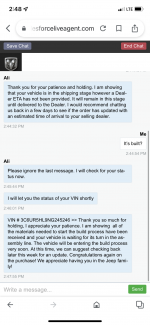
I checked this morning and had the exact same response.Just checked with Ram Chat and received this response....
I checked this morning and had the exact same response.Just checked with Ram Chat and received this response....

I’m in the same boat. Had est ship date of 2/27 on the POC but no equipment listing yet. Based on the tracking spreadsheet, looks like no equipment listing has posted on 2/25 or after. VIN 3C63R3ML4NG262008@brv10 would you be able to check on the status of my order when you get a second. Dealer told me I had an estimated ship date of 2/28 but I dont see a equipment listing or window sticker popping up yet. VIN:
3C63R3SL2NG217040
Thanks!


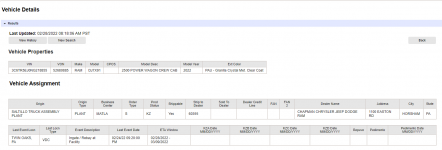
how did you get that?Looks like my 12/11/21 order Power Wagon w/sunroof, buckets and Level 2 made it to the rail yard in Philadelphia on 2/24/22. Now the frustrating wait for a truck to take it the last 45 mins to the dealership. ugh.
I have been emailing the dealership weekly for updates. They send me the screenshot.how did you get that?

I put a "?" next to a status in the sheet if I'm not very confident of the status to represent. I often have a hard time interpreting posts and want to do the best I can to represent the status but also don't want to make too many assumptions.@OfficerDirtySanchez the google doc spreadsheet shows my status as “kzu?” on 2/23. Just curious what that means, especially the “?”
Is there question or concern that I made it to the yard, and if so, based on what?
Edit; upon looking i see other statuses with the “?” Curious what causes/drives the question.
Thx!

You should have the list, but not the window stickerIf My truck is built but is waiting on a bedliner should I not already have an equipment list?
And if I’m KZLD then it’s built and I’m assuming waiting on the vendor for the bed work right? That makes sense to me but I would like to see some type of paperwork showing me somethingYou should have the list, but not the window sticker

Thanks mbarber84! Guess I was reading it wrong. I flipped the switch to the center and no overhead lights, but it was while I was driving own the road. I moved the switch back to the defeat side before I arrived home. This morning after reading your answer to my Post I opened the drivers door and placed the switch in the center position and the overhead lights came on. They went off after I closed the door. It was so much easier back when I was 16. Open the door and the lights came on automatically and went off when you closed the door. Guess I'm too old fashion to own an updated truck..... LOL Hope you're enjoying your truck as much as I'm enjoying mine..... 47 days and I already have 500 miles. I need to take a vacation and put some miles on it..... LOLIsn’t it controlled by the switch on the overhead console? Should be a switch on the left side that shows a door open and says “off”. The manual calls it a “dome defeat” button. If that doesn’t work, then perhaps you have your interior illumination roller switch turned all the way down. There’s two roller style switches on the left side of the dash just to the left and below steering column. One controls the intensity of the instrument lighting, the other controls the interior illumination and accent lights.
For reference and more info see page 58 of the owners manual
Sent from my iPhone using Tapatalk

clearing cache has no effect. I have also tried using other devices. Browsers that have never been used. Other computers. nothing has worked. computers that are basically brand new. Used for non internet purposes. But just for the hell of it, i cleared my cache too. Some peoples vins will work, some dont. Mine will not. I dont think this is a cache problem.That link worked for me.
Ty. Learning your cache.
This has happened to me a couple of times and clearing the cache resolved the issue.

Come on in and join the rest of us . . .Checked with my dealer on my Canadian order.
Order was accepted by Ram on 01/13 currently BX.
Dealer emailed Ram and no VIN yet, awaiting parts for the build. It’s a 3500 HD Longhorn with Level 1 and Safety group, so I hope this doesn’t get stuck in a black hole.

Just a thought - I was struggling at first and turns out the website link was case sensitive for the VIN part. I would have never thought that to be a problem but when i capitalized all the letters it worked for me.Checked with my dealer on my Canadian order.
Order was accepted by Ram on 01/13 currently BX.
Dealer emailed Ram and no VIN yet, awaiting parts for the build. It’s a 3500 HD Longhorn with Level 1 and Safety group, so I hope this doesn’t get stuck in a black hole.
 Looking at ordering a 3500 HO DRW Laramie or Limited. Thanks!
I am starting to worry that this was just ram chat generic lingo for “it left the factory.” A week long ETA from Port Allen to MD if it actually left Port Allen is absurd. Should take mere hours.Looks like I went KXU on my way to KZX!! Hoping it lands soon, as being without a vehicle is terrible.