What's new
Ram Heavy Duty Forum

Register a free account today to become a member! Once signed in, you'll be able to participate on this site by adding your own topics and posts, as well as connect with other members through your own private inbox!

Trying to install OEM bed light kit

wrvond

Well-Known Member
Messages
453
Reaction score
536
Points
93
Location
West Virginia, USA
My 2023 Laramie did not come with bed lights so I purchased the kit several months ago and am just now getting around to trying to put it in. The Infotainment YouTube video makes it look pretty easy but I don't think they accounted for 67 year olds!
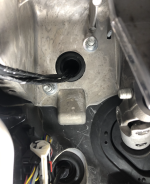
Anyway, I'm up to the point of feeding the wires through the firewall. According to the video there's supposed to be a rubber boot that I'm supposed to cut the end off of and feed it through. I can't find any such critter on my truck. There is, however, a blanking plate that I suspect has replaced the rubber boot. It's got a couple healthy sized nuts on the inside so I'm hesitant to just start wrenching on it without confirming I need to drill a hole in the plastic (looks like plastic) and feeding the wires through.
Here's some pics:

The view from outside:
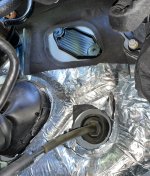
Screenshot 2024-05-30 130434.jpg

The view from inside:
Screenshot 2024-05-30 130514.jpg

Has anybody else run into this issue and what was your solution?

Thanks!
 
I don’t have any information to add for you debacle but, are you sure those 2 haas looking bolts are just for what appears to be a plastic plate? Looks like they may be holding something else together. Just a thought.
 
That looks like the mounting point for the clutch master cylinder (maybe leftover from years ago?). I drilled through the center of that plastic and installed a rubber boot I bought online, for the wiring for my power sidestep running boards....1717099066548.png
 
This is what you need for that spot. Makes it super easy. But looks like they just sold out. Maybe give NH Overland a email and see when they are back in stock.

 
I want to thank everyone for their answers. I really can't wait around for Amazon to deliver though so I scrutinized the YouTube video carefully and realized the pass through they are using is behind a big 'U' shaped bundle of wires. My hood release cable already passes through there so I stole one of my wife's thinnest (and longest) knitting needles and pushed it through from the inside then taped the wires to it from the outside. Pulling it back through worked really well for getting the wires inside the cab.
At the moment I am taking a break from trying to connect the green wire to pin 16 of the connector inside. I can't seem to get two hands up in there so trying to screw the wire tap together with one hand isn't going too well.
I've said it before and I'll say it again - drop lights are an invention of satan. They steadfastly refuse to lay down pointing at the work area. It's always one of two directions - exactly 180° away from the work area or directly into your eyes!
I've already got the tan wire connected under the hood so once I get this green one done and plugged back in, I'll be ready to put the truck back together and get after it with AlfaOBD.
The bed lights are the only option I wanted that did not come on this truck. The lesson here is, get what you want the first time - I'm never doing this again!
Those guys on YouTube say this is an easy mod and estimate one hour to complete. Hah! I'm in my second day! :rolleyes:
I realized they are working on a brand new bare bones truck. Much less interference to deal with and no dirt falling out of the wheel wells and frame into their face. Maybe if I was 30 or 40 years younger and 50 pounds skinnier it wouldn't be so hard. :D
Oh well, break's over - back to work!
 
SUCCESS!!!!
I have spent the last nearly three hours trying to get that C7 connector plugged back in and suddenly it just fell into place, snapped all the way in and locked down. :rolleyes:

I finished putting the truck back together (wheel well liner and under steering wheel area, and started it up to ensure I hadn't broken anything. Everything looks perfect - no untoward lights on the dash, etc.
While I had it running I went to the back and of course the bed lights aren't on, but the cargo light was on and I pressed the button in the bed and the cargo light went on and off with the switch presses. I take that as a sign that all is wired correctly.

I'm about to take my laptop down and fire up AlfaOBD to see if I can get them enabled. I'm using Alfa for Windows and there doesn't seem to be a lot of information online on how to use it - everything seems to be Android oriented.
I'm going to take a few minute break first and un-pretzel myself though, so if anybody has any hints, tips or tricks using AlfaOBD for Windows, I'd like to hear 'em!

Thanks again!
 
Back
Top