What's new
Ram Heavy Duty Forum

Register a free account today to become a member! Once signed in, you'll be able to participate on this site by adding your own topics and posts, as well as connect with other members through your own private inbox!

Screen needs manually turned on

Jmonty

Active Member
Messages
191
Reaction score
175
Points
43
Not sure if it was from an update or not but for the last week(s) anytime I turn the truck on I have to manually turn on the screen by pushing the volume nob. I've searched the settings for some obvious setting to auto turn on the screen but not finding anything. Is this a setting or do I have a problem on my hands?
 
I tried a reset, no change. I also tried just using the menu and restarting through settings, the radio screen remains blank until I hit the power button.
 
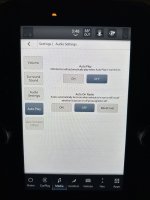
It's an option in the radio settings. I think it's under auto play.

There's 3 options for it off/on/last setting. You have yours to off. Change to on or last setting
 
Thats it! No idea how that got changed to off, I've never gone into any of the audio settings before. Also, what a dumb place to have the head unit on/off settings to be located!


IMG_1633.jpeg
 
I remember seeing it in there when I wanted to mess with the autoplay settings for my phone and thought it was an odd place to put that option. Glad it worked for you!
 
Gawd, who writes this stuff?

Programmers, not UI designers did this. They all think in double reverse negative if then else logic FFS.
 
Back
Top