

Often when I search for past threads on something I have a question about, I run into limitations. Usually it is when the forum software returns a message like, "some search terms or phrases too short or common". So terms like DEF, "how long", and more do not get included. So sometimes, I get no good results even though I am pretty sure the topic or question has been covered before. My question is have any of you found a way around this? I saw mentioned that you can use Google to get around the limitations and limit the search to this site. But I have not had good luck doing that so may be doing that correctly. I know that often when a question gets asked that has been thoroughly covered before, someone will helpfully note that and include a link. But I prefer not to depend on that route and besides, it always just makes me wonder, how did they find that when my searched could not. Thanks for any suggestions.
Ram Heavy Duty Forum
You are using an out of date browser. It may not display this or other websites correctly.
You should upgrade or use an alternative browser.
You should upgrade or use an alternative browser.
Question about searching this forum
- Thread starter Will_T
- Start date



Search restrictions
Admin/Mods, Can we discuss loosening up the search restrictions? Members are told to use the search function first. I find myself with "search keywords were too short, too long, or too common" all too often. There are a lot of three letter words/acronyms that help narrow down a search.
 hdrams.com

Search restrictions
Admin/Mods, Can we discuss loosening up the search restrictions? Members are told to use the search function first. I find myself with "search keywords were too short, too long, or too common" all too often. There are a lot of three letter words/acronyms that help narrow down a search.

I tried the advanced search noted in that thread with words like DEF, and search and it does not seem to change the limitations on short or common words. I just did the same search using the string rb92673 suggested and got good results in Google. So in the future when running into the issue I will go that route. Thanks all!
I just ran a search on DEF and got plenty of results for either post content or thread title.
You have to use the Advanced search on the top bar pulldown, not search or advanced search from the search magnifier.
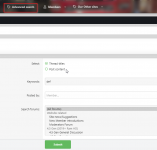
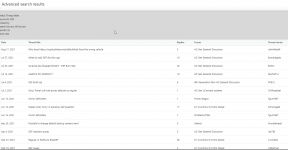
You have to use the Advanced search on the top bar pulldown, not search or advanced search from the search magnifier.
You have to use the Advanced search on the top bar pulldown, not search or advanced search from the search magnifier.
Ah. That is what I was doing wrong. I was clicking the magnifying glass and then when I decided advanced was needed just clicked the "Advanced search" there. My bad for not understanding the dropdown Advanced search was a separate tool and worked differently. I just tried a couple of short word and common word searches and got results without the "OOPS!" message. Sorry for being a little dense on differentiating between the two Advanced search tools. Thanks!
Glad you sorted things out!