What's new
Ram Heavy Duty Forum

Register a free account today to become a member! Once signed in, you'll be able to participate on this site by adding your own topics and posts, as well as connect with other members through your own private inbox!

Is the 12.0" vertical screen just a gimmick?

Minimization

New Member
Messages
27
Reaction score
22
Points
3
Location
King County, Washington, USA
$1,300 option for Laramie, and appears to add no more functionality over 8.4". The lower part of the screen appears to be mainly pictograms in touch screen form of former hard buttons and knobs.

I think I'd rather have hard buttons and knobs; I have a feeling this thing will die within a decade.

Thoughts?
 
To me it is. I like manual controls. Easier to find without taking eyes off the road.

My tman only lacks CarPlay and I would be perfectly happy with its radio capabilities. Especially if on start it would default to last active listening option instead of back to radio.
 
$1,300 option for Laramie, and appears to add no more functionality over 8.4". The lower part of the screen appears to be mainly pictograms in touch screen form of former hard buttons and knobs.

I think I'd rather have hard buttons and knobs; I have a feeling this thing will die within a decade.

Thoughts?
Which physically buttons are missing on the 12” that the 8.4” has?
The 12” is already close to EOL, as it will be replaced by the Uconnect 5 widescreen soon, already used in Durangos and Pacificas. There’ll eventually be 2 touchscreens offered, one for the radio display and one for the controls, as evidenced by the new wagoneer. Then again, you don’t even have to use either the touchscreen or physical buttons, you can just use the steering wheel voice button to tell the truck what to set climates to.
 
I had a 1500 Limited that had the 12 inch display and now I have a 2500 with the 8.4 display, I really don't miss the 12 inch. It was a "nice to have" not a "have to have" in my opinion. No real issues or complaints with the 12 inch display.
 
Coming from a 2017 1500 w/ 8.4 the only thing I really miss is the heated seat / heated steering wheel hard buttons. Kind of a pain having to go find them each time i want them. Moving them to the screen bottom is not an option as other things there are more important. Otherwise IMO the 12" is nice to have for full screen nav and split screen functions.
 
I like the split screen functions. Don't use the full screen NAV screen much but it's nice when I do.

I need to learn to make use of the NAV in motion feature of the NAViKS box I installed for the always on camera. That said, I tend to use Google maps on my phone more whether I'm running Bluetooth or cabled up AA. Maps voice input is so much better than the OEM systems. I tried to find "Autonation Dodge on Arapahoe" via voice 4 times before I gave up and asked Google, which got it right the first time.

If I had one gripe it would be the camera screen forces the lower portion to be the controls only.
 
The NAV is full screen. The biggest problem I have with it is at night when you put it in reverse, there is NO WAY to dim the screen. It's like putting a work light in your face.
I tested my 8.4 the other night and it is dimmable on reverse camera. 2020 RAM 3500 Tradesman with the 8.4 without NAV.
 
Which physically buttons are missing on the 12” that the 8.4” has?
The 12” is already close to EOL, as it will be replaced by the Uconnect 5 widescreen soon, already used in Durangos and Pacificas. There’ll eventually be 2 touchscreens offered, one for the radio display and one for the controls, as evidenced by the new wagoneer. Then again, you don’t even have to use either the touchscreen or physical buttons, you can just use the steering wheel voice button to tell the truck what to set climates to.
Climate controls are buttons/dials with the 8.4.
 
The NAV is full screen. The biggest problem I have with it is at night when you put it in reverse, there is NO WAY to dim the screen. It's like putting a work light in your face.
The dimmer switch is on the lower part of the dash to the left of the steering wheel. There are two dials you rotate up or down. I believe it's the dial on the right.
 
I had it in my 1500, it's nice to split the screen between NAV, HVAC controls, media etc. The lack of buttons is somewhat of a pain but you'll get used to it and figure out where stuff is quick enough and how to best get to it.
For my daily drive, I left the HVAC controls up top with the heated/cooled seats and wheel page open. The XM radio page then lived on the bottom.

Using android auto it would put the nav map on top and then you could have the radio or whatever page you wanted on the bottom.
 
The dimmer switch is on the lower part of the dash to the left of the steering wheel. There are two dials you rotate up or down. I believe it's the dial on the right.

I think everyone knows where the dimmer dials are. You're right that it is the rightmost dial. It only controls the EVIC and dash panel button/controls brightness. The other (left) is the ambient lighting dial.

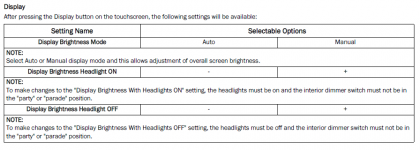
That has no effect on the screen brightness when you put in in reverse and the camera comes up. It's in effect, putting it onto "party" mode.

The screen brightness is controlled in the Uconnect radio settings.

1616618452727.png
 
The NAV is full screen. The biggest problem I have with it is at night when you put it in reverse, there is NO WAY to dim the screen. It's like putting a work light in your face.
I had the same problem with my 8.4. Could dim the screen, but when I put it in reverse it was blinding. Once I got my windows tinted it was impossible to use my mirrors in the dark. I bought a roll of 20% static cling window tint and applied it to the screen. Then I turned the normal screen (radio etc.) up to max so I can still use during the day and at dusk when the lights come on.
 
Back
Top