What's new
Ram Heavy Duty Forum

Register a free account today to become a member! Once signed in, you'll be able to participate on this site by adding your own topics and posts, as well as connect with other members through your own private inbox!

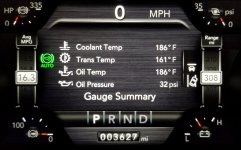
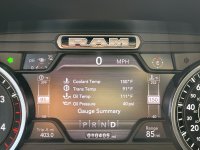
How do you setup your instrument cluster?

kobra

Well-Known Member
Messages
472
Reaction score
964
Points
93
Hi all,

I've been playing with the choices for the driver instrument cluster on my 2020 RAM 3500 ltd. I think this option is also on Laramie models?
There are lots of choices and it might take me awhile to figure it all out.

I'm curious, how do you have yours setup?
Anyone want to share what they've found most useful?

Thanks!
B
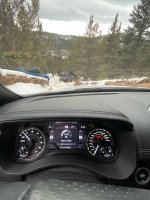
 
Outside temp __Speed__TOD
Average MPG_____Range
Oil Temp_____Battery Voltage

Had voltage in the center in this image because I was actively winching, but normally I’d have it on Tire Pressure or something else
 

Attachments

  • 71D5B197-8B6E-40A2-A68F-11A094EA3004.jpeg
    71D5B197-8B6E-40A2-A68F-11A094EA3004.jpeg
    595 KB · Views: 223
Last edited:
Just put it back to factory for now; I guess that's why I'm looking for suggestions.

Thanks!
As I seem to recall the default set up may have had the time and temp which are on the u connect so I got rid of those two, anyway here is my arrangement going clockwise starting at the top left.
Top left engine temp
Top center compass
Top right trans temp
Center right avg mpg
Bottom right range left
Bottom left battery
Middle left menu
Center speedo

sorry about the picture

Millmutt
 

Attachments

  • 272E10D8-484E-47B5-A40B-82EC5F3702D4.jpeg
    272E10D8-484E-47B5-A40B-82EC5F3702D4.jpeg
    62.8 KB · Views: 141
I will try to get a picture of the way mine are set up
 
Btsbarton are the two trucks below stuck?

beautiful scenery
Yes, It was a actually a 4-vehicle pileup... there’s 2 black trucks in front of the grey one. Blue one on left was already moved out of the way when this photo was taken. It was Long steep downhill, very slick. I think they were pretty well spaced out coming down but they probably each came around the last corner and at that point it was too late.
 
index.php


Gear indicator enable post: https://hdrams.com/forum/index.php?...option-in-gauge-cluster.961/page-3#post-32509
 
Last edited:
I wish they had more and better choices for the left and right gauges. The only useful one to me is range which leaves me with an extra gauge that I can't put anything useful on. All the choices are either useless or redundant if you run the gauge summary in the main screen.
 
I move the middle around a bunch, so I have Trans Temp on the left and Water Temp on the right. Along with Trip and Range on the bottom corners. I’ve changed the upper corners a few times trying to finalize a best choice.

59572744-E588-4E3A-AFE9-FCBC01DD7BBE.jpeg
 
I move the middle around a bunch, so I have Trans Temp on the left and Water Temp on the right. Along with Trip and Range on the bottom corners. I’ve changed the upper corners a few times trying to finalize a best choice.

That's my thought as well. I wanted the coolant and trans temp to always show no matter what I had selected on the center screen.
 
Back
Top