
What's new
Ram Heavy Duty Forum

Register a free account today to become a member! Once signed in, you'll be able to participate on this site by adding your own topics and posts, as well as connect with other members through your own private inbox!

Back up camera surround view vs. non surround

joelp

Member
Messages
97
Reaction score
99
Points
18
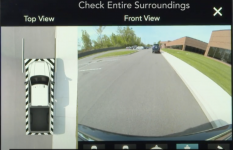
Question for you guys with the surround view. Is the attached photo what your screen looks like from the moment you put the truck into reverse?

The reason I ask is because the non surround version has the 'check entire surroundings' message overlaid on the top portion of the reverse image so when looking to back out you are completely blind to the top of the screen where you can actually see if a car is coming.
 

Attachments

  • Screen Shot 2022-01-21 at 8.50.55 AM.png
    Screen Shot 2022-01-21 at 8.50.55 AM.png
    1 MB · Views: 31
The normal reverse camera check surroundings message should go away after a few seconds, i wish i could remove it on mine as those seconds feel like an eternety when plowing
 
The normal reverse camera check surroundings message should go away after a few seconds, i wish i could remove it on mine as those seconds feel like an eternety when plowing
it has to be 6-8 seconds and it drives me insane. they put the safety message in the place where it MOST gets in the way of your ability to use the screen to make a safe decision.

my question is whether the same overlay exists on the video feed when in a surround view equipped truck (mine is non surround view and HAS the annoying overlay) or if that black bar in my photo is the warning with no overlay.
 
Back
Top