
Ram Heavy Duty Forum
You are using an out of date browser. It may not display this or other websites correctly.
You should upgrade or use an alternative browser.
You should upgrade or use an alternative browser.
Android Auto
- Thread starter Farmatt
- Start date
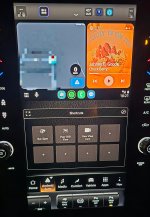
This massive screen and you can't do AA full screen or even half screen? But you can with Apple Carplay? Ridiculous.
Can you share a picture? I'm getting ready to order a 26 and would like to know how limited the AA implementation is.
2024RAM0wner
Member
- Messages
- 53
- Reaction score
- 37
- Points
- 18
UC5 can only do half-screen Android Auto. My nerd intuition is telling me they're done with UC5 and now working on UC6. Which would mean no more updates to UC5...but I hope I'm wrong.
There's a petition on Change.org asking/demanding Stellantis make AA full screen on UC5. https://chng.it/HwXyckqKrw Unfortunately, it doesn't have many signatures.
There's a petition on Change.org asking/demanding Stellantis make AA full screen on UC5. https://chng.it/HwXyckqKrw Unfortunately, it doesn't have many signatures.
The only way to do it is to fool Uconnect into thinking Carplay has been requested, by using a small "smart box" dongle device. Plenty of them on Amazon. It loads its own interface into that CarPlay session and then loads AA into that, fullscreen. I've been using one for a year flawlessly, it just adds 30-40s load time with the extra steps. Ridiculous that we have to spend $70-100 on a dongle on our $60-100k trucks, or buy an iPhone and switch ecosystems (many of us can't), or buy a Ford that offers it natively.
I have this one: https://www.amazon.com/dp/B0BLJWBZGC?ref=ppx_yo2ov_dt_b_fed_asin_title
I have this one: https://www.amazon.com/dp/B0BLJWBZGC?ref=ppx_yo2ov_dt_b_fed_asin_title
Do you have a picture of what it looks like? I bought a similar one, can't remember the name but it didn't work. Turned out it's meant for vehicles that don't do wireless AA/ACP.The only way to do it is to fool Uconnect into thinking Carplay has been requested, by using a small "smart box" dongle device. Plenty of them on Amazon. It loads its own interface into that CarPlay session and then loads AA into that, fullscreen. I've been using one for a year flawlessly, it just adds 30-40s load time with the extra steps. Ridiculous that we have to spend $70-100 on a dongle on our $60-100k trucks, or buy an iPhone and switch ecosystems (many of us can't), or buy a Ford that offers it natively.
I have this one: https://www.amazon.com/dp/B0BLJWBZGC?ref=ppx_yo2ov_dt_b_fed_asin_title
The Ford display makes me jealous. But I didn't like the look of the truck or how it rode. Plus I wanted a cummins motor.
I'm not sure if the last comment is to be believed or if it's just ai bot generated garbage: https://support.google.com/androida...id-auto-and-uconnect-who-is-the-problem?hl=en
"Congratulations on the new 2026 RAM 1500! That 14.5-inch vertical screen is a beast, but seeing it sliced in half by Android Auto is a known "growing pain" for Stellantis vehicles.
To settle the debate: It is primarily a Uconnect/Stellantis issue, but with a touch of Google's strict "handshake" rules mixed in.
The "Half-Screen" Breakdown
The reason you're seeing Android Auto only on the top half (while Scott's Jeep Compass looks great) comes down to Aspect Ratio and Software Mapping:
Uconnect 5 Logic: On the massive vertical screens (12" and 14.5"), Uconnect 5 is designed to be a "multi-card" system. It reserves the bottom half of the screen for its own native widgets (Climate, Media, or Vehicle Info). It essentially tells Android Auto: "I only have a square box available at the top for you."
The Jeep Difference: Scott's Jeep Compass likely has the 10.1-inch horizontal screen. Because that screen is wider than it is tall, Uconnect allows Android Auto to take over the full width. On your vertical RAM screen, "Full Screen" would require Uconnect to surrender its entire vertical real estate, which it isn't currently programmed to do for Android.
The Apple CarPlay Contrast: You might notice Apple CarPlay often goes full-screen on these same trucks. This is because Apple's protocol allows for more aggressive "stretching" and resizing, whereas Google requires the car manufacturer to specifically "authorize" the new dimensions in a firmware update.
Is there a fix?
As of March 12, 2026, there is no simple "toggle" in the settings, but here is the roadmap:
Check for Uconnect Update 26.x: RAM has been rolling out over-the-air (OTA) updates. Go to your System Settings > Software Update. Recent 2026 patches have started introducing a "Full Screen" mode for certain trims that allows you to tap an "Expand" icon to push Android Auto into the lower half.
The "Developer" Trick: * Open Android Auto on your phone > Settings > Scroll to Version and tap it 10 times.
In the Developer Settings (three dots top right), find Video Resolution.
Set it to "Allow up to 1280x720" or "Negotiated by phone/car." Sometimes forcing the resolution forces Uconnect to rethink the layout.
The Dealership "Flash": Scott is right about one thing—dealerships often have access to "Tavern" or "Service" firmware updates that haven't hit the OTA (Over-the-Air) servers yet. Mention that you're looking for the "Android Auto Aspect Ratio Patch" for the 14.5-inch display.
Michaël’s Expert Tip: If you can't get it full-screen yet, use the bottom half of the Uconnect screen to display your "Off-Road Pages" or "Towing Status." It turns the "wasted space" into a useful secondary dashboard until the next software patch drops!
Wazily yours,
Michaël InstantT Android Auto Community & Waze Editor"
"Congratulations on the new 2026 RAM 1500! That 14.5-inch vertical screen is a beast, but seeing it sliced in half by Android Auto is a known "growing pain" for Stellantis vehicles.
To settle the debate: It is primarily a Uconnect/Stellantis issue, but with a touch of Google's strict "handshake" rules mixed in.
The "Half-Screen" Breakdown
The reason you're seeing Android Auto only on the top half (while Scott's Jeep Compass looks great) comes down to Aspect Ratio and Software Mapping:
Uconnect 5 Logic: On the massive vertical screens (12" and 14.5"), Uconnect 5 is designed to be a "multi-card" system. It reserves the bottom half of the screen for its own native widgets (Climate, Media, or Vehicle Info). It essentially tells Android Auto: "I only have a square box available at the top for you."
The Jeep Difference: Scott's Jeep Compass likely has the 10.1-inch horizontal screen. Because that screen is wider than it is tall, Uconnect allows Android Auto to take over the full width. On your vertical RAM screen, "Full Screen" would require Uconnect to surrender its entire vertical real estate, which it isn't currently programmed to do for Android.
The Apple CarPlay Contrast: You might notice Apple CarPlay often goes full-screen on these same trucks. This is because Apple's protocol allows for more aggressive "stretching" and resizing, whereas Google requires the car manufacturer to specifically "authorize" the new dimensions in a firmware update.
Is there a fix?
As of March 12, 2026, there is no simple "toggle" in the settings, but here is the roadmap:
Check for Uconnect Update 26.x: RAM has been rolling out over-the-air (OTA) updates. Go to your System Settings > Software Update. Recent 2026 patches have started introducing a "Full Screen" mode for certain trims that allows you to tap an "Expand" icon to push Android Auto into the lower half.
The "Developer" Trick: * Open Android Auto on your phone > Settings > Scroll to Version and tap it 10 times.
In the Developer Settings (three dots top right), find Video Resolution.
Set it to "Allow up to 1280x720" or "Negotiated by phone/car." Sometimes forcing the resolution forces Uconnect to rethink the layout.
The Dealership "Flash": Scott is right about one thing—dealerships often have access to "Tavern" or "Service" firmware updates that haven't hit the OTA (Over-the-Air) servers yet. Mention that you're looking for the "Android Auto Aspect Ratio Patch" for the 14.5-inch display.
Michaël’s Expert Tip: If you can't get it full-screen yet, use the bottom half of the Uconnect screen to display your "Off-Road Pages" or "Towing Status." It turns the "wasted space" into a useful secondary dashboard until the next software patch drops!
Wazily yours,
Michaël InstantT Android Auto Community & Waze Editor"
2024RAM0wner
Member
- Messages
- 53
- Reaction score
- 37
- Points
- 18
And Subaru figured out how to make AA full screen on their vertical screens, so it can be done.
A little of topic but do you recall when you got updated to that version above? I'm on an older version and having other issues. Also, what model year do you have?Assuming mine is UTD. I show FCA-MY24.U40.20.PROD as my build number.
Also tried developer mode on AA. Tried every video resolution including let them hash it out nothing.
I dont ever remember it being updated. Its a 2026, took delivery 12/15/26.A little of topic but do you recall when you got updated to that version above? I'm on an older version and having other issues. Also, what model year do you have?