
MEZZ2006
Active Member
Has anyone played with AlfaOBD on their 2019 HD's yet? I'm curious if anything is accessible to "change" and if it just works. There is lots of different info out there on other forums, but i haven't found anything in regards to the 2019's.
EDIT: AlfaOBD does work, here is the what is needed to use it on 2019 and newer HD Rams:
- The Android app from google play store, or windows download from AlfaOBD.com. (Windows version strongly recommended) (AlfaOBD is Windows/Android only)
- A Bluetooth interface such as OBDLink MX+ or OBDLink LX (cheaper than the MX+ if you don't need iOS support or use on Ford or GM (MX+ comes with a choice))
vgate vLinker MC or MC+ works as well as the OBDLink and is half the cost.
- And a bypass harness that has BOTH CAN-C and CAN-IHS to bypass the security gateway module so changes can be made- https://www.kaodtech.com/product-page/security-module-bypass or https://infotainment.com/shop/interior-accessories/wiring/c-intbyp/ or https://www.obdgenie.com/collection...y-module-bypass-device?variant=48932036280633
[MOD: Adding a pic of the KAOdTECH bypass cable connections to reduce the daily question]
Added link to Infotainment video:
(we like to just trim the tip of the locking tab to keep some friction fit but make it easy to pull out)
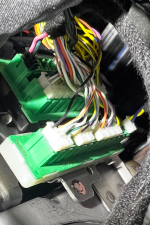
White*/Green wire to WHITE base connector (CANBUS-IHS) CLOSEST TO THE FIREWALL, 1 row of connectors (*may be pink)
Yellow/Blue wire to BLACK base connector (CANBUS-C) CLOSEST TO THE HEADLIGHT SWITCH/DASH, 2 rows of connectors

Another angle; from the dash looking towards the firewall:

A 2024 looking up from the floor; notice the same block colors (note these cables shown are inserted improperly):
EDIT: AlfaOBD does work, here is the what is needed to use it on 2019 and newer HD Rams:
- The Android app from google play store, or windows download from AlfaOBD.com. (Windows version strongly recommended) (AlfaOBD is Windows/Android only)
- A Bluetooth interface such as OBDLink MX+ or OBDLink LX (cheaper than the MX+ if you don't need iOS support or use on Ford or GM (MX+ comes with a choice))
vgate vLinker MC or MC+ works as well as the OBDLink and is half the cost.
- And a bypass harness that has BOTH CAN-C and CAN-IHS to bypass the security gateway module so changes can be made- https://www.kaodtech.com/product-page/security-module-bypass or https://infotainment.com/shop/interior-accessories/wiring/c-intbyp/ or https://www.obdgenie.com/collection...y-module-bypass-device?variant=48932036280633
[MOD: Adding a pic of the KAOdTECH bypass cable connections to reduce the daily question]
Added link to Infotainment video:
White*/Green wire to WHITE base connector (CANBUS-IHS) CLOSEST TO THE FIREWALL, 1 row of connectors (*may be pink)
Yellow/Blue wire to BLACK base connector (CANBUS-C) CLOSEST TO THE HEADLIGHT SWITCH/DASH, 2 rows of connectors
(FYI, the Infotainment bypass cable comes clearly marked CAN-C, CAN-IHS )
https://hdrams.com/forum/index.php?...module-location-for-programmer.440/post-26099Another angle; from the dash looking towards the firewall:
A 2024 looking up from the floor; notice the same block colors (note these cables shown are inserted improperly):
- Vlinker MC+ $59:
- AlfaOBD (discounts for multiple purchase) $49
- JSCAN (can now program FOB on 19+ HD) $23.99
- KAOdTECH bypass cable $55:
- Infotainment (OBDGenie) bypass cable $50
- OBDGenie bypass cable $50
- 5-button $26 ebay FOB:
Last edited by a moderator:




