What's new
Ram Heavy Duty Forum

Register a free account today to become a member! Once signed in, you'll be able to participate on this site by adding your own topics and posts, as well as connect with other members through your own private inbox!

AlfaOBD and 2023 Ram 3500

3500_Gasser

Member
Messages
54
Reaction score
81
Points
18
I'm trying to change a setting in AlfaOBD, in order to disable the notification "Active Tuned Mass Module Temporarily Unavailable"

Jimmy07 here on the forum was kind enough to point me towards the setting I need to change: disable P/T Chassis Net: Active Tuned Mass Module

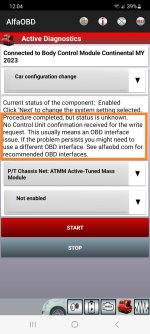
However, the change to "Disable" doesn't seem to stick. Instead, AlphaOBD says:
"Procedure completed, but status is unknown" and suggests an OBD interface issue. See attached image for more detail.

For OBD connector, I am using a 2019 model OBDLink MX (Model MX101) that shows a manufacture date of 2019.09.29

I believe that My OBD connector is compatible (?) Any suggestions welcome. Thanks.
 

Attachments

  • Screenshot_20231029_120422_AlfaOBD_2.jpg
    Screenshot_20231029_120422_AlfaOBD_2.jpg
    238.6 KB · Views: 35
You need to use a bypass to make changes with alfaobd.
Thanks, just ordered bypass cable on Amazon. Hopefully it comes with instructions.

Where are the connections are made on a 2023 RAM 3500? Under the steering wheel, or on passenger side?
 
Thanks, just ordered bypass cable on Amazon. Hopefully it comes with instructions.

Where are the connections are made on a 2023 RAM 3500? Under the steering wheel, or on passenger side?
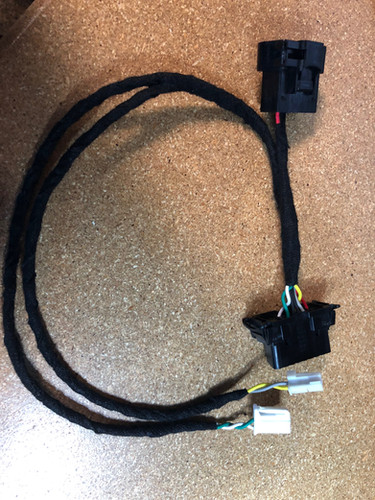
This is the type of bypass you should get for your truck:

This is where it plugs in:
 
It’s all on the driver side. I think the instructions from the kaodtech site might be better…


Sent from my iPhone using Tapatalk
 
Interesting… I have a 2022 and was looking at this one, but was under the impression the bypass needed to connect directly to the CAN bus. Is that not the case with the 2023’s?


Sent from my iPhone using Tapatalk
hmmm...maybe I'm misunderstanding, but based on the photo below, the Exctool does appear (to me) to connect directly to CAN C and CAN IHS.

If I am understanding correctly, the Kaodtech cable seems to be a more versatile design that incorporates a "Y" cable to allows for different configurations (temp vs permanent install). At least that's what I gathered from downloading the install instructions at the kaodtech site. I would guess the kaodtech is also a higher-quality build.
 

Attachments

  • exctool.JPG
    exctool.JPG
    82.1 KB · Views: 23
hmmm...maybe I'm misunderstanding, but based on the photo below, the Exctool does appear (to me) to connect directly to CAN C and CAN IHS.

If I am understanding correctly, the Kaodtech cable seems to be a more versatile design that incorporates a "Y" cable to allows for different configurations (temp vs permanent install). At least that's what I gathered from downloading the install instructions at the kaodtech site. I would guess the kaodtech is also a higher-quality build.
That Amazon one will work, it’s just a different method of bypassing that involves disconnecting the security gateway itself, which is behind the instrument cluster on the HD Rams. Removing the instrument cluster is a bit of a pain compared to installing the kaodtech style bypass.
 
get the one Jim suggested. pop the driver side cover off and each end of the bypass is labeled. stick the corresponding pigtail into the terminal blocks ( pay attention to the block base color ) and you're good to go.
 
hmmm...maybe I'm misunderstanding, but based on the photo below, the Exctool does appear (to me) to connect directly to CAN C and CAN IHS.

If I am understanding correctly, the Kaodtech cable seems to be a more versatile design that incorporates a "Y" cable to allows for different configurations (temp vs permanent install). At least that's what I gathered from downloading the install instructions at the kaodtech site. I would guess the kaodtech is also a higher-quality build.

Send that Amazon cable back or cancel the order if you can. You do not want to mess with pulling the EVIC just to install a bypass cable.

The HD style cables like the KaodTech plug in behind the headlight switch, the panel just pulls off for access.
 
Update: using the KaodTech cable, I was able to change the setting. Thanks again for the help.

Afterwards, I left the color-coded leads of the bypass cable plugged into the CAN blocks. I then disconnected the two OBD-type connectors at the other end of the cable, and zip-tied those connectors out of the way, leaving the factory OBD port in its original location.
 
Last edited:
Is there is a security risk in leaving the 2 CAN blocks jumpered together with the KaodTech cable, when the Kaodtech cable is NOT plugged into the factory OBD port?
 
Might be a little off topic but I have a 2012 Ram 1500 and I am getting this same exact message? I shouldn’t need the bypass cable right? It’s only 2018 plus that needed it I thought? I’m using Alfaobd with a obdlink cx and an android tablet
 
Might be a little off topic but I have a 2012 Ram 1500 and I am getting this same exact message? I shouldn’t need the bypass cable right? It’s only 2018 plus that needed it I thought? I’m using Alfaobd with a obdlink cx and an android tablet

You do not need a bypass cable for pre 18 HD. There is no SGM.

1500. Dunno.
 
Last edited:
You do not need a bypass cable for pre 18 HD. There is no SGM.

1500. Dunno.
I figured it out. It was the OBDLink cx it wasn’t fast enough or strong enough I believe. But I got the OBDLink Mx+ and it worked flawlessly
 
Back
Top