What's new
Ram Heavy Duty Forum

Register a free account today to become a member! Once signed in, you'll be able to participate on this site by adding your own topics and posts, as well as connect with other members through your own private inbox!

8.4 Uconnect 5 Nav top shortcut control disappears

Chris85xlt

Member
Messages
97
Reaction score
88
Points
18
Location
SoCal
Hi,
Just got my 2022 Power Wagon last week and i already noticed an issue with the 8.4 Uconnect 5 Nav.
The shortcuts in the very top corners for interior climiate temp, driver/pass seat and steering wheel control icons would occationally disappear. Aside from doing a soft reset, i can change the background Theme to get the shortcuts back.
I thought i check in here to see if anyone had experienced the same issue, have a solution to fix it or just looking for some inputs
I havent checked to see if theres an update yet, but im sure its a software issue and since being so new i figure ill give Ram some time.
Thanks for looking
 
Hi Chris,

Sorry to hear that! If you'd like us to look into this for you, feel free to send our team a private message with your VIN and any additional details that would be helpful for us to know.

Thanks,

Courtney
Ram Cares
 
Hi Chris,

Sorry to hear that! If you'd like us to look into this for you, feel free to send our team a private message with your VIN and any additional details that would be helpful for us to know.

Thanks,

Courtney
Ram Cares
Hi Courtney,
It would be great if your team take a look into this for me. How do i send your team a private message, would DM you work?

Thanks

Chris
 
quick update. I notice the same upper icons would disappear whenever I remote start.

Do they come back once you push the start button after entering the truck? That may be "normal"? Some icons may not appear until you actually turn the truck on by pushing the button.


.
 
Do they come back once you push the start button after entering the truck? That may be "normal"? Some icons may not appear until you actually turn the truck on by pushing the button.


.
Nope, icons gone till i either soft reboot or if i go to "Settings" and change the "Theme" and the icons will return. Turning the vehicle ON/OFF or leaving the truck for a number hours does not change anything.

I'll see if i can attach some pictures to show the difference shortly
 
Last edited:
Nope, icons gone till i either soft reboot or if i go to "Settings" and change the "Theme" and the icons will return. Turning the vehicle ON/OFF or leaving the truck for a number hours does not change anything.

I'll see if i can attach some pictures to show the difference shortly
Did you check the TSB for Uconnect 5? I posted it last week. Check your software version.
 
Hi,
Just got my 2022 Power Wagon last week and i already noticed an issue with the 8.4 Uconnect 5 Nav.
The shortcuts in the very top corners for interior climiate temp, driver/pass seat and steering wheel control icons would occationally disappear. Aside from doing a soft reset, i can change the background Theme to get the shortcuts back.
I thought i check in here to see if anyone had experienced the same issue, have a solution to fix it or just looking for some inputs
I havent checked to see if theres an update yet, but im sure its a software issue and since being so new i figure ill give Ram some time.
Thanks for looking
This is what you want. Mine had to be done at a dealer although others have reported that they got an update OTA.

The TSB states that the dealer needs to do it.

Thread 'Oct 2, 2022 TSB 08-155-21 for Uconnect 5 Nav - 12” / 8.4”'
https://hdrams.com/forum/index.php?threads/oct-2-2022-tsb-08-155-21-for-uconnect-5-nav-12”-8-4”.6937/
 
Thanks, yes I saw the thread. It said trucks built before October 1st. Mine is late September but I’ll definitely look more into it.
 
Thanks, yes I saw the thread. It said trucks built before October 1st. Mine is late September but I’ll definitely look more into it.
If your truck was build in late September, it is subject to the TSB. They also provide a VIN number check.

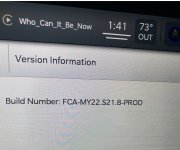
You can see your current version by doing this: On the screen, tap Vehicle, then tap Settings, scroll on the left side and tap Systems Information, tap on Version Information.

The update installs the version listed below:
 

Attachments

  • UCONNECTUPDATE.jpg
    UCONNECTUPDATE.jpg
    727.2 KB · Views: 12
If your truck was build in late September, it is subject to the TSB. They also provide a VIN number check.

You can see your current version by doing this: On the screen, tap Vehicle, then tap Settings, scroll on the left side and tap Systems Information, tap on Version Information.

The update installs the version listed below:

My version is FCA-MY22.S21B.5-PROD
I assume the “B” means it’s newer?
 

Attachments

  • 530B7F8C-DC31-4267-87A5-CD48AA376BE0.jpeg
    530B7F8C-DC31-4267-87A5-CD48AA376BE0.jpeg
    771.7 KB · Views: 7
Back
Top