What's new
Ram Heavy Duty Forum

Register a free account today to become a member! Once signed in, you'll be able to participate on this site by adding your own topics and posts, as well as connect with other members through your own private inbox!

2023 RAM 2500 Tow Mode Camera Fix & Installation

Radiometer1

Member
Messages
31
Reaction score
16
Points
8
I’m posting my experience with the Tow Mode Camera in hopes that it will help others on this forum.

I have a 2023 RAM 2500 RAM Limited equipped with the Digital Rear View Mirror (DRVM) & the round connector for the Tow Mode Camera. It didn’t come with the Tow Mode Camera, but I got one from Jimmy07. It should have been plug ‘n play, but initially it didn’t work when plugged into the round connector at the rear bumper.
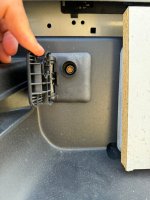
IMG_2255 - resized.jpg
With the help of Jimmy07 and CortexM0, I determined the camera worked when plugged directly into the DVRM module under the drivers seat which indicated there was a disconnect between the DVRM module & the connector at the rear bumper. I found 2 terminated/plugged Fakra connectors under the truck bed which were hanging loose. They were initially ~1/2” too far apart to be connected, so I removed the clip securing at the Fakra connector inside the cabin behind the drivers side rear passenger seat. This provided enough slack to plug in the connectors. The cabin connector was now unsecured & hanging loose, so I wrapped it in pipe foam insulation & electric tape to prevent it from rattling. The Tow Mode Camera then worked when plugged in at the rear bumper!

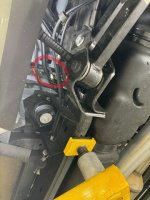
Location of Disconnected Fakra Connectors Under Truck Bed
Fakra Connector Location.jpgIMG_2347 - resized.jpgIMG_2348 - resized.jpgIMG_2352 - resized.jpg

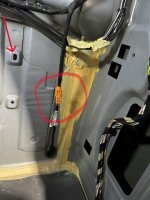
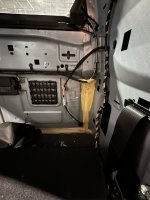
Fakra Connector in Cabin Behind Drivers Side Rear Passenger Seat
2024.03.05 - Airport CDJR - Fakra Connector-1b.jpgIMG_2358 - resized.jpgIMG_2359 - resized.jpg

I wasn’t able to find much help online on how to mount the Tow Mode Camera specifically on a travel trailer, so I took pictures & videos of the install on my 2021 Grand Design Imagine 2800BH & uploaded them to the following Amazon Photos link:

https://www.amazon.com/photos/shared/NkBZxkCiQmCpu_lE-uvQtg.T-A3fJx7Uzne0I_QSQvaI8
 

Attachments

  • 2024.03.05 - Airport CDJR - Fakra Connector-1a.jpg
    2024.03.05 - Airport CDJR - Fakra Connector-1a.jpg
    399.8 KB · Views: 88
Last edited:
Nice work! One of these days (if I ever find a job again) I'll get around to installing the DRVM that I was told my truck would come with.
 
I’m posting my experience with the Tow Mode Camera in hopes that it will help others on this forum.

I have a 2023 RAM 2500 RAM Limited equipped with the Digital Rear View Mirror (DRVM) & the round connector for the Tow Mode Camera. It didn’t come with the Tow Mode Camera, but I got one from Jimmy07. It should have been plug ‘n play, but initially it didn’t work when plugged into the round connector at the rear bumper.
View attachment 70470
With the help of Jimmy07 and CortexM0, I determined the camera worked when plugged directly into the DVRM module under the drivers seat which indicated there was a disconnect between the DVRM module & the connector at the rear bumper. I found 2 terminated/plugged Fakra connectors under the truck bed which were hanging loose. They were initially ~1/2” too far apart to be connected, so I removed the clip securing at the Fakra connector inside the cabin behind the drivers side rear passenger seat. This provided enough slack to plug in the connectors. The cabin connector was now unsecured & hanging loose, so I wrapped it in pipe foam insulation & electric tape to prevent it from rattling. The Tow Mode Camera then worked when plugged in at the rear bumper!

Location of Disconnected Fakra Connectors Under Truck Bed
View attachment 70471View attachment 70472View attachment 70473View attachment 70474

Fakra Connector in Cabin Behind Drivers Side Rear Passenger Seat
View attachment 70478View attachment 70476View attachment 70477

I wasn’t able to find much help online on how to mount the Tow Mode Camera specifically on a travel trailer, so I took pictures & videos of the install on my 2021 Grand Design Imagine 2800BH & uploaded them to the following Amazon Photos link:

https://www.amazon.com/photos/shared/NkBZxkCiQmCpu_lE-uvQtg.T-A3fJx7Uzne0I_QSQvaI8
How do I contact Jimmy07 to procure the tow mode camera and cable? Thank you.
 
How do I contact Jimmy07 to procure the tow mode camera and cable? Thank you.
The Tow Mode Camera p/n 68586112AA, aka Digital Rear View Camera Kit, is almost impossible to find. Apparently its been discontinued. @Jimmy07 happened to have one he was willing to sell me. Not sure if he has any more, but you can private message him via this forum under Conversations (upper right corner of this page). I just saw one posted on ebay which is rare:

 
The Tow Mode Camera p/n 68586112AA, aka Digital Rear View Camera Kit, is almost impossible to find. Apparently its been discontinued. @Jimmy07 happened to have one he was willing to sell me. Not sure if he has any more, but you can private message him via this forum under Conversations (upper right corner of this page). I just saw one posted on ebay which is rare:

T. Thank you for this response.
 
Does anyone know if a shorter cable exist? I only need a 12 foot cable for my slide in camper not 87' hell the old 58 was too much for my 25' cabin boat.
 
Please forgive my ignorance. Is it possible to just by an extension to connect under the bed vice tear the cab apart? Can you tell that I don't want to pull the cab part to find the connector
 
I’m posting my experience with the Tow Mode Camera in hopes that it will help others on this forum.

I have a 2023 RAM 2500 RAM Limited equipped with the Digital Rear View Mirror (DRVM) & the round connector for the Tow Mode Camera. It didn’t come with the Tow Mode Camera, but I got one from Jimmy07. It should have been plug ‘n play, but initially it didn’t work when plugged into the round connector at the rear bumper.
View attachment 70470
With the help of Jimmy07 and CortexM0, I determined the camera worked when plugged directly into the DVRM module under the drivers seat which indicated there was a disconnect between the DVRM module & the connector at the rear bumper. I found 2 terminated/plugged Fakra connectors under the truck bed which were hanging loose. They were initially ~1/2” too far apart to be connected, so I removed the clip securing at the Fakra connector inside the cabin behind the drivers side rear passenger seat. This provided enough slack to plug in the connectors. The cabin connector was now unsecured & hanging loose, so I wrapped it in pipe foam insulation & electric tape to prevent it from rattling. The Tow Mode Camera then worked when plugged in at the rear bumper!

Location of Disconnected Fakra Connectors Under Truck Bed
View attachment 70471View attachment 70472View attachment 70473View attachment 70474

Fakra Connector in Cabin Behind Drivers Side Rear Passenger Seat
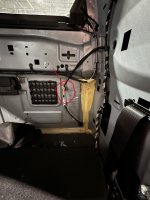
View attachment 70478View attachment 70476View attachment 70477

I wasn’t able to find much help online on how to mount the Tow Mode Camera specifically on a travel trailer, so I took pictures & videos of the install on my 2021 Grand Design Imagine 2800BH & uploaded them to the following Amazon Photos link:

https://www.amazon.com/photos/shared/NkBZxkCiQmCpu_lE-uvQtg.T-A3fJx7Uzne0I_QSQvaI8
Radiometer, you may have explained MY problem with my 2024 Ram 2500 Limited 6.7 CTD. I installed the trailer camera kit 86886112AA ….and found that the Fakra bumper “Dock” is not connected to any thing on the truck-side behind the bumper.

My selling dealer in KY and my local dealer in TX don’t know what jumper-harness is needed to complete the connection to my DVRM (digital rear view mirror) which came with my truck.

Any help is appreciated.

I’m on a trip (pulling a travel-trailer with a new tow-camera and no connection) and as soon as I get to AZ tomorrow I’ll crawl under the trailer to see if I can find that disconnected Fakra pair you describe. There MAY be (my imagination) a jumper cable that the two unconnected Fakra’s connect-to which then runs to the rear Dock. ??
 
Back
Top