What's new
Ram Heavy Duty Forum

Register a free account today to become a member! Once signed in, you'll be able to participate on this site by adding your own topics and posts, as well as connect with other members through your own private inbox!

2023 Cluster Swap - Wheel buttons not working

jim9812

Member
Messages
26
Reaction score
53
Points
13
Just picked up my 2023 2500 with the 3.5" cluster. Swapped it out with a used 7.0" cluster from a 2022. I was able to connect to the cluster with AlfaOBD and get the mileage corrected no problem.

Everything seems to be working fine except the buttons on the steering wheel aren't controlling the cluster.

Looks like the 2023 may have a different switch? It looks like the 1500 switch, but looking at the part number looks like it is a new switch unique for the 2023 2500/3500. I can't find the wiring diagram for the 2023 so not sure how the switch works. Seems the cluster is getting the signal over the can bus, not sure why they'd change the can message but who knows, if the cluster is different that'd also explain why they let you add the 7.0 cluster as a $75 option in 2022 but cut it on the 2023 trucks...

IMG-4552.jpg
 
Just picked up my 2023 2500 with the 3.5" cluster. Swapped it out with a used 7.0" cluster from a 2022. I was able to connect to the cluster with AlfaOBD and get the mileage corrected no problem.

Everything seems to be working fine except the buttons on the steering wheel aren't controlling the cluster.

Looks like the 2023 may have a different switch? It looks like the 1500 switch, but looking at the part number looks like it is a new switch unique for the 2023 2500/3500. I can't find the wiring diagram for the 2023 so not sure how the switch works. Seems the cluster is getting the signal over the can bus, not sure why they'd change the can message but who knows, if the cluster is different that'd also explain why they let you add the 7.0 cluster as a $75 option in 2022 but cut it on the 2023 trucks...


View attachment 53058
I was afraid of this being the case. I forgot about the new button layout, and I plan on swapping in the digital cluster to my 2017, so I’ll have the same issue I’ll have to deal with. This post below also confirms that there are different messages being sent by the buttons:

All of the actual wiring is the same, it’s just different button messages, and it’s a different steering column control module too.
 
Ah dang that's unfortunate. I'm having a hard time finding any wiring diagrams or anything especially for the 23s, but it looks like the cluster is only connected to CAN C.

Assuming that's the case it seems a solution (probably the only solution?) would be to tap into the bus, listen for the new button messages and inject the old message equivalent? Or vice versa for a newer cluster in an older truck.

It looks like at the OBD port there is only the CAN D bus, which is separate from CAN C? Is this still true if I have the security gateway bypassed?

I'll try to sniff the can bus when I get some time and see if I can figure the new button messages out.
 
Ah dang that's unfortunate. I'm having a hard time finding any wiring diagrams or anything especially for the 23s, but it looks like the cluster is only connected to CAN C.

Assuming that's the case it seems a solution (probably the only solution?) would be to tap into the bus, listen for the new button messages and inject the old message equivalent? Or vice versa for a newer cluster in an older truck.

It looks like at the OBD port there is only the CAN D bus, which is separate from CAN C? Is this still true if I have the security gateway bypassed?

I'll try to sniff the can bus when I get some time and see if I can figure the new button messages out.
FFC1005E-FB04-4EBE-90DC-6EF3CAE2994F.jpeg
 
It looks like at the OBD port there is only the CAN D bus, which is separate from CAN C? Is this still true if I have the security gateway bypassed?
6&14 on the OBD are CAN C, even when bypassed.
Yeah, we’re both gonna have to get this figured out. I’ve got someone on it too (posted above). In your situation, worst case scenario, you’ll have to use a 2023 7” cluster instead.
 
6&14 on the OBD are CAN C, even when bypassed.
Yeah, we’re both gonna have to get this figured out. I’ve got someone on it too (posted above). In your situation, worst case scenario, you’ll have to use a 2023 7” cluster instead.
Great, thanks for all of the info! I’ll try to sniff my truck and see if I can figure anything out. Seems odd that they changed this.
 
Great, thanks for all of the info! I’ll try to sniff my truck and see if I can figure anything out. Seems odd that they changed this.
Another issue: looks like 2023 steering control column communicates to BCM first over linbus.
F3BFB950-4B81-4E82-9D71-F870D09DB1F4.jpeg
11C589DC-1D9D-4474-AF46-174C9E21BB30.jpeg
 
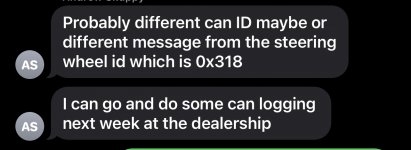
I was able to pull some data from my truck quickly and at an initial glance it does not appear this data is on 0x318 anymore, no matter how I press the buttons all of my frames for that one show: [00000318](00) 00 00 00 00 00 00 FF 00

Hopefully I'll get some time tomorrow to dig into this data some more. If the BCM is the one broadcasting this now I guess that'd line up with it being broadcast on a different ID.
 
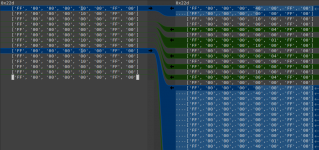
I may have found something! The button data seems to appear in 0x22D.

Screenshot from 2023-03-10 00-32-05.png

Without hitting any buttons, I get no 0x22D. Left side is me hitting the left button repeatedly. Right side is me cycling through up, right, down, left in a circle.

Searching that in google pointed me to some work being done for the JL Wrangler, looks like a perfect match in here: https://docs.google.com/spreadsheet...4-gMmVRjeR85fYplpV12aCHJC4/edit#gid=303439516

Also found this header file: https://github.com/karlyamashita/common_libraries/blob/master/CHRYSLER_CAN_ID.h

This bit is particularly interesting:

#define SWC_ID 0x22D // basic audio controls. Dodge Ram SWC ID is 0x318

Perhaps the Ram was the odd one out using 0x318 and this change just brought the Ram in line with the other Chrysler vehicles? I should be able to test this by injecting the 0x22D messages onto the bus to see if I can make the cluster cycle programmatically, I will try that next. This is definitely the button data, but will have to test if this is what the cluster is listening for.
 
The switches on the “old” steering wheel matched those on my old ‘16 JK Wrangler, and the switches on the “new” wheel match those that were on my ‘21 Gladiator, so I’d say they were just being slow to update the HDs.

There’s definitely different signaling, as the old switches had arrows only on the left, and the new has an “OK” button. Also the Resume and Set buttons for the cruise control are no longer doing double duty as + and -. (This may be useful for those using Comma.ai as you can spam resume without increasing the set speed).
 
Is it worth investigating whether or not there is a BCM configuration that can be changed to support the old cluster with the new buttons? I found one called Audio Steering Wheel Switch Configuration and another about steering wheel switches on the LIN bus.

I have my 23 configuration dump, maybe that could be compared to a 22? Not sure if this is worth exploring, or if it's a feature that they could not have coded into the BCM anyway since it seems with the old switches the BCM was not the one broadcasting the CAN messages anyway.
 
Is it worth investigating whether or not there is a BCM configuration that can be changed to support the old cluster with the new buttons? I found one called Audio Steering Wheel Switch Configuration and another about steering wheel switches on the LIN bus.

I have my 23 configuration dump, maybe that could be compared to a 22? Not sure if this is worth exploring, or if it's a feature that they could not have coded into the BCM anyway since it seems with the old switches the BCM was not the one broadcasting the CAN messages anyway.
Audio steering wheel switch configuration should be Core for 2023, and Brand focus for pre-2023.
Lin and Misc- Steering wheel switch module present is set to yes on all Rams
 
My 23 actually has "Brand Focus Steering Wheel"

Any use in trying to change that or will it not change what i'm thinking?
 
My 23 actually has "Brand Focus Steering Wheel"

Any use in trying to change that or will it not change what i'm thinking?
Probably not. All of the 2023 configs that I have are digital cluster equipped, and they are all set to core steering wheel. I doubt that setting has any effect on anything.
 
Got a POC working!

IMG-4565.jpg
Arduino with a CAN shield hooked to the OBD port, listening for up / down / left / right messages on ID 0x22D, when it receives these it broadcasts the equivalent message over 0x318 using the data I found in that Jeep Google Sheet. Seems to work well in my minimal testing.

I'll clean up the code and post it on github if anyone is interested.
 
Nice work Jim!

What are you going to have it do with the OK button?
 
Nice work Jim!

What are you going to have it do with the OK button?
So I think for my use case of the 22 cluster in the 23 truck I just ignore it, since there was no OK button on a 22. Or at least I don't think there was, this is my first HD ram, I used to have a 2014 1500 which I think had the same button layout as a 22 HD and had no OK.

For someone looking to put a 23 cluster in a 22 or older truck, that'll be more tricky. Would probably have to hijack another button, or detect a long press of one of the direction buttons and use that to spoof an OK message.
 
Got a POC working!

View attachment 53122
Arduino with a CAN shield hooked to the OBD port, listening for up / down / left / right messages on ID 0x22D, when it receives these it broadcasts the equivalent message over 0x318 using the data I found in that Jeep Google Sheet. Seems to work well in my minimal testing.

I'll clean up the code and post it on github if anyone is interested.
If I could get a copy that would be great .
I’m currently working on getting my 5th gen cluster to work on my 4th gen and trying to figure out my speed signal missing message .
I’m using the new teensy 4.0 board
 
Got a POC working!

View attachment 53122
Arduino with a CAN shield hooked to the OBD port, listening for up / down / left / right messages on ID 0x22D, when it receives these it broadcasts the equivalent message over 0x318 using the data I found in that Jeep Google Sheet. Seems to work well in my minimal testing.

I'll clean up the code and post it on github if anyone is interested.
I've just swap my cluster I have a 23 HD truck and swap the cluster from a 21, what do I have to do to get the buttons to work?
 
Back
Top