
Musclelogic
Member
- Messages
- 35
- Reaction score
- 34
- Points
- 18
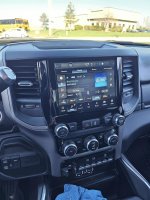
I've seen quite a bit of information on the 8.4" to 12.1" radio swap, of which none of them detail the 6.7 Cummins equipped truck radio, specifically.
Basically put, the 6.7 Radio is entirely different from the Gas equivalents. As it has a physical, separate hard button for the traction control. While gas trucks have their traction control switch in the lower switch bank.
This swap literally takes 10 minutes to do and is a 100% plug and play swap, given the 8.4 NAV trucks already have the separate radio receiver and display, unlike the integrated receiver/display on the 5" and 8.4 NON NAV trucks.
The following settings need to be changed in AlfaOBD
Cabin Net: ICS integrated center stack - Set to "Not Enabled".
Radio & Connectivity: Head Unit Screen Size MUST be set to: R1_12' - 1920x1200
If the above setting isn't set to R1_12' - 1920x1200, your integrated traction control switch, WON'T WORK.
It took a few days, jacking around with settings off and on, in AlfaOBD to come to this solution.
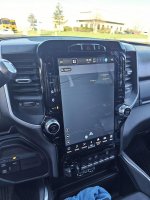
Got lucky and scored this 12" display for $250.83.
Basically put, the 6.7 Radio is entirely different from the Gas equivalents. As it has a physical, separate hard button for the traction control. While gas trucks have their traction control switch in the lower switch bank.
This swap literally takes 10 minutes to do and is a 100% plug and play swap, given the 8.4 NAV trucks already have the separate radio receiver and display, unlike the integrated receiver/display on the 5" and 8.4 NON NAV trucks.
The following settings need to be changed in AlfaOBD
Cabin Net: ICS integrated center stack - Set to "Not Enabled".
Radio & Connectivity: Head Unit Screen Size MUST be set to: R1_12' - 1920x1200
If the above setting isn't set to R1_12' - 1920x1200, your integrated traction control switch, WON'T WORK.
It took a few days, jacking around with settings off and on, in AlfaOBD to come to this solution.
Got lucky and scored this 12" display for $250.83.
