What's new
Ram Heavy Duty Forum

Register a free account today to become a member! Once signed in, you'll be able to participate on this site by adding your own topics and posts, as well as connect with other members through your own private inbox!

12 inch UConnect 5 cargo camera in 2022 Ram 2500?

SeanF

New Member
Messages
6
Reaction score
2
Points
3
Hi All,
I have been trying to figure out how to connect to the unused cargo camera input on my 2022 Ram 2500 with the 12 inch UConnect system. Everything I have found online refers to a previous generation with a large 52 pin connector on the back of the radio where the cargo camera can be connected to pins 21 and 22. Apparently changed this to multiple connectors for the 2022 model with the 12 inch screen. (See Attached Photo).

Does anybody have a connector pin-out for this newer radio?

More information:
- Truck is a 2022 2500 Laramie with the 6.7 Cummins standard output
- I do not have the surround camera system
- I am going to use this for a front camera.
- I can enable the cargo camera with AlfaOBD
- The camera I have is powered and working
- The camera is a 480P that is using the yellow RCA composite video connector.

Any helpful info would be appreciated!
 

Attachments

  • IMG_8024.JPG
    IMG_8024.JPG
    676 KB · Views: 88
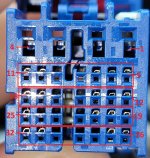
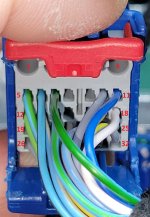
Crashing HD with my 2023 Ram Rebel, but have the same issue. I purchased the Tazer DT and A/V kit (for a front camera) to find out that I also have no 52-Pin harness. I was able to go to the dealership and get a pinout for the blue connector (RADIO C2 ASSOCIATED RFL ONLY) connector (which I will post in the next day or so), but the pinout I have shows only the circuit, gauge, color, function of the pin slots that are occupied/used in this 32-Pin connector. If you orient the blue connector where you have the four pin female slots on the top (with the four rows of seven pins on the bottom), the top pins are 1-4, starting at the top-right. The numbering of the right-most columns for the remaining 4 rows of seven are: 5, 12, 19, 26 (all pin numbers increase from right to left). The confusing part to me was that the number of female slots seemed to be twice as much, but if you reference the male portion, you will see there are actually 4 pins at the top and 28 in the 4x7 section of the bottom. So, when you reference the female portion just realize that each row of pins/pin-outs involves two rows of holes. (Hope that was not to consusing). But when I take a close-up of the plug side/female side, I see on my vehicle that pins: 8,9,15,16,22,23,24,28,29,30 seem to be empty. And, of course, the pinout does not say what those are. So, I forwarded the above details to Zautomotive last evening and will see what I hear. I think that we are just too close to the "bleeding edge" with our efforts. Hope this helps, if only that I am currently sharing your pain.
 
I know this doesn't answer the question about where to wire in the cargo camera and the UConnect 5 connectors, but this may be useful information for somebody out there:

I ended up installing a Naviks unit into my 2022 Laramie. OK, It is not factory and is a bit on the expensive side. I am using the Naviks unit for a front and blinker cameras. I have the blinker cameras coming on automatically with the turn signals (set to can bus option) and the Front camera is triggered with one of the Aux switches.

I used the relatively cheap Amazon automotive backup cameras. The Naviks unit supports a rear camera and HDMI input as well, which I am not using. The instructions are not very good, but I was able to figure it out. I had to call the Naviks tech support. It is also a challenge to find a place behind the dash to install the Naviks unit.


Another option I was considering was the cargo camera kit from Infotainment.com. They have the connectors with the break-out for the camera inputs.


Hope this helps.
 
Crashing HD with my 2023 Ram Rebel, but have the same issue. I purchased the Tazer DT and A/V kit (for a front camera) to find out that I also have no 52-Pin harness. I was able to go to the dealership and get a pinout for the blue connector (RADIO C2 ASSOCIATED RFL ONLY) connector (which I will post in the next day or so), but the pinout I have shows only the circuit, gauge, color, function of the pin slots that are occupied/used in this 32-Pin connector. If you orient the blue connector where you have the four pin female slots on the top (with the four rows of seven pins on the bottom), the top pins are 1-4, starting at the top-right. The numbering of the right-most columns for the remaining 4 rows of seven are: 5, 12, 19, 26 (all pin numbers increase from right to left). The confusing part to me was that the number of female slots seemed to be twice as much, but if you reference the male portion, you will see there are actually 4 pins at the top and 28 in the 4x7 section of the bottom. So, when you reference the female portion just realize that each row of pins/pin-outs involves two rows of holes. (Hope that was not to consusing). But when I take a close-up of the plug side/female side, I see on my vehicle that pins: 8,9,15,16,22,23,24,28,29,30 seem to be empty. And, of course, the pinout does not say what those are. So, I forwarded the above details to Zautomotive last evening and will see what I hear. I think that we are just too close to the "bleeding edge" with our efforts. Hope this helps, if only that I am currently sharing your pain.
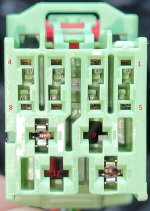
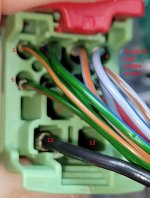
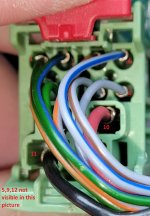
Update: Zautomotive is working on integrating with Uconnect 5. I sent them some pictures of the connectors (blue: C2) and (green:C1) with pins located on both sides of the connectors based on a pinout I received from a dealer (for blue:C2) and a pinout previously uploaded to the 5thgen ram group.
 

Attachments

  • Blue_Connector_RADIO_C2_ASSOCIATED_RFL_ONLY.jpg
    Blue_Connector_RADIO_C2_ASSOCIATED_RFL_ONLY.jpg
    711.3 KB · Views: 55
  • Picture_of_Green_Connector_RADIO_C1_ASSOCIATED_RFL_ONLY.jpg
    Picture_of_Green_Connector_RADIO_C1_ASSOCIATED_RFL_ONLY.jpg
    330.4 KB · Views: 45
  • Geen_Connector_Wires_1.jpg
    Geen_Connector_Wires_1.jpg
    329.2 KB · Views: 32
  • Geen_Connector_Wires_2.jpg
    Geen_Connector_Wires_2.jpg
    350.7 KB · Views: 27
  • Geen_Connector_Wires_3.jpg
    Geen_Connector_Wires_3.jpg
    342.1 KB · Views: 26
  • Geen_Connector_Wires_4.jpg
    Geen_Connector_Wires_4.jpg
    297.1 KB · Views: 29
  • Blue_Connector_Wires1.jpg
    Blue_Connector_Wires1.jpg
    417.4 KB · Views: 34
  • Blue_Connector_Wires2.jpg
    Blue_Connector_Wires2.jpg
    368.9 KB · Views: 32
  • Blue_Connector_Wires3.jpg
    Blue_Connector_Wires3.jpg
    346.5 KB · Views: 37
  • Blue_Connector_Wires4.jpg
    Blue_Connector_Wires4.jpg
    322.5 KB · Views: 47
did you ever get this resolved? I found this posted by Jimmy in the 5thgenrams forum but didn't see it in the hdrams forum.

he said:
"The terminals are TE Connectivity 2272196-2.
The camera signal wire is pin 25, and the return wire is pin 32, both on the blue radio connector."
 
Zautomotive engineer is working on it. Since these are different pins, the engineer has to determine how to switch/enable the new pin/s to enable the cargo camera (aux camera). So, my current Tazer DT enabled some pin, but not the correct one, so I will return the cargo camera back to disable the pin it thinks is the cargo camera and wait for a zautomotive fix and new Tazer DT firmware for this new-fangled "electronification".
 
Zautomotive engineer is working on it. Since these are different pins, the engineer has to determine how to switch/enable the new pin/s to enable the cargo camera (aux camera). So, my current Tazer DT enabled some pin, but not the correct one, so I will return the cargo camera back to disable the pin it thinks is the cargo camera and wait for a zautomotive fix and new Tazer DT firmware for this new-fangled "electronification".
The pin numbers/wire positions are irrelevant to the tazer DT, since all tazer is doing is enabling the cargo camera setting in the BCM, the same as alfaobd and JScan does.
I’m assuming that since you have a tazer DT, your truck is a 1500? If that is the case, the cargo camera setting doesn’t even work on a 1500 equipped with Uconnect 5 anyway, the cargo camera soft key will never show up.
In order for a 1500 owner to utilize the analog camera pins on UC5 ( pins 25&32, and pins 19&26), you need to enable the auxiliary trailer camera setting instead, which tazer is not capable of doing.
In alfaobd or JScan, that setting would be VehConfig 8: Auxiliary Trailer Camera Present- Yes.
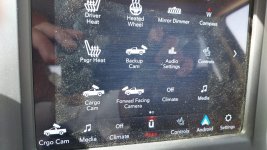
That setting will make the Aux 1 and Aux 2 camera soft keys show up in the radio, and you can then name them whatever you want.
 
@Jimmy07 are terminals 25 and 32 the same? It looks like 32 is larger? I bought te 2272196-2 but it seems small for pin 32. Thanks! Jeff
 
@Jimmy07 . Ok. Thanks for the quick reply!!. I was reading the numbers off the plug from the harness adapter.

1000017074.jpg

Which showed 29-32 on the top row. I guess those aren't the numbers to be reading.

Is this the numbering I should be using:

1000017065.jpg

And if I read it correctly, this is pinside so when I look at the pic above the wireside would be on the lower right for 25 and 32. White and white with a stripe. Yes?

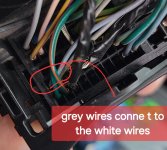
If I follow the white wires to where the adapter plugs into the 52pin harness the harness has two grey wires.

Screenshot_20240608_074904_Gallery.jpg

I saw on YouTube a guy installing a cargo camera and he plugged into a i370 plugs on the left side the the dash area. Does the 2020 3500 have it in the same place?

Sorry for so many questions!!
 
I was not clear when I typed this "I saw on YouTube a guy installing a cargo camera and he plugged into a i370 plugs on the left side the the dash area. Does the 2020 3500 have it in the same place?"

this video was for a Gen4 truck. that's why I was asking if the 2020 RAM 3500 would have a similar set up because it seemed like it might be an easy place to tie into the harness.

jeff
 
If anyone has the answer to my question above I'd appreciate any input. Thanks. Jeff
 
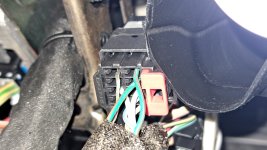
In my 22 2500 the plug is behind the rear bumper and under the dash next to the amp , I connect the front amazon camera to the plug under the dash .
 

Attachments

  • Blue_Connector_Wires3.jpg
    Blue_Connector_Wires3.jpg
    346.5 KB · Views: 36
I use the green ones for the front cam and the gray ones for the trailer.
 

Attachments

  • 20240706_221429.jpg
    20240706_221429.jpg
    360.3 KB · Views: 30
In my 22 2500 the plug is behind the rear bumper and under the dash next to the amp , I connect the front amazon camera to the plug under the dash .
Thanks John. "under the dash next to the amp" where is that under the dash? thanks! jeff.
 
The black connector is behind the headlight switch if the wires in the blue stereo plug are present .
 
hello
I would be happy to help,
I am trying to connect a RAM 2500 GEN 5 front camera
Year 2019, by ALFAOBD I opened the option of a front camera
Forward Facing Camera on my built-in screen
I can't figure out where to connect the physical equipment
I purchased a camera and I want to connect it, I found it on the website
https://connectorrepairkit.mopar.com/
An explanation of the PIN that needs to be connected to the camera
But I can't find a drawing of the exact location
Should the connector be missing?
can you help me

Thank you very much!!

By the way, I made the CARGO camera with Tazer RAMcon.jpgCAM.jpgcam2.jpg
And it works for me, thank you very much!
Now the FORWARD FACING CAMERA I'm trying to figure out where to connect its cable, is it according to the blueprint?
If so, where does it go in the vehicle's built-in screen
I would appreciate any help in this regard
Thank you very much!!
MYBS
 
hello
I would be happy to help,
I am trying to connect a RAM 2500 GEN 5 front camera
Year 2019, by ALFAOBD I opened the option of a front camera
Forward Facing Camera on my built-in screen
I can't figure out where to connect the physical equipment
I purchased a camera and I want to connect it, I found it on the website
https://connectorrepairkit.mopar.com/
An explanation of the PIN that needs to be connected to the camera
But I can't find a drawing of the exact location
Should the connector be missing?
can you help me

Thank you very much!!

By the way, I made the CARGO camera with Tazer RAMView attachment 78627View attachment 78629View attachment 78628
And it works for me, thank you very much!
Now the FORWARD FACING CAMERA I'm trying to figure out where to connect its cable, is it according to the blueprint?
If so, where does it go in the vehicle's built-in screen
I would appreciate any help in this regard
Thank you very much!!
MYBS
You need to install the full factory surround view camera system in order to use that forward camera icon in the radio.
 
Back
Top