What's new
Ram Heavy Duty Forum

Register a free account today to become a member! Once signed in, you'll be able to participate on this site by adding your own topics and posts, as well as connect with other members through your own private inbox!

I messed up using alfaobd will pay for help

2021ram5500

New Member
Messages
9
Reaction score
7
Points
3
Ok so I genuinely messed up my truck, I need help to fix what I did I will pay for your time PLEASE
Truck transmission goes into limp mode, 2021 Ram 3500, 68RFE with RACEME unit, deleted, Revmax valve body, did the quick learn already, I have reverse, truck goes into 4th gear forward and doesn’t budge
 

Attachments

  • IMG_0911.jpeg
    IMG_0911.jpeg
    437.1 KB · Views: 46
  • IMG_0910.jpeg
    IMG_0910.jpeg
    579.3 KB · Views: 46
Bummer.
What did you do with AlphaOBD to mess it up? That’s what we need to know in order to hopefully help you.
 
Ok so I genuinely messed up my truck, I need help to fix what I did I will pay for your time PLEASE
Truck transmission goes into limp mode, 2021 Ram 3500, 68RFE with RACEME unit, deleted, Revmax valve body, did the quick learn already, I have reverse, truck goes into 4th gear forward and doesn’t budge

If you haven't already, possibly reach out to tech support with RevMax. They have a link on their webpage. https://www.revmaxconverters.com/tech-support/
This additional link here might also help you as well. https://tcraonline.com/technical-article/dodge-ram-68rfe-2019-pi-curve-relearn/
I am so much big trouble because it’s so big and it’s gonna be pain to tow it, thank you so much for your reply!
 
Bummer.
What did you do with AlphaOBD to mess it up? That’s what we need to know in order to hopefully help you.
I changed things I shouldn't have like an idiot and did not save the original parameters before tinkering with it.
it actually all started because my retarded self wanted power seats, so I bought 2025 Ram Rebel 1500 seats and wanted to make the vented and heated seats work so I went into the AlfaObd to activate them and ended up trying to change the splash screen, disable the TPMS system, and seatbelt chime, then got WAYYYY carried away and changed Special Packages, end tried to enable seeing what gear I was shifting into and REAlly messed things up. Soooo i changed the valve body, TCC solenoid which i believe can only be programmed by the dealer or someone who has Witech and so now its stuck in limp mode.... and it says vehicle not in park on the dash........
I think the shifter type, transmission and transfer case parameters i messed with are wrong
Question:
-Does a base Tradesman have a Transfer case module since it has a floor shifter?
-What settings are there supposed be for Maserati mode?
-Does setting a Special Package setting mess with anything in the vehicle?
-Why are there 3 different Special Package 1,2,3?

I WILL pay money to anyone that can help me
I know and respect everyones time is valuable
Thank you in advance!
 
Wow. That is a mess. Wish I could help ya.
 
If possible post the bcm config data here, im sure people with similar trucks could compare your settings to theirs and help you figure it out
 
If possible post the bcm config data here, im sure people with similar trucks could compare your settings to theirs and help you figure it out
It is one milk chocolatie cluster F&ck I EXTREMELY appreciate if someone had a stock configuration list of a 2021 Ram 3500 Tradesman 4x4 dually, floor shift transfer case, will compensate whoever provides it $$$
 
Yep apparently Chrysler puts the same components in the Maserati as well as Ram there are two separate changeable criteria’s in Alfaobd for Ram…. I know it sounds stupid I’ll post screenshots
 
Send me your vin, and I’ll be able to get your original backup file for you to restore.
I will compensate you sir, I just need the stock settings as a guide to go back thru the Alfaobd program and go one by one and check what my stupid self did….
Let this be a lesson to anyone thinking of tinkering with your truck, Alfaobd is no joke, you are definitely playing with fire….
And happy birthday to me, I single handedly disabled my truck…
Happy Thanksgiving to y’all I appreciate your help and yes my vin has “666” in it lucky me…
 

Attachments

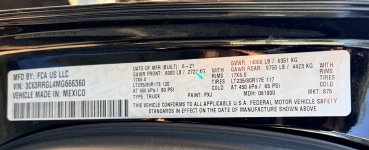
  • IMG_0830.jpeg
    IMG_0830.jpeg
    528.1 KB · Views: 30
I will compensate you sir, I just need the stock settings as a guide to go back thru the Alfaobd program and go one by one and check what my stupid self did….
Let this be a lesson to anyone thinking of tinkering with your truck, Alfaobd is no joke, you are definitely playing with fire….
And happy birthday to me, I single handedly disabled my truck…
Happy Thanksgiving to y’all I appreciate your help and yes my vin has “666” in it lucky me…
Which version of alfaobd are you using- android, or windows?
 
I will compensate you sir, I just need the stock settings as a guide to go back thru the Alfaobd program and go one by one and check what my stupid self did….
Let this be a lesson to anyone thinking of tinkering with your truck, Alfaobd is no joke, you are definitely playing with fire….
And happy birthday to me, I single handedly disabled my truck…
Happy Thanksgiving to y’all I appreciate your help and yes my vin has “666” in it lucky me…
Here is the bcm log of your original settings from factory. You can use this to compare to your current settings to manually change/correct settings back as needed:

Here is your original factory backup file. Use this to quickly restore your bcm back to all the original factory settings, then start over with making configuration changes:

For windows, save that backup file on your desktop as a .txt file. Connect alfaobd to your body computer, go to active diagnostics, scroll to restore configuration from backup file, and choose that file from your desktop.

For android version, on your Android device navigate to:
Internal storage (file manager app) > Android > data > com.android.AlfaOBD > files > bcmconfig. Once there, add that .txt backup file to the bcmconfig folder.
Connect alfaobd to your body computer, click on the car with hood open, scroll down to restore configuration from backup file, and choose that backup file.
 
Jimmy07 coming in clutch.
Glad it sounds like you're getting the help you need. This thread is exactly why I'm afraid to mess with any of the computer settings. I bought a tool (Jscan) to be able to adjust my tire size after putting on bigger tires, and I was nervous about it. I can't imagine going as deep down the rabbit hole as you did.
 
Here is the bcm log of your original settings from factory. You can use this to compare to your current settings to manually change/correct settings back as needed:

Here is your original factory backup file. Use this to quickly restore your bcm back to all the original factory settings, then start over with making configuration changes:

For windows, save that backup file on your desktop as a .txt file. Connect alfaobd to your body computer, go to active diagnostics, scroll to restore configuration from backup file, and choose that file from your desktop.

For android version, on your Android device navigate to:
Internal storage (file manager app) > Android > data > com.android.AlfaOBD > files > bcmconfig. Once there, add that .txt backup file to the bcmconfig folder.
Connect alfaobd to your body computer, click on the car with hood open, scroll down to restore configuration from backup file, and choose that backup file.
Wow you are truly a blessing man, let me send you some money for your effort please, tell me what apps you have for transferring money over to you and a million thanks
Happy Thanksgiving
 
Back
Top