What's new
Ram Heavy Duty Forum

Register a free account today to become a member! Once signed in, you'll be able to participate on this site by adding your own topics and posts, as well as connect with other members through your own private inbox!

AlfaOBD

Vlinker will work for both.

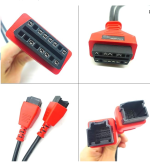
You’ll need two bypass cables. The CAN ports in the Wrangler are not near the OBD port like they are in the RAM. It’s usually easier to use a regular bypass for those.

I still prefer AlfaOBD (the windows version, not the android version) for both, but jscan is nice for quick changes on the road.
 
Vlinker will work for both.

You’ll need two bypass cables. The CAN ports in the Wrangler are not near the OBD port like they are in the RAM. It’s usually easier to use a regular bypass for those.

I still prefer AlfaOBD (the windows version, not the android version) for both, but jscan is nice for quick changes on the road.
Something like this for the Jeep?


Thanks, I'll stick with Alfa as well, definitely getting the Windows version.
 
I have both AlfaOBD and JScan and prefer JScan on my iPhone over AlfaOBD on windows. It's nice to have the windows AlfaOBD but if I were to only own one it would be JScan.
 
I have both AlfaOBD and JScan and prefer JScan on my iPhone over AlfaOBD on windows. It's nice to have the windows AlfaOBD but if I were to only own one it would be JScan.
Agree. I have found JScan really easy to use with my iPhone. While I made some permanent changes, it is my tire pressures that I change several times a year and that is super easy with JScan.
 
Something like this for the Jeep?


Thanks, I'll stick with Alfa as well, definitely getting the Windows version.
Yeah, like that. There are some much cheaper ones out there but I forget the name. It had green letters on it.
 
I believe the 5th gen 1500 crew calls them an 8+12 bypass cable.
On the Wranglers and Gladiators it’s common to use a little module (ECRI was that one I had, I looked it up, but they don’t sell it anymore) to completely take the SGW out of the system, as it’s super easy to reach it under the dash. No cable necessary.
 
Is the owner of KAODTECH a member of this forum? I ordered the cable on Wednesday and immediately sent a message letting them know PayPal had my old address listed. Heard nothing Thursday or today. Sent another message a few minutes ago. I paid for 2 day shipping in the hopes I could install my new headlights this weekend. @Jimmy07 do you make this cable?
 
So I was doing some mods on my Body Control module in a 2022 5500 and when I entered the tire info everything went array. No problem, I restored the vehicle configuration and all went back to normal....Except I cannot get the check engine light to reset. I have gone into every module I can without the MS-CAN BLUE adapter and reset all the codes. Currently I cannot get any codes to pop up in any module that I can access.

Is there a global code scan? Any other suggestions?

Thanks!
 
So I was doing some mods on my Body Control module in a 2022 5500 and when I entered the tire info everything went array. No problem, I restored the vehicle configuration and all went back to normal....Except I cannot get the check engine light to reset. I have gone into every module I can without the MS-CAN BLUE adapter and reset all the codes. Currently I cannot get any codes to pop up in any module that I can access.

Is there a global code scan? Any other suggestions?

Thanks!

What brand OBD reader?

OBDLink has their own app that can clear codes, others may. I don't know if the non-pro Torque app can clear codes, but worth a try.

You may also have to drive it or do a couple starts if you haven't.
 
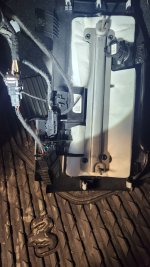
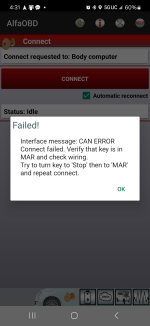
Trying to connect my bypass cable from @Jimmy07 but I can't get it to connect in AlfaOBD and change a couples of codes for my new rear view camera mirror so that my auto dimming exterior mirrors still come on.

I've downloaded the BCM info txt before I even attempted to install the bypass cable, so I know AlfaOBD is working and I have all my baseline specs. With the bypass cable installed, I tried moving the two wires to different ports to no avail. My MY23 RAM 2500 should have these other ports open, right? I don't need that 12 + 8 cable with the ports behind the instrument display, I hope. Using the Vlinker MC+ and have no problem getting it to read-only without the bypass cable.

Just not connecting like I was able to without the cable. I'm obviously not doing something right, any suggestions?
 

Attachments

  • 20240906_162930.jpg
    20240906_162930.jpg
    323.5 KB · Views: 45
  • 20240906_165102.jpg
    20240906_165102.jpg
    416.3 KB · Views: 45
  • Screenshot_20240906_163116_AlfaOBD.jpg
    Screenshot_20240906_163116_AlfaOBD.jpg
    118.5 KB · Views: 45
Last edited:
What brand OBD reader?

OBDLink has their own app that can clear codes, others may. I don't know if the non-pro Torque app can clear codes, but worth a try.

You may also have to drive it or do a couple starts if you haven't.
OBDLink MX+

I ended up having the dealer scan it. Apparently it needed a steering column calibration. They were great about it though. Didn't charge me anything.
 
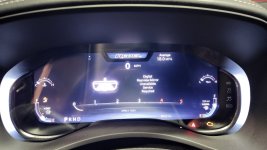
Have been working with @Jimmy07 offline to add the rear-view digital mirror to my MY23 RAM 2500 Rebel, and we're out of ideas. Installed the mirror 3+ months ago and it's always worked great. Went to finally go change the code with AlfaOBD and now have a silly erroneous error message that I can't get rid of.

Digital Rearview Mirror Unavailable Service Required

Went to change the 2 lines of code after adding my rear-view digital mirror.

CBC Config I/O Usage: RVDM Present: No to Yes
LIN & Misc: CRVMM Present: Yes to No

Soon as I make the change, I get this silly error message which briefly comes up upon initial startup. (No CEL, though.) Everything works, (RVDM has always worked since I installed it) and I now have the exterior auto-dimming rear-view mirrors restored with the code changes. Tried reverting the changes back to the original states and the silly error message remains. Coding is not supposed to work like that!

Added RVDM 68519222AA and the CHMSL with the extra camera 68465998AA. Dropped the headliner from the back just a tad so I could run a 10' Fakra cable. Has been working great for 3+ months, no problems. Only problem now is the erroneous error message.

Have to take it to the dealer for the SCCM recall, not sure what they will do with the error message.

 

Attachments

  • 20240910_075952.jpg
    20240910_075952.jpg
    288.8 KB · Views: 27
Have been working with @Jimmy07 offline to add the rear-view digital mirror to my MY23 RAM 2500 Rebel, and we're out of ideas. Installed the mirror 3+ months ago and it's always worked great. Went to finally go change the code with AlfaOBD and now have a silly erroneous error message that I can't get rid of.

Digital Rearview Mirror Unavailable Service Required

Went to change the 2 lines of code after adding my rear-view digital mirror.

CBC Config I/O Usage: RVDM Present: No to Yes
LIN & Misc: CRVMM Present: Yes to No

Soon as I make the change, I get this silly error message which briefly comes up upon initial startup. (No CEL, though.) Everything works, (RVDM has always worked since I installed it) and I now have the exterior auto-dimming rear-view mirrors restored with the code changes. Tried reverting the changes back to the original states and the silly error message remains. Coding is not supposed to work like that!

Added RVDM 68519222AA and the CHMSL with the extra camera 68465998AA. Dropped the headliner from the back just a tad so I could run a 10' Fakra cable. Has been working great for 3+ months, no problems. Only problem now is the erroneous error message.

Have to take it to the dealer for the SCCM recall, not sure what they will do with the error message.
I've been wanting to add it to mine but haven't gotten around to it yet. Please keep us updated on this.
 
I've been wanting to add it to mine but haven't gotten around to it yet. Please keep us updated on this.
Took it to the dealer for the SCCM recall. Took them awhile but they were finally able to get it to download the update.

They said they wouldn't have time to troubleshoot my error code, but I asked them to just try and delete the codes to get the error message to go away. They came back and said the same thing AlfaOBD was telling me: there are codes in the BCM that will not clear because they say the fault is present.

Has anyone ever heard of anybody using AlfaOBD trip a fault code in the BCM that won't clear? I don't think there is any way I could have broken something simply by changing two lines of code. If the problem were just code related, then reverting the two changes back to the OE settings should resolve that, correct? Especially binary code. It's either Yes or No. No grey area.

I had to make an appointment to bring back my truck when they had more time to troubleshoot it. As far as I am concerned, if something failed and needs to be replaced, that should be done under warranty. I didn't do anything.
 
Took it to the dealer for the SCCM recall. Took them awhile but they were finally able to get it to download the update.

They said they wouldn't have time to troubleshoot my error code, but I asked them to just try and delete the codes to get the error message to go away. They came back and said the same thing AlfaOBD was telling me: there are codes in the BCM that will not clear because they say the fault is present.

Has anyone ever heard of anybody using AlfaOBD trip a fault code in the BCM that won't clear? I don't think there is any way I could have broken something simply by changing two lines of code. If the problem were just code related, then reverting the two changes back to the OE settings should resolve that, correct? Especially binary code. It's either Yes or No. No grey area.

I had to make an appointment to bring back my truck when they had more time to troubleshoot it. As far as I am concerned, if something failed and needs to be replaced, that should be done under warranty. I didn't do anything.
It possible that making those changes forced a change in another module that now will not revert back even though you reversed the changes in the BCM, im assuming that you are troubleshooting with Jimmy07?
 
It possible that making those changes forced a change in another module that now will not revert back even though you reversed the changes in the BCM, im assuming that you are troubleshooting with Jimmy07?
Yes, but I'm not sure he has any ideas at this point, though. You say it's possible so that makes me believe you have seen or at least heard of something like this before.

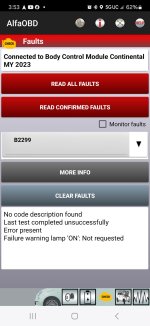
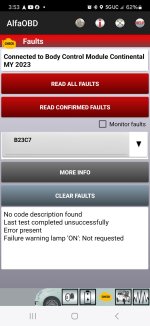
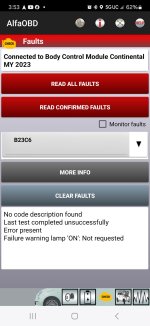
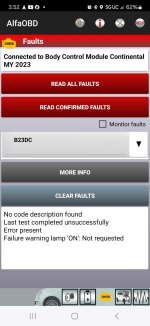
AlfaOBD had no description of the faults. I'm sure others have changed these two lines of code before and not had any issue. I was able to restore my auto-dimming exterior rear-view mirrors and of course, the RVDM works great!
 

Attachments

  • Screenshot_20240911_155323_AlfaOBD.jpg
    Screenshot_20240911_155323_AlfaOBD.jpg
    167.1 KB · Views: 12
  • Screenshot_20240911_155316_AlfaOBD.jpg
    Screenshot_20240911_155316_AlfaOBD.jpg
    167.2 KB · Views: 12
  • Screenshot_20240911_155310_AlfaOBD.jpg
    Screenshot_20240911_155310_AlfaOBD.jpg
    167.2 KB · Views: 10
  • Screenshot_20240911_155305_AlfaOBD.jpg
    Screenshot_20240911_155305_AlfaOBD.jpg
    167.2 KB · Views: 9
  • Screenshot_20240911_155258_AlfaOBD.jpg
    Screenshot_20240911_155258_AlfaOBD.jpg
    167.2 KB · Views: 12
Yes, but I'm not sure he has any ideas at this point, though. You say it's possible so that makes me believe you have seen or at least heard of something like this before.

AlfaOBD had no description of the faults. I'm sure others have changed these two lines of code before and not had any issue. I was able to restore my auto-dimming exterior rear-view mirrors and of course, the RVDM works great!
The only time I experienced the BCM make changes in other modules was when I changed the axle gear ratio, I made the change in the BCM and it broadcasted the change over the network to other modules which then showed the new ratio. I guess it could be possible for it to make the change, but not be able to reverse it, just a theory though.
 
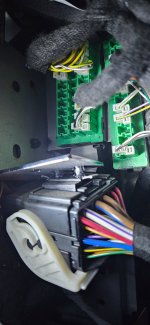
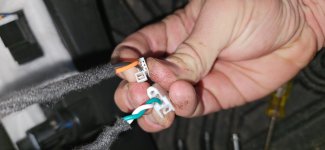
Hey all - Kaodtech bypass harness, can't for the life of me plug in the larger connector....? I'm now thinking wrong harness? The orange and black cable connector plugs into either block.....? Am I missing something? Or do they change **** when they ship these to us in Australia?
 

Attachments

  • 20240922_122301.jpg
    20240922_122301.jpg
    409.4 KB · Views: 29
  • 17269721979233355134005160142831.jpg
    17269721979233355134005160142831.jpg
    186.9 KB · Views: 30
  • 17269722363484819914987699296334.jpg
    17269722363484819914987699296334.jpg
    222.2 KB · Views: 30
Last edited:
Back
Top