What's new
Ram Heavy Duty Forum

Register a free account today to become a member! Once signed in, you'll be able to participate on this site by adding your own topics and posts, as well as connect with other members through your own private inbox!

Disabling RSRA (Rear Seat Reminder Alert)

Shots

Active Member
Messages
138
Reaction score
128
Points
43
I'm all for safety but this is ridiculous. Do you really need a reminder to check for your child?!! Every spring/summer the news has stories about things you can do to prevent leaving your kid in the back seat. One year they said to "put something valuable back there, like your cell phone" and I about lost my mind. So your phone is more valuable than your child? Wow, the world we live in.

Anyway I digress. I'm not an idiot so I don't need reminded to check my back seat for a human being that depends on me for survival, or even a pet for that matter. I want to disable RSRA but it's pretty clear from the forum that the option isn't listed even though the owner's manual says you can.

So my question is, can you disable it with AlphaOBD, Jscan or other brand of programmers?
I have an appointment next week to have a recall taken care of. While it's there I asked the dealership to disable RSRA. I doubt they'll do it but worth a shot I guess.

That said, I also have a Kaodtech cable on the way, and a vLinker on my desk waiting for it to arrive (so I can change tpms thresholds). Once installed it's just a matter of activating the software of choice (I downloaded the demo of both of the previously mentioned programs). If one can disable RSRA and the other can't that's the one I'll activate just in case the dealership can't/won't turn it off. But I can't seem to find it in either programmer, but there's a ton of options to look through. Does anyone know if either can do it?
 
What is your truck?

The 2024 HD owners manual says it can be disabled thru the center stack settings pages.
 
These are some of the best responses I've seen to a thread. Sadly some of them may be predictions of the future.

What is your truck?

The 2024 HD owners manual says it can be disabled thru the center stack settings pages.
Yeah I guess the details help. It's a '23 2500 and my manual says the same thing:

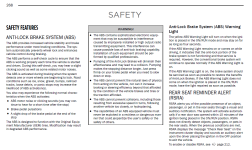
The index references page 268 for RSRA. It is there (see bottom right corner) but doesn't tell you how to disable it.
1704398149029.png

Instead it refers you to page 212. "To enable or disable RSRA, see → page 212."

1704398222460.png

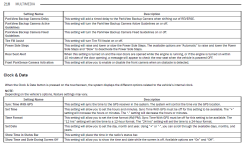
Page 212 is just the Uconnect main page. Nothing here about enabling/disabling RSRA.
Scrolling through the Uconnect section I found RSRA on page 218, but it only says what triggers it (which was already described on page 268).

1704398418820.png

None of the pages tell you how to disable it. There's no setting on the EVIC, and no settings on the Uconnect (12") that I could find by scrolling through menus. Obviously it can be done or the manual wouldn't mention it. But apparently they've taken that ability away from the owner. Since the dealer can probably still do it, I would assume one of the programmers may be able to do it too.
 
These are some of the best responses I've seen to a thread. Sadly some of them may be predictions of the future.


Yeah I guess the details help. It's a '23 2500 and my manual says the same thing:

The index references page 268 for RSRA. It is there (see bottom right corner) but doesn't tell you how to disable it.
View attachment 67537

Instead it refers you to page 212. "To enable or disable RSRA, see → page 212."

View attachment 67538

Page 212 is just the Uconnect main page. Nothing here about enabling/disabling RSRA.
Scrolling through the Uconnect section I found RSRA on page 218, but it only says what triggers it (which was already described on page 268).

View attachment 67539

None of the pages tell you how to disable it. There's no setting on the EVIC, and no settings on the Uconnect (12") that I could find by scrolling through menus. Obviously it can be done or the manual wouldn't mention it. But apparently they've taken that ability away from the owner. Since the dealer can probably still do it, I would assume one of the programmers may be able to do it too.

Page 217 indicates that it's an option under Safety/Driving Assistance and says this...

When the Safety/Driving Assistance button is selected on the touchscreen, the system displays the options related to the vehicle’s safety settings. These options will differ
depending on the features equipped on the vehicle. The settings may display in list form or within subfolders on the screen. To access a subfolder, select the desired folder; the
available options related to that feature will then display on the screen.
 
These are some of the best responses I've seen to a thread. Sadly some of them may be predictions of the future.


Yeah I guess the details help. It's a '23 2500 and my manual says the same thing:

The index references page 268 for RSRA. It is there (see bottom right corner) but doesn't tell you how to disable it.
View attachment 67537

Instead it refers you to page 212. "To enable or disable RSRA, see → page 212."

View attachment 67538

Page 212 is just the Uconnect main page. Nothing here about enabling/disabling RSRA.
Scrolling through the Uconnect section I found RSRA on page 218, but it only says what triggers it (which was already described on page 268).

View attachment 67539

None of the pages tell you how to disable it. There's no setting on the EVIC, and no settings on the Uconnect (12") that I could find by scrolling through menus. Obviously it can be done or the manual wouldn't mention it. But apparently they've taken that ability away from the owner. Since the dealer can probably still do it, I would assume one of the programmers may be able to do it too.
Yeah, I searched all through my 12" menus and can't find anything to disable it
 
The option doesn’t exist. Several of us have spent a good amount of time in AlfaOBD trying to find a way to disable it with no results.
 
Went through my 12" screen, and no option to turn off
 
I do, but haven’t done anything on this truck yet.
You’re the only one that has verified that there’s actually a setting for it.
Any chance you can post your backup file here?
If you connect to the body computer, drop down the list that has car configuration change in it, and select backup configuration to file, it will give you the path to the file after it’s complete.
Open that file and copy and paste everything here (it’s just a bunch of lines of numbers and letters that all begin with “62”).
Then I can compare it to @jsalbre backup file, which I already have, and know that he has the feature but not the radio setting for it.
 
Back
Top