What's new
Ram Heavy Duty Forum

Register a free account today to become a member! Once signed in, you'll be able to participate on this site by adding your own topics and posts, as well as connect with other members through your own private inbox!

Instructions for Trailer brake controller

Rzrbrn

Member
Messages
37
Reaction score
13
Points
8
I tried searching on this site but being new I could not locate a previous thread that might answer my question.

I have downloaded the Ram owner's manual and the diesel supplement. Both seem to be missing any instructions related to the OEM brake controller. Is there any official pdf that describes how to program or adjust the brake controller? People have described to me how to do it but I would like an official pdf to go with the owner's manual land the diesel supplement.
 
It is eminently more helpful when a poster provides details re the year/model of their truck. Otherwise we're left guessing. As such, I'll assume it's 2019 HD Ram and will direct the poster to page 421 of the 2019 Base HD OM. Lotsa how-to re the brake controller there and on the following pages. And... welcome to the forum!
 
If you get into settings in Radio go to "Settings" trailer brakes and you can set trailer type. Manual is crap on this clear as MUD.

Best post for this
 
If you get into settings in Radio go to "Settings" trailer brakes and you can set trailer type. Manual is crap on this clear as MUD.

To clarify, are you talking about the User Guide that comes with the truck or the Owner's Manual which you have to download from RAM?
If you are talking about the User Guide that came with the truck, then yeah.. it is useless...
 
I would like to know what is "LIGHT" and "Heavy" electric mean to everyone and how the two systems differ operationally.
 
light is the suggested setting for trailers under 10,000 lbs, and heavy for trailers over 10,000 lbs.
 
Thanks to everyone for responding. I will try to figure out how to put my truck info into my signature. 2019 Ram 2500 HD crew cab, 4x4 6.4" bed, about 400 miles on the ODO.

I can't figure out how to put info into the signature line, sorry. Signature may not be the correct description, but that area that shows up below the line of the query. Like elephantrider noted that he has a '19 tradesman ccsb.
 
Last edited:
Thank you Burn'n oil that helps a lot. Somehow I missed that info starting on page 421. I will go out and try it tomorrow.

On the otherhand ddown noted the Uconnect screen may be the best way to input data. I will try the OM first then the Uconnect. Thanks to everyone who has replied.
 
Last edited:
I can't figure out how to put info into the signature line, sorry. Signature may not be the correct description, but that area that shows up below the line of the query. Like elephantrider noted that he has a '19 tradesman ccsb.

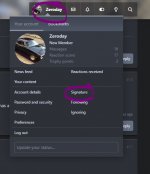
Signature is the right word - if you click on your username up in the upper right corner, you can set the signature by clicking 'Signature' there!

signature.JPG
 
On the other hand ddown noted the Uconnect screen may be the best way to input data. I will try the OM first then the Uconnect.
Via Uconnect works too and is on page 590 of the OM. You can even give your trailer a name.
 
Yes, I think I need to re read the OM. About page 588 it seems to indicate how to turn on the accessories without the engine running. I tried just pressing the start button but the engine keep turning over. Thanks again Burn'n oil.
 
Take your foot off the brake pedal.
Yes, I think I need to re read the OM. About page 588 it seems to indicate how to turn on the accessories without the engine running. I tried just pressing the start button but the engine keep turning over. Thanks again Burn'n oil.
 
@JC, Yes, I touch the start button with the foot off the pedal and can get to the Uconnect 12.1 screen without starting the engine. But I seem to remember the salesman saying that the OM can be accessed from the Uconnect screen but I can't find it.

The OM said to refer to a "Uconnect owners manual supplement". There is no supplement for the 12" screen, although I did find one for the 8.4" screen, but it did not address the trailer brake as far as I can see. I did not download it.

When I use the steering wheel to enter the information on the dashboard, I can navigate to the trailer brake screen but cannot enter any information or set up the brake controller. So I then went to the Uconnect 12 screen and so far have not been able to find the brake controller on the Uconnect 12 screen or the OM. I have tried the apps button. My computer is in the house, and the Ram is in the barn. I am going out to try again. So it will be a bit before I get back here.
 
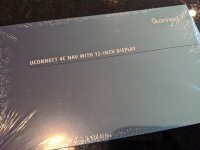
Foot off the brake, press start twice to switch it to On. You should be able to access everything in the options with the truck in the On position without the engine running. You also should have had one of these in your glovebox...

IMG_121533.jpg

You can call or get online with Ram Chat to have them mail you the full manuals if you don't have them.
 
Last edited:
@JC, Thanks again. My truck did not come with any written OM's. I will try to the one in the picture.

Success with the trailer brake control at last! This is what I have found:

Engine must be running to set the Gain. To set Gain use the +/- buttons above the trailer brake control slider. It cannot be set from the steering wheel controls, or from the Uconnect screen. I will try to do this with the Uconnect with the engine running, maybe I missed it. Trailer selection can only be made from the Uconnect screen. Up to four trailer types. The U Connect screen is the only way to set light (<10,000)/heavy.

I will try Ram Chat as suggested. I will Google "Ram Chat" to find what website it is on.
 
I could not find a Ram Chat to get a hard copy. I did find " Uconnect 4c with 12- inche display manual" as a pdf download here:


I could not find this supplement on the Ram or Mopar sites.

Unfortunately this pdf does not address the trailer brake control which can be found on the Uconnect screen. It really seems to be only for music, SiriusXM and navigation, but hats ok. I listen to the radio pretty much only for news and weather.
 
Back
Top